

PRO
monterdur
USA
Asked
 Resolved by DJ Sures!
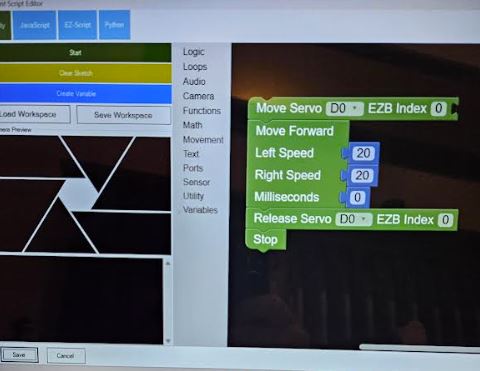
How To Move A Servo 360 Using Blocky With Time
I would like to control a 360-degree continuous rotation servo using Blockly in Synthiam ARC, specifying the duration of movement instead of a specific angle. Which blocks should I use to achieve this? I assume I need to use the "Move Servo" block to identify the servo number. What other blocks should I use to set the duration and speed for the servo's movement? Should I also consider using the "Move Forward" block, which allows setting left speed, right speed, and duration in milliseconds?
Related Hardware (view all EZB hardware)

EZ-B V4
by EZ-Robot
EZ-B v4/2 robot controller: dual Cortex ARM, Wi-Fi, audio/video, 24 servo/digital ports, I2C/UART, camera and Synthiam ARC control for custom robots
Wi-Fi / USB
Servos
24
Camera
Audio
UART
3
I2C
ADC
8
Digital
24
Related Robot Skill (view all robot skills)

Continuous Servo
by Synthiam
Control a 3-wire continuous 360-degree servo in ARC: adjustable forward/reverse speeds, start/stop buttons, board/port selection and test controls

That's great to hear! Thanks for the kind words. Let me know what your next step with the kids is if you need any help