

PCA9685 Servo Driver icon PCA9685 Servo Driver Drive 16 servos over EZB I2C with a PCA9685 PWM controller, using ARC servo commands and hardware-timed outputs. Try it →
Asked — Edited
Resolved Resolved by DJ Sures!
How To Use Auto Position Actions

How To Use Auto Position Actions

Hi , I want to know how to use Auto Position actions in vs using c# ,I've try that code


     ezb = new EZ_B.EZB();
           ezb.Connect("192.168.1.1:23");
           ezb.AutoPosition.ExecAction("Bow");

but after reading many forums I realized that my code isn't correct. also I've saw tutorial 59 but it doesn't match my needs.
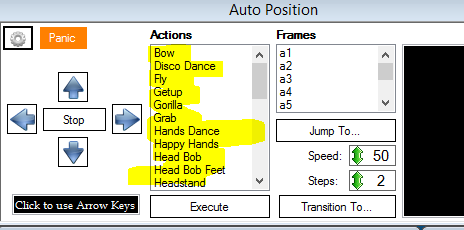

User-inserted image

I need to use the hi-lighted actions in pic from my c# code . is that possible ?


ARC Pro

Upgrade to ARC Pro

Your robot can be more than a simple automated machine with the power of ARC Pro!

Author Avatar
PRO
Synthiam
LinkedIn Thingiverse Twitter YouTube GitHub
#1  

Click the config button and export the frames as c# code

#2  

@DJ

thanks:)

but I've anther question how to use forward , reverse , left & right I've tried that code but it doesn't work


            ezb = new EZ_B.EZB();
            ezb.Connect("192.168.1.1:23")  ;
            ezb.Movement.GoForward();
// also and
this.ezb = EZ_Builder.EZBManager.EZBs[0];
            this.ezb.Movement.GoForward();