

Hitachi-LG LDS Lidar icon Hitachi-LG LDS Lidar Hitachi-LG LDS 360-degree LiDAR driver streaming scans into ARC NMS for obstacle detection, SLAM use, Arduino hookup, config options and variables. Try it →
Asked — Edited
Resolved Resolved by DJ Sures!
How To Use Auto Position Actions

How To Use Auto Position Actions

Hi , I want to know how to use Auto Position actions in vs using c# ,I've try that code


     ezb = new EZ_B.EZB();
           ezb.Connect("192.168.1.1:23");
           ezb.AutoPosition.ExecAction("Bow");

but after reading many forums I realized that my code isn't correct. also I've saw tutorial 59 but it doesn't match my needs.
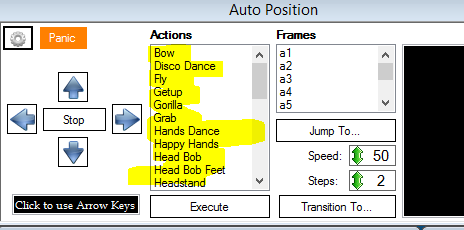

User-inserted image

I need to use the hi-lighted actions in pic from my c# code . is that possible ?


ARC Pro

Upgrade to ARC Pro

Stay on the cutting edge of robotics with ARC Pro, guaranteeing that your robot is always ahead of the game.

Author Avatar
PRO
Synthiam
LinkedIn Thingiverse Twitter YouTube GitHub
#1  

Click the config button and export the frames as c# code

#2  

@DJ

thanks:)

but I've anther question how to use forward , reverse , left & right I've tried that code but it doesn't work


            ezb = new EZ_B.EZB();
            ezb.Connect("192.168.1.1:23")  ;
            ezb.Movement.GoForward();
// also and
this.ezb = EZ_Builder.EZBManager.EZBs[0];
            this.ezb.Movement.GoForward();