

joannadillman
USA
Asked
 Resolved by DJ Sures!
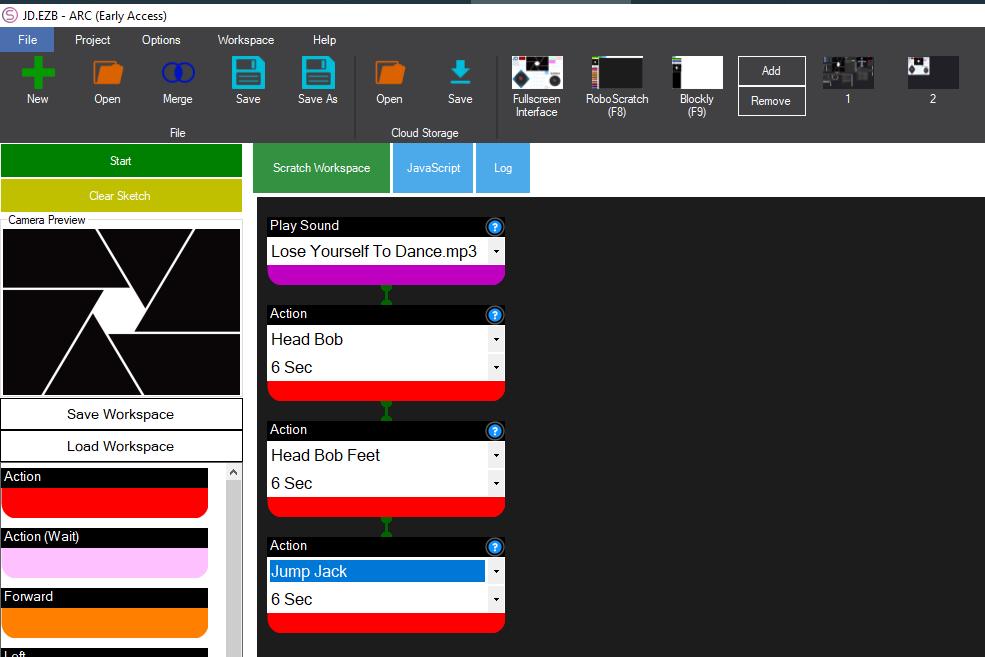
Adding Pre-Programmed Dance To Robo-Scratch
Hi there, I have spent half the day researching and toying with an issue with a program for the JD Humanoid. I am pretty sure it's user error. :/ I am trying to add the pre-programmed dance for the song Lose Yourself to Dance using Robo-Scratch. I have added both the sound and sound wait function. The song will play, but the movements as seen when I click play in the home workspace are not working. I can see from the Java script view that the instructions say "ignore script". I have watched a few tutorials and it looks like it should work by just adding the sound. Any ideas would be super helpful. Is there a way to add the pre-programmed movements to the Lose Yourself to Dance using Robo-Scratch?
Related Hardware (view all EZB hardware)

JD Humanoid
by EZ-Robot
JD humanoid robot kit - WiFi-enabled, 16 DOF with metal-gear servos; easy, fun, educational, available from the EZ-Robot online store.
Wi-Fi / USB
Servos
24
Camera
Audio
UART
3
I2C
ADC
8
Digital
24

Here's a good tutorial for creating a dance with the EZ-Robot JD Humanoid: https://www.ez-robot.com/learn-robotics-creating-a-robot-dance.html
Hello @joannadillman I was curious if you've tried placing sleep delays in your Robo-scratch program to make sure the action has time to execute and finish before moving to the next part of the program?
The RoboScratch Action has a built-in sleep to make it easier.
Behind the scenes it it adds sleep just like what's selected...
Ideally it'll be easier and way more fun to create the dance like that awesome The Robot Program episode
PS, if you're curious about the "ignoreScript" ControlCommand parameter, take a look in the soundboard manual here: https://synthiam.com/Support/Skills/Audio/SoundBoard-EZB?id=16060
That optional parameter instructs the soundboard to not execute scripts that are already associated with the song. The soundboard may already have scripts added to the audio timeline, so that parameter is automatically added when using RoboScratch so you can have your own actions.
DJ you are a genius!!! Thank you so much for including the info about the soundboard manual.
Glad that helped