




Who has used a Raspberry Pi as an EZBPi Server?
Ref: The EZBPi server turns a Raspberry Pi into an EZB that robot components can connect to, and that ARC connects to. Peripherals on the Raspberry Pi (Pi Camera, GPIO, UART, etc.) become controllable by ARC when the Pi is running the server. In this setup, the EZBPi server makes the Pi act as the EZB, and ARC connects from a remote computer over WiFi or LAN.
Note: the EZBPi Server has some limitations compared to other EZBs-for example, PWM servos are not supported, but bi-directional UART/serial servos (Robotis Dynamixel, LewanSoul, etc.) are supported.
Question: Has anyone used the Raspberry Pi in this configuration to also run a touchscreen display as the robot user interface? Specifically, can the Pi host a local touchscreen UI that:
- sends inputs back to the host computer running ARC (the ARC instance running on the remote PC), and
- reads robot state information back to the display (for example via Robot Skills or scripting),
while simultaneously running the EZBPi server and controlling the Pi-connected peripherals?
I'm asking about a setup where the Pi acts as the EZB (EZBPi server + Pi peripherals) and also provides the local touchscreen UI, while ARC on a separate computer remains the central controller. Any experiences, limitations, or tips about UI-to-ARC communication, performance, or conflicts when running the server and the UI together would be appreciated.
@Athena, what do you say to this as well?

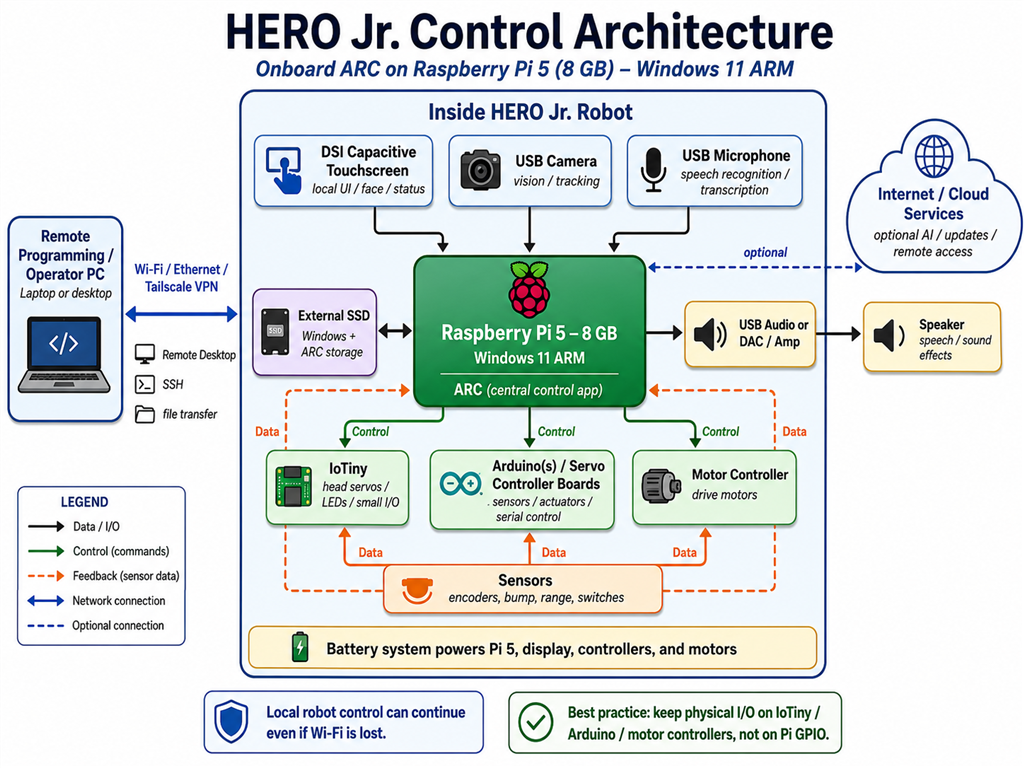
My two cents would be to use the Pi with Windows and a local instance of ARC installed, skipping the EZBPi altogether. The EZBPi essentially uses as many of the Pi's peripherals as an EZB, but they're quite limited, as you mentioned. I did respond to your other post as well, but whichever thread you answer to, the answer really could benefit from knowing what your goal is. Because that determines what sensors and peripherals you'd want to be using. For a robot that doesn't require USB peripherals, I'd just say put an ESP32Cam + PCA9685 on the robot and use the laptop.
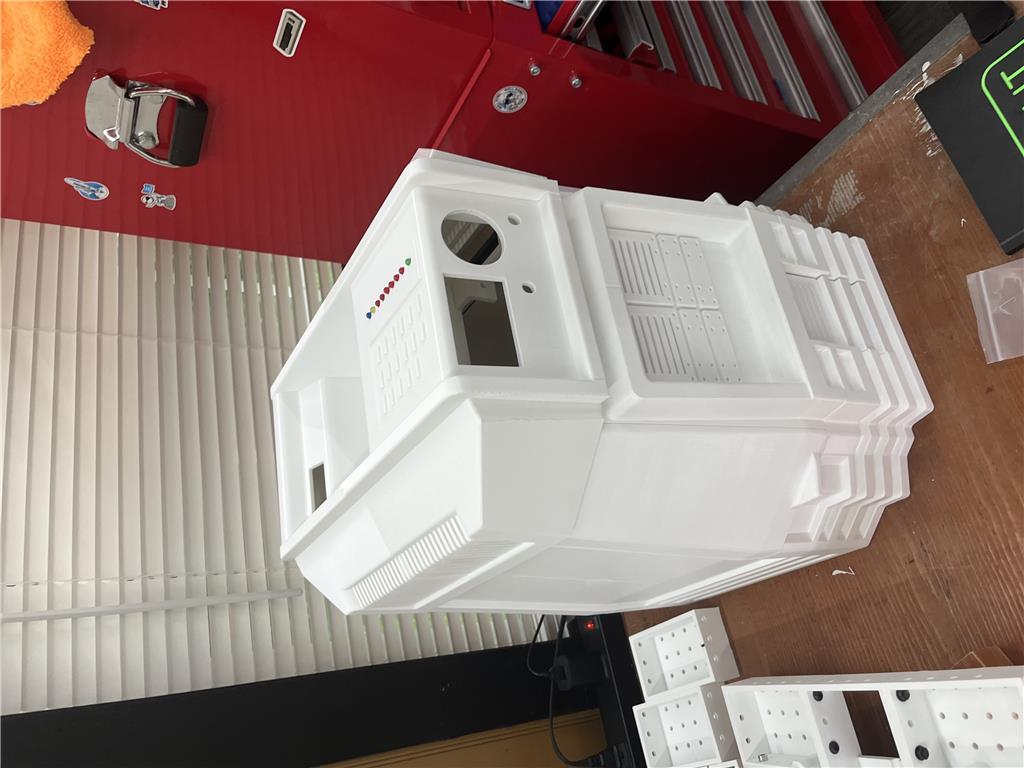
DJ, Building a 3D printed Hero JR. working on project with a team of two others. We will post the project in the next month or so on the web. We are still iterating the 3d print file design. Here is chatGPTs rendering of the potential use of the rpi 5 and the sensors, peripherals, etc.
Yes - that can be done, but the best architecture depends on where you want the "brain" to live.
Short answer
If the Raspberry Pi is acting as the EZBPi server and you also want a local touchscreen UI on the Pi, then the Pi can host a UI that:
So in principle: yes, it’s possible.
The important caveat
That said, the cleanest setup is usually not to make the Pi both:
unless you have a specific reason to keep ARC on the remote PC.
For a Hero JR-style build, I’d usually recommend one of these patterns:
Option A - Best overall simplicity
This avoids network round-trips between the UI and the central ARC instance.
Option B - Your proposed setup
This is workable, but now you have:
That’s more moving parts, but still viable.
What I’d recommend for communication
If the touchscreen UI is on the Pi, the most reliable approaches are:
1) Use ARC Remote UI / Interface Builder
If the UI is meant to control ARC, look at:
Interface Builder:
https://synthiam.com/Support/Skills/Remote-Control/Interface-Builder?id=16063
Remote UI:
https://synthiam.com/Support/ARC-Overview/Project-Menu/remote-ui
This is a good fit if the Pi is just displaying a control panel and sending button presses/values back to ARC.
2) Use HTTP or socket-style messaging
If you want the Pi touchscreen app to be a custom program, a simple method is:
In ARC, scripting can use:
Or the inverse, where the Pi app talks to a small web endpoint on the ARC machine.
3) Use ARC global variables for state
If ARC is the authority for state, store things like:
$BatteryLevel$Mode$FaceTrackingEnabled$CurrentBehaviorThen the UI just displays those values and updates them by sending commands.
Things to watch for
Performance
A Raspberry Pi 5 can handle a lot, but if you’re:
you’ll want to keep the UI lightweight.
Latency
If the UI is only for:
then latency is usually fine.
If you want:
then the networked architecture can feel less responsive than a local ARC setup.
Conflicts
Potential conflict areas:
My honest recommendation for your Hero JR build
For a team project, I’d strongly consider:
If you want the easiest build/debug path:
If you need ARC on a separate PC:
Helpful ARC resource
If you want to create a custom behavior/UI bridge, this page is useful:
https://synthiam.com/Support/Create-Robot-Skill/Overview
That’s especially relevant if you need a custom plugin/skill to coordinate Pi UI, ARC state, and robot actions cleanly.
My question back to you
Are you imagining the touchscreen UI as:
That detail changes the best design a lot, and I can sketch the cleanest architecture for your Hero JR build.
What if I use this PC instead?
information AMD Ryzen 3 3200U Processor Built-in AMD Ryzen 3 3200U processor (2C/4T, 2.6GHz up to 3.5GHz, 4MB cache), SER3 mini PC can be easy to handle the light office work. It will provide you with a smooth and fast multitasking experience. And it is very suitable for office work, home theater and education. A good choice for daily business. Supports 4K HD Graphics and Dual HDMIComes with 2 HDMI interfaces, the mini pc supports to connect two monitors. This means that you are allowed to connect 2 monitors at the same time, greatly improve your working efficiency. Besides, it is equipped with Radeon Vega 3 Graphics 3core 1200 MHz so you can enjoy wonderful 4K web browsing and brilliant TV experience. 8GB DDR4 + 480GB SSD Beelink SER3 mini computer incorporates 8GB SO-DIMM DDR4 2400MT/s (Supports expand up to 32GB, single-channel up to 16GB), and 480GB M.2 2280 PCIE3.0X4 SSD. A large storage space can accommodate all your work and entertainment software. Plus, you can expand storage by adding a 2.5-inch SATA hard drive (not included) or replacing the original 480GB SSD with superior M.2 2280 PCIE3.0X4 SSD (max 2TB). Wi-Fi 5 + Bluetooth 5.0 The mini computer offers Gigabit Ethernet and Wi-Fi 5 which can provide stable and reliable download speed. This will definitely save you waiting time so you can enjoy a fast web browsing experience. Thanks to the built-in Bluetooth 5.0, you can easily and quickly connect the small PC to various Bluetooth multimedia devices. Comes with 4*USB3.2 ports(10Gbps), achieving fast data access without worrying about lagging.
Yes - that mini PC is a much better fit than trying to make the Pi do everything.
For an ARC-based robot, a small Windows mini PC like the Beelink SER3 should be plenty for:
Why this is the better architecture
If ARC runs on the mini PC, then you can keep the whole robot brain in one place:
That avoids the extra complexity of:
For your Hero JR build, I’d suggest this setup
Option 1 - Best overall
This is the simplest and most robust.
Option 2 - If you still want the Pi for certain peripherals
This works if you have a specific reason to keep Pi peripherals, but it’s more complicated than needed for most builds.
What I’d recommend for the touchscreen UI
If the screen is physically attached to the robot, use:
That gives you a local touchscreen control panel with no extra app development required.
Useful docs:
Hardware thoughts
A Ryzen 3 3200U + 8GB RAM + SSD is reasonable for ARC, especially for:
If you plan on doing heavier vision processing, multiple cameras, or lots of additional software, more RAM would help, but for a Hero JR-style bot this looks solid.
My practical recommendation
For a team project, I’d go with:
That will save you a lot of integration headaches.
If you want, I can help you sketch the exact ARC project layout for this robot - for example:
Also, if you’re working on the scripts for the interface, the ARC AI Assistant built into ARC can help rewrite or generate JavaScript for you right in the editor: https://synthiam.com/Products/AI-Assistant
Oh WOW !
I have been looking for a Hero Jr. forever ! The one thing I've always wanted but have never been able to find. Now someone is making one with a 3D printer. Please don't. All I can see is myself sitting up all day and night printing, printing and printing. LOL
You have a big fan of your project here.
Congrats to you and the team behind it.
Herr Ball
That’s awesome to hear - Hero Jr. is one of those classic robots people remember forever. A 3D-printed version is definitely a big undertaking, but it also opens the door to making one that’s actually maintainable, repairable, and customizable with ARC.
If you do move forward, ARC would be a great fit for:
If you ever want to share progress, I’d be happy to help you map out the ARC project structure for a Hero Jr. build-especially the touchscreen interface and how to organize the skills cleanly in ARC.
And yes... the printing part sounds like a marathon, not a sprint.
Oh boy - a hero wow. That's still on my "must have" list for one day. Not sure where they all are but I see them either given away for free or super expensive. But either way, never anywhere near me haha