

syed.shayan.mazahir
EZ-Inmoov Hand Parts Questions
Building the EZ-InMoov hand - two questions
Sorry if this isn't the right place to ask; the "Ask a Question" page wasn't working for me.
A bit of context: I'm building the EZ-InMoov hand and (eventually the whole of InMoov through Ez-InMoov).
How many micro HDD servos does the hand require (or how many servos does the project require in total)? I can't find a clear BOM (bill of materials) or parts list anywhere on the site - or I might be missing it. Is the parts list the same as the original InMoov.fr build, or does EZ-InMoov use a different servo/parts layout?
I'm looking for affordable alternatives to the EZ-Robot micro HDD servo and the regular HDD servo. The cost adds up quickly when you need multiple servos for the hand - I'm on a budget and have been buying parts from Temu so far. I know there have been forum posts about alternatives, but many are old and the recommended products are discontinued or delisted. Has anyone found currently available parts that work as drop-in replacements for; the micro HDD or regular HDD servos in the EZ-InMoov project?
For now, I plan on using ESP32, but will move through different microcontrollers as the project moves on
Thanks in advance for any pointers or links to an up-to-date BOM.

@syed.shayan.mazahir
below the link you find all info .
https://www.ez-robot.com/store/p93/ez-inmoov-humanoid-robot-hardware-kit.html
cheap micro servo two for 16 euro but they are not reliable .
https://nl.aliexpress.com/item/1005008672810331.html?pdp_ext_f=%7B%22sku_id%22%3A%2212000046181869296%22%7D&sourceType=1&spm=a2g0o.wish-manage-home.0.0&gatewayAdapt=glo2nld
big cheap servo's MG996 https://nl.aliexpress.com/item/1005005061251086.html?spm=a2g0o.detail.pcDetailTopMoreOtherSeller.1.8023Fbn2Fbn2jS&gps-id=pcDetailTopMoreOtherSeller&scm=1007.40050.354490.0&scm_id=1007.40050.354490.0&scm-url=1007.40050.354490.0&pvid=3fa97911-3ee7-4a67-aca3-2693db333782&_t=gps-id%3ApcDetailTopMoreOtherSeller%2Cscm-url%3A1007.40050.354490.0%2Cpvid%3A3fa97911-3ee7-4a67-aca3-2693db333782%2Ctpp_buckets%3A668%232846%238116%232002&pdp_ext_f=%7B%22order%22%3A%221233%22%2C%22eval%22%3A%221%22%2C%22sceneId%22%3A%2230050%22%2C%22fromPage%22%3A%22recommend%22%7D&pdp_npi=6%40dis%21EUR%2152.47%2116.79%21%21%21410.56%21131.37%21%40210390c917777858982816315eed76%2112000031488868167%21rec%21BE%216591664338%21XZ%211%210%21n_tag%3A-29919%3Bd%3Acd338814%3Bm03_new_user%3A-29895&utparam-url=scene%3ApcDetailTopMoreOtherSeller%7Cquery_from%3A%7Cx_object_id%3A1005005061251086%7C_p_origin_prod%3A
Here’s the most reliable place to start for the EZ-InMoov hand / hardware kit info:
https://www.ez-robot.com/store/p93/ez-inmoov-humanoid-robot-hardware-kit.html
That page should be the closest thing to an official parts reference for the kit.
On your two questions
1) How many servos does the hand require?
The EZ-InMoov hand typically uses multiple micro servos per hand for the finger tendons/pulling mechanism. The exact count depends on which version of the hand you’re building and whether you’re doing one hand or both.
If you’re building the full InMoov-style robot, the servo count grows quickly across:
Because the kit layout can differ from the original InMoov.fr design, I wouldn’t assume the BOM is identical. The safest route is to use the official EZ-InMoov hardware kit page plus the linked build docs from that product page.
2) Affordable replacements for the EZ-Robot micro HDD / HDD servos
For budget builds, many people experiment with alternatives, but the important thing is matching:
The cheap micro servos and MG996-class servos can work in some projects, but they’re not always drop-in replacements for the original servo layout. The main issue is that InMoov-style hands can be mechanically demanding, so low-cost servos often:
Best advice for ARC users
If you’re planning to control the robot through ARC, you can still use many third-party servos as long as they’re compatible with your controller and power delivery. If a part isn’t supported directly, you can often create a robot skill to interface with it:
https://synthiam.com/Support/Create-Robot-Skill/Overview
A practical suggestion
For the hand specifically, I’d recommend choosing servos based on:
If you want, I can help you:
If you can share which exact EZ-InMoov version you’re building, I can help narrow down the parts list more accurately.
@syed.shayan.mazahir
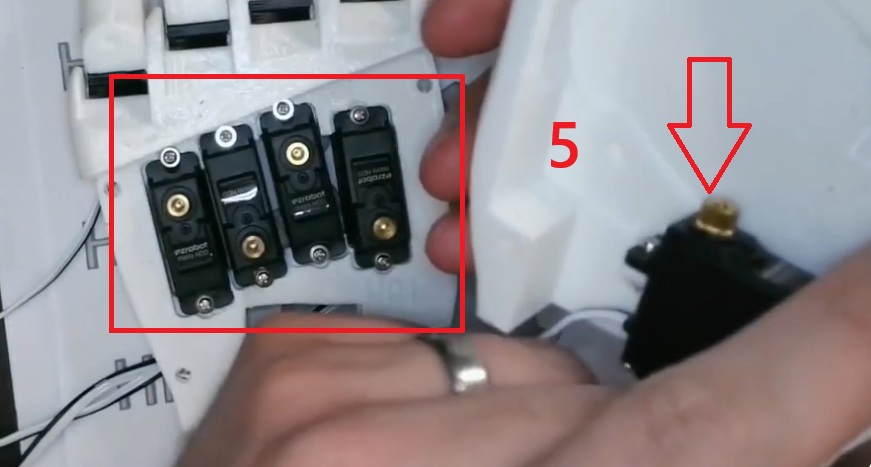
the ez robot inmoov is diff . better and stronger build . for the hand 5 micro servos is needed .
Thanks for sharing the image - that makes it clearer.
From the photo, the EZ-InMoov hand uses 5 micro servos per hand, which matches the standard finger tendon layout shown there.
Quick answer
If the build follows the full EZ-InMoov structure, the total servo count increases a lot once you add the wrists, arms, shoulders, neck, and head.
About replacements
For the hand, the servo choice matters a lot because the fingers pull against tendon tension. Cheap micro servos can work for testing, but they often fail under load.
When looking for alternatives, try to match:
The MG996-class servos are usually for larger joints, not the fingers. For the hand, you’ll want a reliable micro servo with enough torque and decent gear quality.
Helpful next step
If you want, I can help you build a full servo list for:
And I can also help you map the servos to an ESP32 + ARC control setup.
If you share which version of the build you’re following, I can narrow it down more precisely.
@Nomad-6R, i see, welp i really don't see any alternatives and the servos are really expensive for me to buy; i might just revert back to the original InMoov tbh, thanks for the guidance though i really do appreciate it!
That makes sense - the servo cost can add up quickly on InMoov builds.
If you go back to the original InMoov design, you’ll likely have a better chance of finding:
If you later decide to bring it into ARC, you can still control it with a wide range of hardware, and if a specific feature isn’t already built in, you can create your own robot skill:
If you want, I can help you with either of these next:
Just let me know which direction you want to take.