
PRO
manishabh77
USA
Asked
Blockly Access Issues And Performance
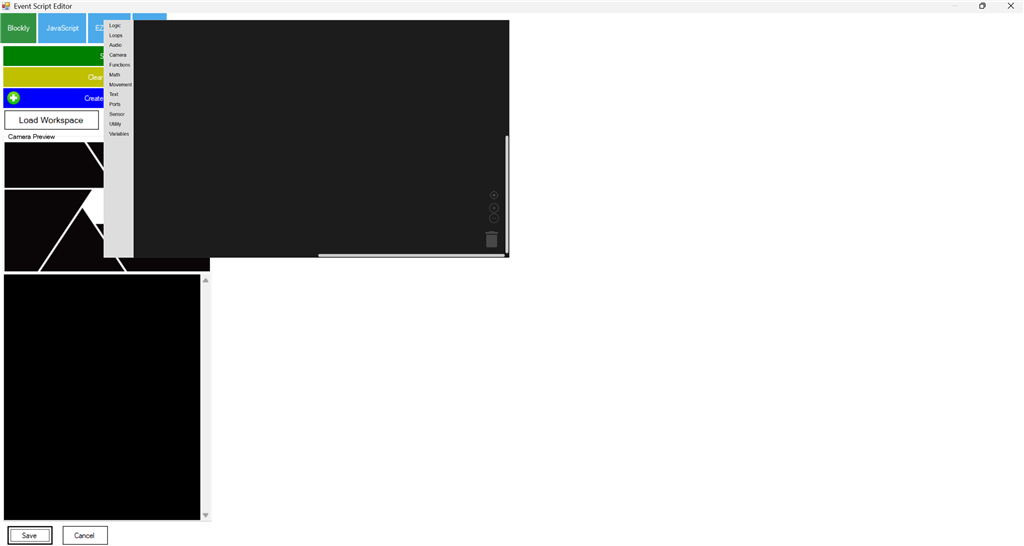
I am currently experiencing issues accessing features within Blockly. Previously, it was functioning correctly. Is there an ongoing environmental issue that might be affecting its performance?

There is no error message. The features of Blockly eg. movement, audio etc is unclickable and the whole Blockly dialog box has become very small. I tried it on multiple windows computer and it is the same issue. This was not the case a week back.
The error is see is this
Timestamp: 2026-01-31 16:31:08 UTC ARC Version: 2025.12.21.00 OS Version: Microsoft Windows NT 10.0.26200.0 Base Directory: C:\Program Files (x86)\Synthiam Inc\ARC by Synthiam\
=== Exception Information === Type: System.InvalidOperationException Message: Cef.IsInitialized was false!.Check the log file for errors!. See https://github.com/cefsharp/CefSharp/wiki/Trouble-Shooting#log-file for details. HResult: -2146233079 Source: CefSharp.WinForms TargetSite: Void InitializeCefInternal()
StackTrace: at CefSharp.WinForms.ChromiumWebBrowser.InitializeCefInternal() in C:\projects\cefsharp\CefSharp\Internals\Partial\ChromiumWebBrowser.Partial.cs:line 532 at CefSharp.WinForms.ChromiumWebBrowser.InitializeFieldsAndCefIfRequired() in C:\projects\cefsharp\CefSharp.WinForms\ChromiumWebBrowser.cs:line 336 at CefSharp.WinForms.ChromiumWebBrowser.OnHandleCreated(EventArgs e) in C:\projects\cefsharp\CefSharp.WinForms\ChromiumWebBrowser.cs:line 593 at System.Windows.Forms.Control.WmCreate(Message& m) at System.Windows.Forms.Control.WndProc(Message& m) at System.Windows.Forms.Control.ControlNativeWindow.OnMessage(Message& m) at System.Windows.Forms.Control.ControlNativeWindow.WndProc(Message& m) at System.Windows.Forms.NativeWindow.Callback(IntPtr hWnd, Int32 msg, IntPtr wparam, IntPtr lparam)
There has not been an update to ARC since December 21st, which is over a month ago from today. That means something has happened to the ARC files on your pc. Specifically, it appears the builtin webbrowser for ARC is unable to load (cef).
If you have not restarted the pc, I would recommend reinstalling arc.
uninstall arc: https://synthiam.com/Support/Install/uninstall-arc
reboot the pc
download and install arc
let us know if that helps with the display issue.
Also, has any updates or changes occurred to the pc in the last 7 days that you can think of?
I uninstalled ARC, rebooted my PC and installed again. The issue still persists.
Do you still get the error? If you can, please provide details, such as errors or messages, that will help the team figure out why your computers are behaving this way.
Also, can you try installing this Microsoft VC++ 2022 Redistributable x86 from here: https://aka.ms/vs/17/release/vc_redist.x86.exe
Install it and let the team know your experience. Also, the image is useful, but you don't need to post it again unless something has changed. What matters most at this point is the error messages. Let us know any error messages, and if anything changes in the picture.
You can also check the error in the debug log view - and any popups.
DJ Sures so good to hear from you. I am still facing the issue. I installed Microsoft VC++ 2022 Redistributable x86 and restarted ARC pro. The only change I see is that I see ControlCommand blurb in Blockly but cannot access the Blockly features. Also see the error I saw when I ran as administrator
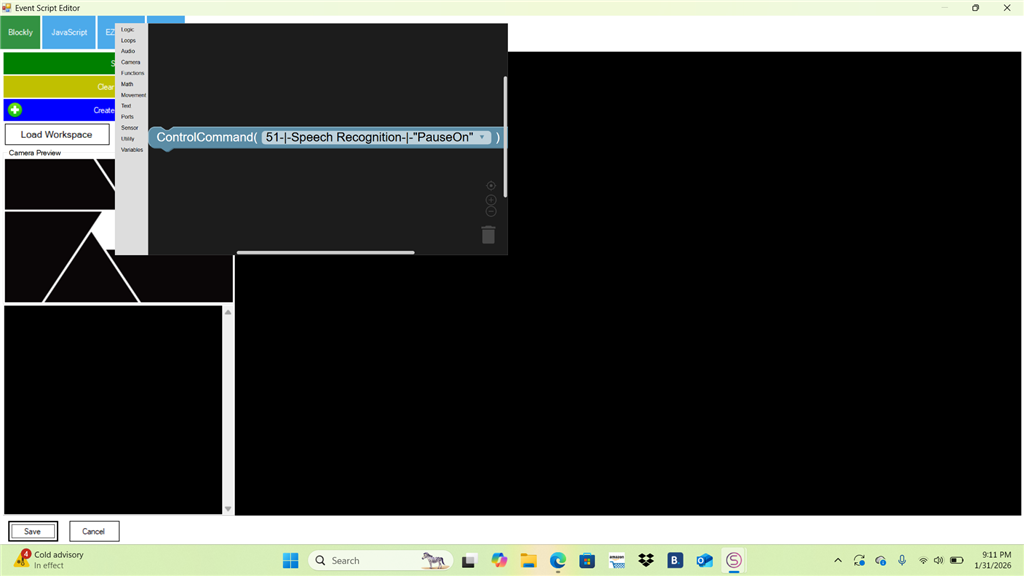
Timestamp: 2026-02-01 02:07:38 UTC ARC Version: 2025.12.21.00 OS Version: Microsoft Windows NT 10.0.26100.0 Base Directory: C:\Program Files (x86)\Synthiam Inc\ARC by Synthiam\=== Exception Information === Type: System.InvalidOperationException Message: Cef.IsInitialized was false!.Check the log file for errors!. See https://github.com/cefsharp/CefSharp/wiki/Trouble-Shooting#log-file for details. HResult: -2146233079 Source: CefSharp.WinForms TargetSite: Void InitializeCefInternal()
StackTrace: at CefSharp.WinForms.ChromiumWebBrowser.InitializeCefInternal() in C:\projects\cefsharp\CefSharp\Internals\Partial\ChromiumWebBrowser.Partial.cs:line 532 at CefSharp.WinForms.ChromiumWebBrowser.InitializeFieldsAndCefIfRequired() in C:\projects\cefsharp\CefSharp.WinForms\ChromiumWebBrowser.cs:line 336 at CefSharp.WinForms.ChromiumWebBrowser.OnHandleCreated(EventArgs e) in C:\projects\cefsharp\CefSharp.WinForms\ChromiumWebBrowser.cs:line 593 at System.Windows.Forms.Control.WmCreate(Message& m) at System.Windows.Forms.Control.WndProc(Message& m) at System.Windows.Forms.Control.ControlNativeWindow.OnMessage(Message& m) at System.Windows.Forms.Control.ControlNativeWindow.WndProc(Message& m) at System.Windows.Forms.NativeWindow.Callback(IntPtr hWnd, Int32 msg, IntPtr wparam, IntPtr lparam)