

Hi,
I have two displays connected to my computer. Can I have Desktop1 on one display and Desktop2 on another? I want to be able to have the video player on full screen in Desktop2 while still been able to have Desktop1 on the other screen.
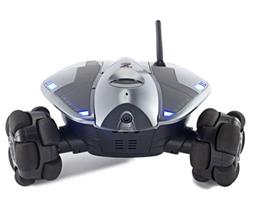 Wowwee Rovio
— Movement panel integrating WowWee Rovio with Synthiam ARC for remote drive, live camera, audio and docking control. Under development.
Try it →
Wowwee Rovio
— Movement panel integrating WowWee Rovio with Synthiam ARC for remote drive, live camera, audio and docking control. Under development.
Try it →

 Resolved by DJ Sures!
Hi,
I have two displays connected to my computer. Can I have Desktop1 on one display and Desktop2 on another? I want to be able to have the video player on full screen in Desktop2 while still been able to have Desktop1 on the other screen.

It’s quite easy. You don’t have to run an exec or any scripting like that.
Simply set your secondary display to be "extended desktop" in windows display settings
Then set ARC to "not maximized". So the program looks like a window that you can move around. Then drag and position the ARC window so it spans both monitors across the extended desktop
Now place your controls anywhere you need. This means placing your video player on one desktop and drag it to fill the screen. You’ll have to unselect "auto arrange controls" in the add control menu.
That’s all it takes. Everything saves with your project.
Thanks. The extended display will do what I want