Community Robot Questions Saylotiny ( Hello ) ? PRO Nomad 6R Belgium Asked Jul 2018 — Edited Jul 2018 3 Participants DJ Sures Dunning-Kruger thetechguru Saylotiny ( Hello ) ? ARC Skip to comments Jump to end how does it work to use the lotiny.sayezb dont work. anyone thank you Quote Jump to end Upgrade to ARC Pro Unlock the true power of automation and robotics by becoming a proud subscriber of Synthiam ARC Pro. Compare Pro Features View Subscription Plans thetechguru PRO USA #1 Jul 2018 Are you sure the speaker is plugged in? Sayezb absolutely does work on the iotiny. Alan Reply Quote Share Nomad 6R PRO Belgium #2 Jul 2018 hi alan yes its plugged in.other sounds can be played. i use another speaker from 4 watt. Reply Quote Share Nomad 6R PRO Belgium #3 Jul 2018 i have conneted the lotiny on connection 4,and set the sayezb to , connection 4,not working. Reply Quote Share Nomad 6R PRO Belgium #4 Jul 2018 i tested on connection 0 and it works.so to use a script on connection 4, how do i ad it to connection4? i notice when saving in cloud,there is no choice for a lotiny. but when i choose a V4 it saves. Reply Quote Share DJ Sures PRO Synthiam #5 Jul 2018 First paragraph of the manual for the iotiny provides notice: https://synthiam.com/Tutorials/Lesson/72?courseId=4 Reply Quote Share Nomad 6R PRO Belgium #6 Jul 2018 ah thats why it saves as ezbv4.thanks Reply Quote Share Nomad 6R PRO Belgium #7 Jul 2018 how do i choose connection 4 for sayezb(" hello ") if thats possible.seems it only works on connection 0 Reply Quote Share Dunning-Kruger Canada #8 Jul 2018 The Sayezb() command works on any connection, not just board 0.... Reply Quote Share 1 2 » »» Login to post a comment
PRO Nomad 6R Belgium Asked Jul 2018 — Edited Jul 2018 3 Participants DJ Sures Dunning-Kruger thetechguru Saylotiny ( Hello ) ? ARC Skip to comments Jump to end how does it work to use the lotiny.sayezb dont work. anyone thank you Quote Jump to end
thetechguru PRO USA #1 Jul 2018 Are you sure the speaker is plugged in? Sayezb absolutely does work on the iotiny. Alan Reply Quote Share
Nomad 6R PRO Belgium #2 Jul 2018 hi alan yes its plugged in.other sounds can be played. i use another speaker from 4 watt. Reply Quote Share
Nomad 6R PRO Belgium #3 Jul 2018 i have conneted the lotiny on connection 4,and set the sayezb to , connection 4,not working. Reply Quote Share
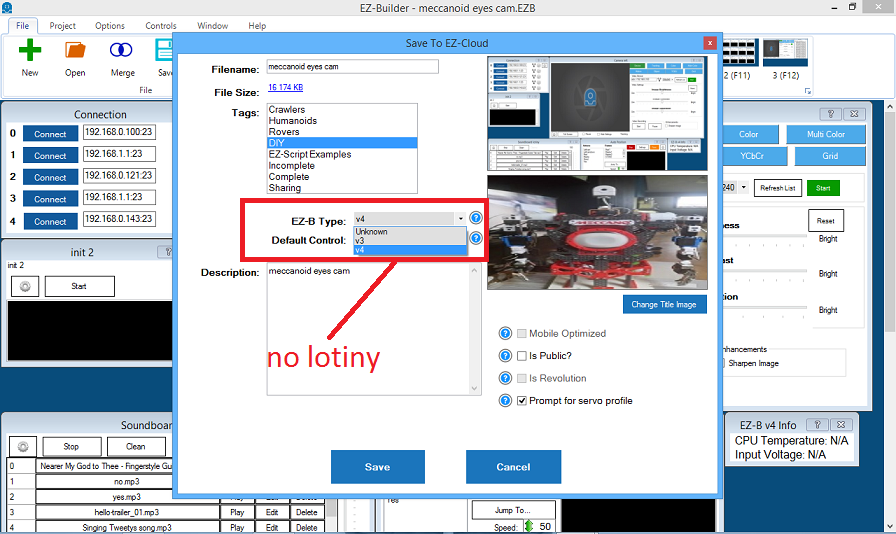
Nomad 6R PRO Belgium #4 Jul 2018 i tested on connection 0 and it works.so to use a script on connection 4, how do i ad it to connection4? i notice when saving in cloud,there is no choice for a lotiny. but when i choose a V4 it saves. Reply Quote Share
i tested on connection 0 and it works.so to use a script on connection 4, how do i ad it to connection4? i notice when saving in cloud,there is no choice for a lotiny. but when i choose a V4 it saves.
DJ Sures PRO Synthiam #5 Jul 2018 First paragraph of the manual for the iotiny provides notice: https://synthiam.com/Tutorials/Lesson/72?courseId=4 Reply Quote Share
First paragraph of the manual for the iotiny provides notice: https://synthiam.com/Tutorials/Lesson/72?courseId=4
Nomad 6R PRO Belgium #7 Jul 2018 how do i choose connection 4 for sayezb(" hello ") if thats possible.seems it only works on connection 0 Reply Quote Share
how do i choose connection 4 for sayezb(" hello ") if thats possible.seems it only works on connection 0
Dunning-Kruger Canada #8 Jul 2018 The Sayezb() command works on any connection, not just board 0.... Reply Quote Share







Are you sure the speaker is plugged in? Sayezb absolutely does work on the iotiny.
Alan
hi alan
yes its plugged in.other sounds can be played. i use another speaker from 4 watt.
i have conneted the lotiny on connection 4,and set the sayezb to , connection 4,not working.
i tested on connection 0 and it works.so to use a script on connection 4, how do i ad it to connection4?
i notice when saving in cloud,there is no choice for a lotiny. but when i choose a V4 it saves.
First paragraph of the manual for the iotiny provides notice: https://synthiam.com/Tutorials/Lesson/72?courseId=4
ah thats why it saves as ezbv4.thanks
how do i choose connection 4 for sayezb(" hello ") if thats possible.seems it only works on connection 0
The Sayezb() command works on any connection, not just board 0....