


Hi DJ,
I have just purchased the Brookstone rover + the Ez Robot complete kit.
I am very skilled in IT / programming and cannot get the rover to connect to the Ez Builder software.
The PC is connected to the Rover via Wifi and I can access the IP of the units DHCP and login using the AC13 credentials.
I cannot however get the software to connect, it simply refuses to do so.
I am not certain if I have a 2.0 version of the rover, is there anything else I should be checking?
My rover is a dark green color model: GT-3598
Cheers

Today's release includes brookstone rover connection debug information
Hi DJ,
New debug output from the new version is below:
If really needed, I can try to get tcpdump running on an iPad. I work in a very resourceful IT company and we have been driving the rovers around the office
Rover Connection Error Step 6: System.IO.IOException: Unable to read data from the transport connection: A connection attempt failed because the connected party did not properly respond after a period of time, or established connection failed because connected host has failed to respond. ---> System.Net.Sockets.SocketException: A connection attempt failed because the connected party did not properly respond after a period of time, or established connection failed because connected host has failed to respond at System.Net.Sockets.Socket.Receive(Byte[] buffer, Int32 offset, Int32 size, SocketFlags socketFlags) at System.Net.Sockets.NetworkStream.Read(Byte[] buffer, Int32 offset, Int32 size) --- End of inner exception stack trace --- at System.Net.Sockets.NetworkStream.Read(Byte[] buffer, Int32 offset, Int32 size) at System.IO.Stream.ReadByte() at EZ_B.BrookstoneRover.Connect() Rover Connection Error Step 7: System.ArgumentOutOfRangeException: Index was out of range. Must be non-negative and less than the size of the collection. Parameter name: index at System.ThrowHelper.ThrowArgumentOutOfRangeException() at EZ_B.BrookstoneRover.Connect() Rover Connection Error Step 8: System.InvalidOperationException: The operation is not allowed on non-connected sockets. at System.Net.Sockets.TcpClient.GetStream() at EZ_B.BrookstoneRover.Connect() Rover Connection Error Step 9: System.InvalidOperationException: The operation is not allowed on non-connected sockets. at System.Net.Sockets.TcpClient.GetStream() at EZ_B.BrookstoneRover.Connect()
Where did you buy this tank? I can't find any information about it.
https://www.electusdistribution.com.au/productView.asp?ID=14013&CATID=39&keywords=&SPECIAL=&form=CAT&SUBCATID=
https://www.jaycar.com.au/productView.asp?ID=GT3598
This is the version of the rover for sale in Australia and also likely New Zealand as well.
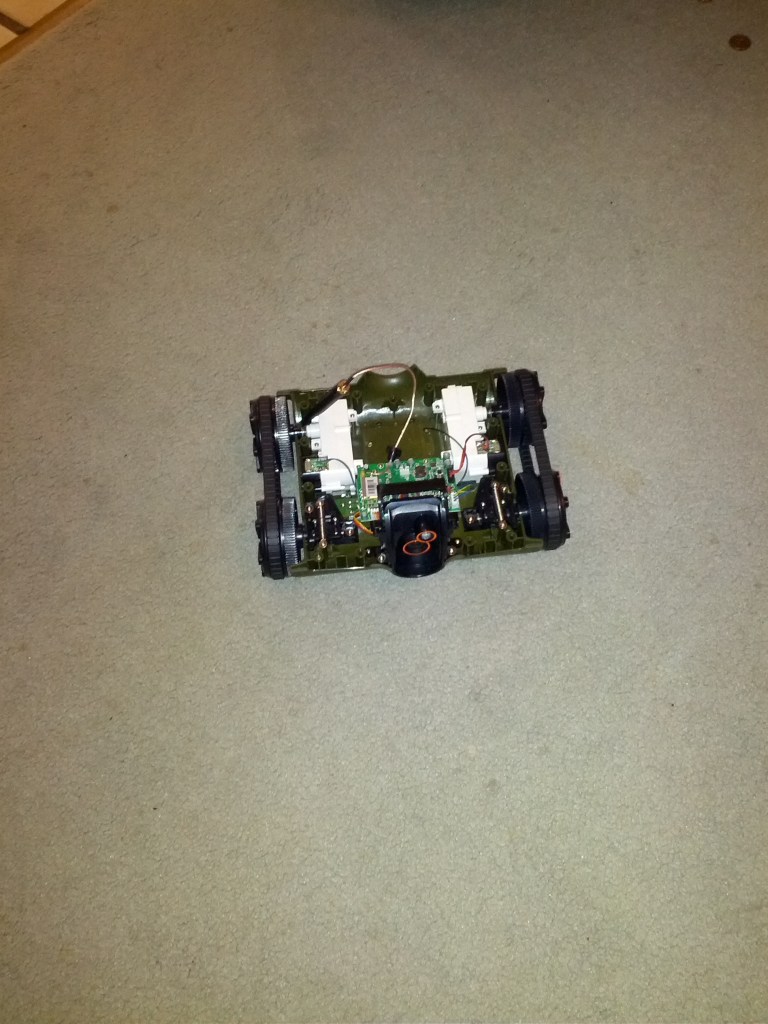
Also here are some pictures after it has been ripped apart
Ill be fitting a massive Gel Cell battery (6amp) in the back there.
A couple of top platforms (one will hold the motherboard from an atom Eee PC)
And then on top I will have a swivel second camera.
I will also be adding a Z-wave home automation controller on-board so that it can act as a portable room open air mic for turning appliances on and off.
Some decent speakers too if they will fit
I am looking to get 1 week battery life running 24/7 ideally.
Might need to upgrade the engines though, I will see how it goes.
DJ?
Supporting that device is added to our to-do list. I do not have an eta, but there are over 100 items ahead of it
Hey guys, i'm trying to connect my rover to the ARC, but it won't connect. A mesage scrolls up from the bottom saying:
Rover Error: System.IO.IOException: Unable to read data from the transport connection: A connection attempt failed because the connected party did not properly respond after a period of time, or established connection failed because connected host has failed to respond. ---> System.Net.Sockets.SocketException: A connection attempt failed because the connected party did not properly respond after a period of time, or established connection failed because connected host has failed to respond at System.Net.Sockets.Socket.Receive(Byte[] buffer, Int32 offset, Int32 size, SocketFlags socketFlags) at System.Net.Sockets.NetworkStream.Read(Byte[] buffer, Int32 offset, Int32 size) --- End of inner exception stack trace --- at System.Net.Sockets.NetworkStream.Read(Byte[] buffer, Int32 offset, Int32 size) at System.IO.Stream.ReadByte() at EZ_B.BrookstoneRover.Connect()
What does this mean? What should I do?