


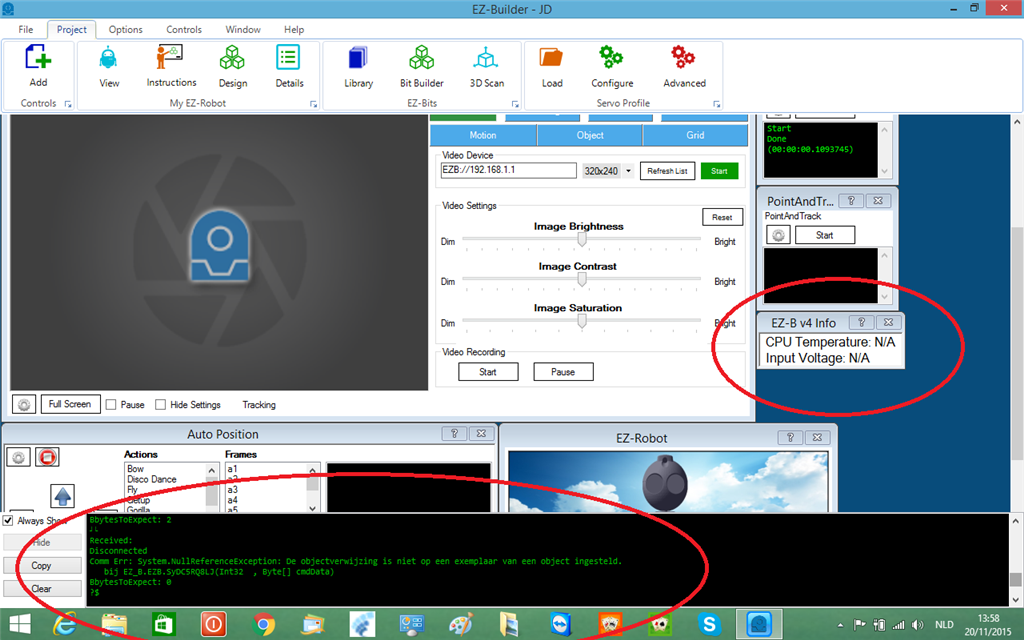
i get an error when i connect with the window ezb info.ez builder craches
 EZB Connection
— Connects EZ-B I/O controllers to ARC via COM or IP (5 connections). Supports init scripts, battery monitoring, TCP/EZ-Script server and serial/I2C.
Try it →
EZB Connection
— Connects EZ-B I/O controllers to ARC via COM or IP (5 connections). Supports init scripts, battery monitoring, TCP/EZ-Script server and serial/I2C.
Try it →
 Resolved by Steve G!
i get an error when i connect with the window ezb info.ez builder craches

Is the connection information correct? This would indicate that ARC is receiving invalid information so naturally you'd assume you are not communicating with an EZ-B V4 but possibly some other device.
HI RICH
dumb question how can i see if the connection info is correct.
Funny, if had something similar over the past few days. Usually it's when I disconnect an EZ-B, then the debug message repeatedly pops up. This happens on two different old projects I regularly use and nothing has changed. When the EZ-B connects again, the message stops. Doesn't seem to be causing me any issues so I haven't given it a second thought.
https://synthiam.com/Tutorials/Lesson/14?courseId=5
ok thanks bolt
the ezbv connect but i cant play sound or choose ezbv info. i can also only connect to win8.
i dont think its an conection error,it connect without the ezb info window. what els can i look for
So when you delete the v4 info control, do you still get the message?
when i delete window ezbv info it stays connect