


I created a servo profile and saved it locally and that works fine.
I'm not sure how to save one on EZcloud for use on the mobile app without overwriting any others
Does saving the project include the servo profile?
 Intel Realsense D435i
— Connect Intel RealSense depth cameras to ARC NMS for depth-based distance detection, point-cloud mapping, video streaming, and navigation telemetry.
Try it →
Intel Realsense D435i
— Connect Intel RealSense depth cameras to ARC NMS for depth-based distance detection, point-cloud mapping, video streaming, and navigation telemetry.
Try it →
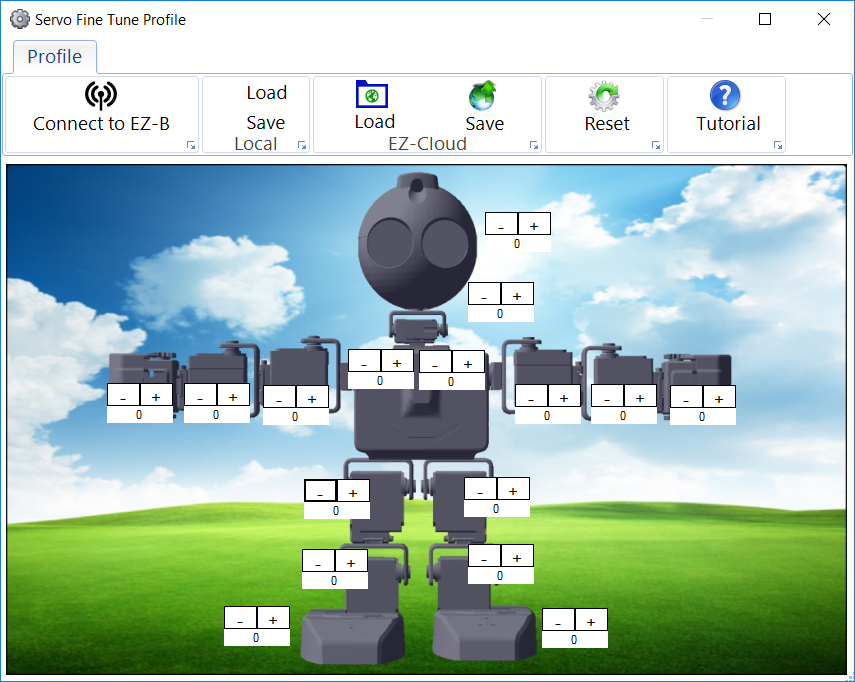

save it to the cloud and it will sync to your device when you load servo profiles. It will also sync when you install a project from the cloud.
It's the LOAD and SAVE buttons when you create a profile labelled EZ-Cloud on your screen in the servo profile window. In order to have already created servo profile (as mentioned), you have previously viewed the load and save buttons. This screenshot will be familiar...
Lastly, you can create profiles on the mobile device as well.