



I have the IoTiny board, my bluetooth connection is good, but when I try (Yes, I've tried all the com ports as well) the connection fails and times out.
When I perform a search, it's looking for EZ-B4, not sure if that's helping.
Any advice?
Also, is there a more in-depth manual then what the website provides?

Due to limited bandwidth of bluetooth, EZ-Robot controllers are ALL WiFi and not Bluetooth. Information about the product you purchased can be found here: https://synthiam.com/Shop/AccessoriesDetails.aspx?prevCat=101&productNumber=50
Follow that link for the Getting Started Guide for your EZ-B IoTiny, which operates the same way as the EZ-B v4. The same activities of the EZ-B v4 also apply to the EZ-B IoTiny, as mentioned in the Getting Started guide of the EZ-B IoTiny.
Have fun!
Hi,
Sorry to bother you again, I went to the site to add the IoTiny to my network, and I entered my wifi info into the Wifi Ap (which is not the right way) I can't access it now to reset it and put the info into the proper location (Wifi Client) any suggestions?
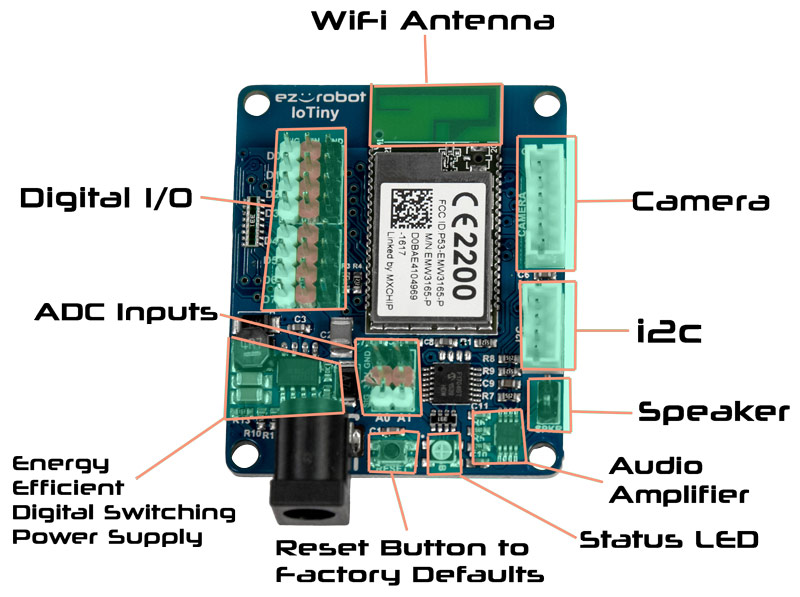
There is a reset button on the IoTiny - press it. The button has the word "reset" next to it.
Here's the ports for the EZ-B IoTiny from the product page. Have fun!
@dchailler The iOTiny behaves pretty much exactly like an ezb4 x/2.... It's bascally an ezb4 with a few less goodies... As @DJ mentioned reset it and try again and follow the tutorials if need be... I guess you have already found out that like the EZB4 the iOTiny uses wifi not bluetooth...