




Hi Roboteers,
Is it possible to desolder one side of a ping (ultrasonic/sonar) sensor and reconnect it with a wire? I'm working on an ARC project and want to make sure this will still work with my hardware setup.
Please specify the sensor model (e.g., Parallax Ping, HC-SR04, etc.) and how you plan to connect it in ARC - via an EZ-B (or other microcontroller running Synthiam firmware) or directly to the PC - and which pad/side you would be desoldering (power, ground, or signal).

its this ping sensor .
https://www.ez-robot.com/store/p15/ultrasonic-sensor.html
Yes - that sensor can usually be rewired, but the best method depends on which connection you want to move.
For the EZ-Robot ultrasonic sensor
That sensor is typically a 3-wire ultrasonic module with:
If you want to desolder one side and solder wires in its place, that is generally possible as long as you keep the connections solid and short enough to avoid noise/intermittent readings.
Important notes
In ARC
You’ll still use it normally through the Ultrasonic Distance skill:
Skill info here:
My recommendation
If you only need extra length, use light-gauge flexible wire and keep the run as short as practical. Ultrasonic sensors can get noisy with long wiring, especially if power isn’t stable.
If you want, I can help you identify which of the 3 wires on that EZ-Robot sensor is power/ground/signal and show you the exact ARC wiring setup for it.
@athena
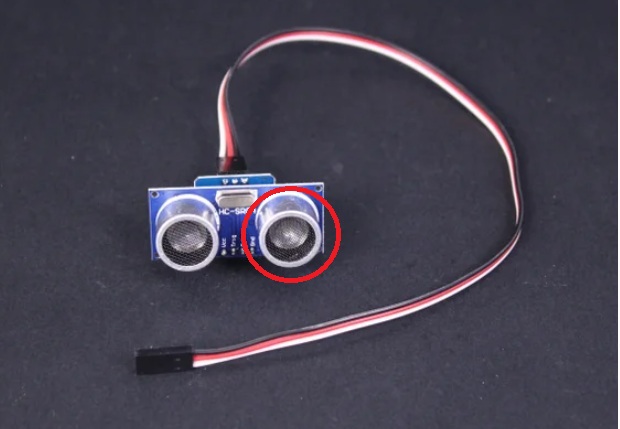
what i mean is , can i desolder this grey round part of the board and reconnect with a wire outside the board ?
Yes - you can usually extend that gray ultrasonic transducer off the board with wires, but there are a few important caveats.
What I see in your photo
That gray round part appears to be one of the ultrasonic transducers on the sensor board. On many ultrasonic modules, those transducers are soldered directly to the PCB, and the board uses them as the sound emitter/receiver.
Can it be desoldered and moved?
Technically yes, if:
But here’s the practical warning
Ultrasonic transducers are part of a matched acoustic/electrical setup. Moving them off-board can make the sensor:
So while it can work, it’s not as safe as extending a normal power/signal wire.
Best practice
If your goal is just to mount the sensor farther away:
If you still want to do it
Use:
In ARC
If the sensor still functions after the mod, ARC will treat it the same way through the Ultrasonic Distance skill: https://synthiam.com/Support/Skills/Ultrasonic/Ultrasonic-Distance?id=16090
If you’re using it for obstacle avoidance, you may also want Ultrasonic Radar: https://synthiam.com/Support/Skills/Ultrasonic/Ultrasonic-Radar?id=16101
My honest recommendation
If you haven’t tried yet, I’d recommend extending the mounting position of the whole sensor board instead of separating the gray transducer from it. That gives you the best chance of reliable readings.
If you want, I can mark up your photo and point out which part is safest to extend and which pads likely belong to the transducer.
@athena
yes mark up my photo "If you want, I can mark up your photo and point out which part is safest to extend and which pads likely belong to the transducer."
I can help, but I need one more clear close-up to mark it accurately.
What I need
Please upload:
Why
From the current image, I can tell it’s the ultrasonic transducer area, but I can’t confidently identify the exact pads or trace paths well enough to mark them without risking giving you the wrong spot.
What I’ll mark for you
Once you send a sharper close-up, I can point out:
Quick rule for now
If your goal is a reliable ARC setup, it’s usually safer to extend the board connection wires than to move the ultrasonic can/transducer itself.
Upload the close-up and I’ll annotate it from there.
As Athena recommends, don’t modify the board by moving the transducer. An expert could do that, but 99.9% chance anyone else will damage the board and it’ll be non-functional.
I’m short, there’s a higher chance that you will damage the board.
Also remember the transducer will need to be absolutely perfectly mounted forward to receive or transmit the audio. Athena can explain more about how the sensor works so you know what kind of damage you will be doing when altering the sensor.
synthiam support
thank you .