




Hello Everybody!
I want to add a gps module to a robot I am building for a school project. If anyone could please let me know of GPS modules that are compatable with the EZ-B v3?
Thanks again!
 Feetech Serial Bus Servo
— Control Feetech SC serial bus smart servos via EZB UART or PC COM port with ARC virtual ports, speed, position, release, and acceleration.
Try it →
Feetech Serial Bus Servo
— Control Feetech SC serial bus smart servos via EZB UART or PC COM port with ARC virtual ports, speed, position, release, and acceleration.
Try it →

Hello Everybody!
I want to add a gps module to a robot I am building for a school project. If anyone could please let me know of GPS modules that are compatable with the EZ-B v3?
Thanks again!

Any bluetooth, USB or Serial GPS.
Read the GPS Serial tutorial page for more information.
Purchase this: https://www.ebay.ca/itm/VK-162-GPS-Module-with-SIRF3-Ceramic-Antenna-TTL-USB-Signal-/330817769260?pt=GPS_Antennas&hash=item4d06468f2c
Then go to our store and purchase the Bluetooth TLL SPP Module.
Voila
This looks like another opportunity for the WiFi TTL board as well.
Hello all, thanks for the advice! I got a bluetooth module as well as the gps DJ told me to get. However, when connecting to the gps control, it always displays 0 on all categories. I am thinking maybe it could be the actual gps module. Maybe I am wrong. Please help!
Thanks!
:D
Cold starting a new GPS chip, more than 500 miles from its last known location and without an up to date almanac can take as much as 15 minutes in good conditions. Try taking it outside with a clear view of the sky for 15 to 20 minutes before assuming that the chip is bad.
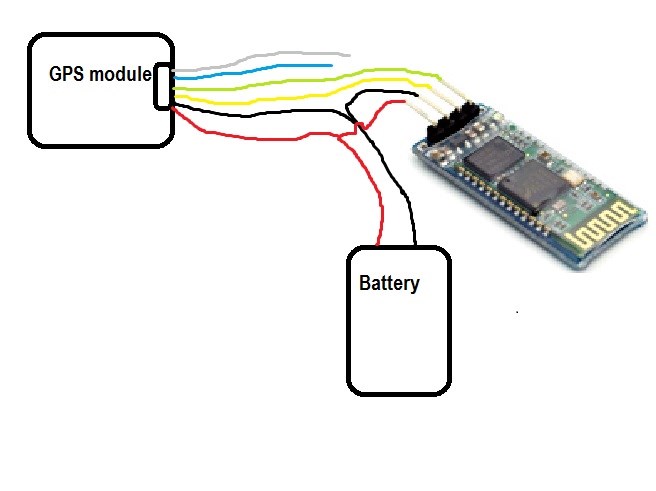
like this? Just a guess. please edit to show.