Change Release Notes
This release contains a rewrite of the EZ-Script compiler for more features, functions, scientific math and compliance. The old compiler allowed you to embed variables within a quoted string ( i.e. "Text: $variable" ). However, that wasn't a compliant syntax to be similar with other programming languages. The new compiler requires the strings to be concatenated (i.e. "Text: " + $variable). This will aid in education and readability.
There is also a slight speed increase in the compiler. And many new functions for Math and Logic.
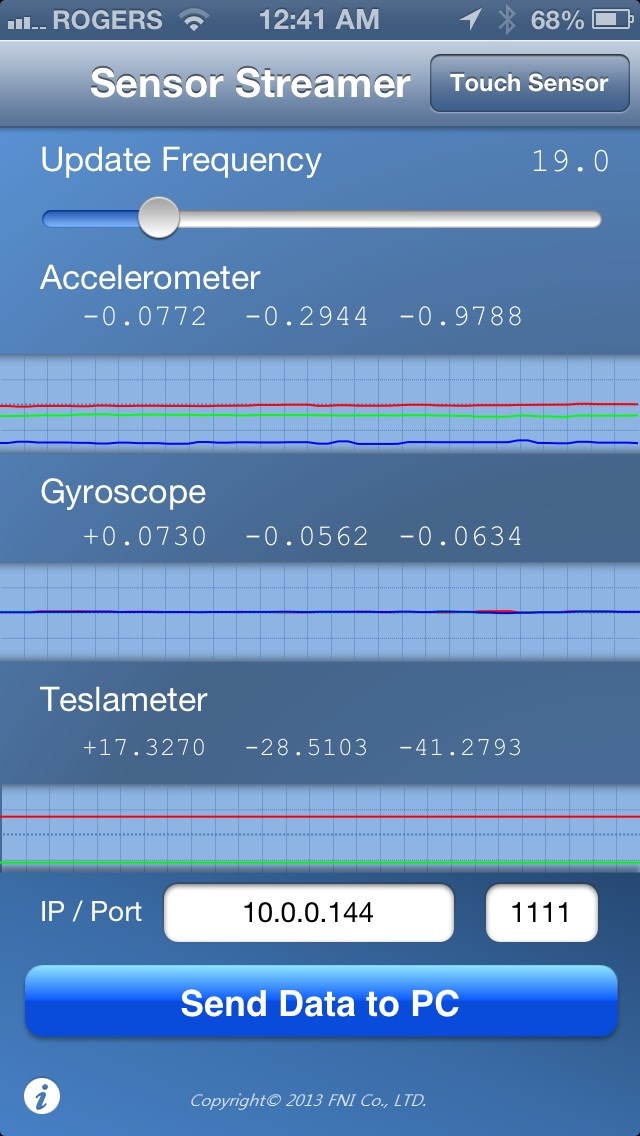
A really neat add-in is a new control for the Apple Mobile Device App called FNI Co. Sensor Streamer. There is both a free and paid version available. The control can be found under the Misc category of Add Control. The control will set variables to the values of parameters from the application. This includes sensors such as Compass (teslameter), Accelerometer, Gyroscope, GPS (longitude, latitude), and touchscreen. It's a really great app! Download App: https://itunes.apple.com/app/sensor-data-streamer/id608278214?mt=8
New EZ-Script compiler
New Control: Sensor Streamer Server
New memory Variable Manager
File->Open dialog remembers last open location To Use
- Load ARC
- Select Projects tab from top menu
- Press Add Control
- Select MISC tab
- Add the control "Sensor Streamer Server"
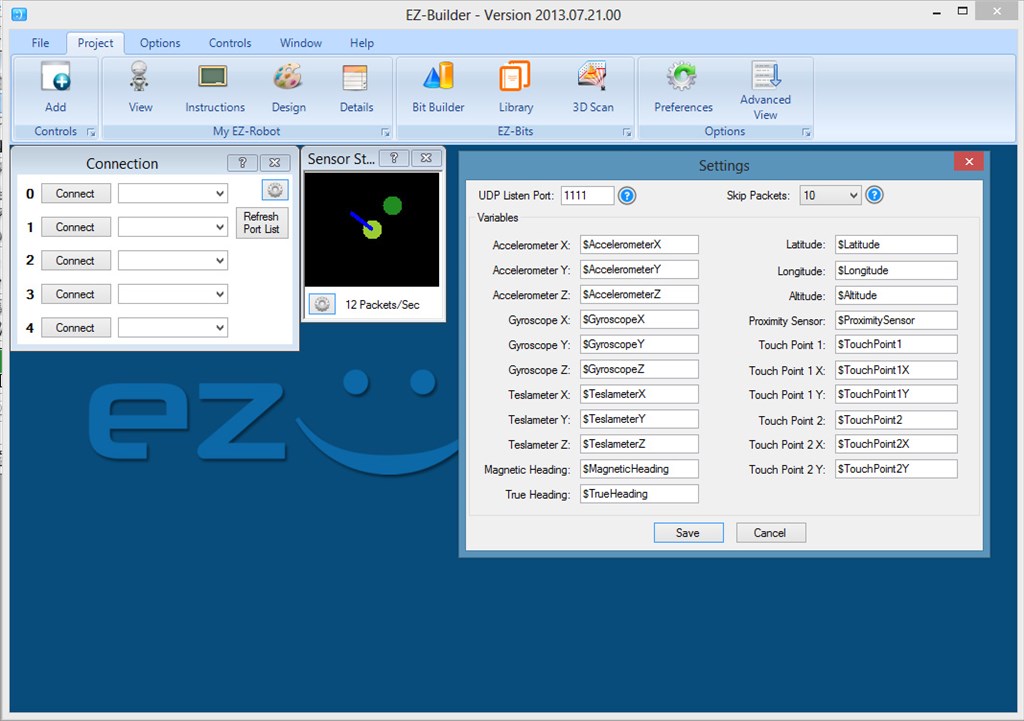
The control will default to port 1111. Configure your Mobile Device to connect to your computer's IP Address. The control will display the Accelerometer, Gyroscope and Compass Direction. The Config menu will allow you to assign sensor values to EZ-Script variables. The Sensor Stream Server will also control servos. This can be configured under the Config menu of the control.
ARC Downloads
ARC
FREE- 1 third-party plugin skill per project
- Trial cloud services
- Personal, DIY & education use
- Updated every 6–12 months
 Download
ARC
PRO- Use on 2+ PCs simultaneously
- Unlimited robot skills
- Cloud backup & revision history
- Weekly features & bug fixes
- Business use permitted
ARC
RUNTIME- Load & run any ARC project
- Read-only mode
- Unlimited robot skills
- Includes early access fixes & features
- Minimum requirements: Windows 10 or higher, 2 GB RAM, 500 MB free disk space.
- Recommended: Windows 10 or higher, 8 GB RAM, 1 GB free disk space.
- Prices are in USD.
- More about each edition: Download & install guide.
- Latest changes: Release notes.
Compare Editions
| Feature |
ARC
FREE
|
ARC
PRO
|
|---|---|---|
| Get ARC Free | View Plans | |
| Usage | Personal · DIY · Education | Personal · DIY · Education · Business |
| Early access to new features & fixes | — | ✓ |
| Simultaneous microcontroller connections * | 1 | 255 |
| Robot skills * | 20 | Unlimited |
| Skill Store plugins * | 1 | Unlimited |
| Cognitive services usage ** | 10 / day | 6,000 / day |
| Auto-positions gait actions * | 40 | Unlimited |
| Speech recognition phrases * | 10 | Unlimited |
| Camera devices * | 1 | Unlimited |
| Vision resolution | max 320×240 | Unlimited |
| Interface builder * | 2 | Unlimited |
| Cloud project size | — | 128 MB |
| Cloud project revision history | — | ✓ |
| Create Exosphere requests | — | 50 / month |
| Exosphere API access | — | Contact Us |
| Volume license discounts | — | Contact Us |
| Get ARC Free | View Plans |
* Per robot project
** 1,000 per cognitive type: vision recognition, speech recognition, face detection, sentiment, text recognition, emotion detection, azure text to speech

Upgrade to ARC Pro
Experience the transformation – subscribe to Synthiam ARC Pro and watch your robot evolve into a marvel of innovation and intelligence.
Thanks
Although I will be updating my scripts to remove the port variables, it's not good practice at the end of the day. It may make it easier for the community to use the scripts but it takes away from them understanding the scripts and how they are put together. And it's mainly the battery monitor and ping roam scripts that use them, both of which are being updated so it's no biggie if you did want to take it out (I have no problems with it - it is the kick up the backside I need to get my head back in to those scripts)
Is it time to start having specific users (@Rich, @jstarne1) beta test prior to releases? It seems to me that ARC is getting complex enough that each new release breaks something that a small team of dedicated beta testers would probably identify.
Just a thought. (for a change, I am not volunteering myself. Barely have enough free time to work on production releases let alone Beta...).
Alan
The Techguru,
I find the releases hot off the press extremely valuable. I find these breaks backwards compatibility issues to be quite rare yet easy to remedy over all. I also keep all previous downloads. Might I suggest if you find something is broke, report it of course, but uninstall that version and reinstall the versions that previously worked with your models?
Bill
Just to point out, everything is currently in beta since the revolution release
With ARC being an evolving application I will always expect the possibility of a few bugs somewhere but we can rest easy knowing that those bugs will be squashed
Folks, is there a way to display the video (on ControlCommand video player...) on full screen ? I mean, can I configure that window to play full? Thanks! Tevans.
You can resize the window but it wont be full screen, you'll still have the ribbon across the top.
I tried the three most promising Android apps I found for streaming sensor data "Sensor Fusion" and "IMU+GPS Stream" and "wireless IMU" (which doesn't include GPS data but also just streams the raw data without headers, so I thought it might show something), and ARC doesn't see the packets so is not populating the variables (yes, I opened the port in Windows Firewall). I suspect that the iPhone app has specific header data or labels that DJ programmed for that are different in the Android apps (IMU_GPS and Wireless IMU, at least according to the log files they create just stream raw data with no headers, so you need to know the order the data is coming to know which variable to put it in. Sensor fusion keeps crashing and not writing to the log, so basically useless).
I was not connected to my EZ-B at the time, so if this is like how voice reco used to require the board to be connected for timing, then my test may have been invalid.
I'll try again tomorrow night connected to an EZ-B unless DJ can post some information about what specifically the stream is watching for.
DJ, if you want to add Android support, Sensor Fusion has the cleanest interface, but also crashed on me several times and would not even save data to a log file. IMU+GPS Stream includes the most sensor data but I need to update the target IP address and which sensors I want to stream every time I run it. Wireless IMU only streams three sensors, but is also open source, so could be a good place to start if we want to build a ARC specific app.
Alan
Good job DJ, the possibility to use the sensor from the Iphone give us an interresting tool to play, I begin to regret having only an Ipod.
DJ, is it possible to make an addition to the Digital panel ? The Set Digital is fine but I'd like to be able to control more I/O. I am currently testing a track platform and it need 4 i/o total to work, 2 for the right motor and two for the left one. I know it's selfish to ask for this but at least it will populate a little bit the Digital window I'd like to have one same as the Modified servo Movement Panel...
Thank you for the good work and so many improvement !
Andre