
Change Release Notes
This release contains a rewrite of the EZ-Script compiler for more features, functions, scientific math and compliance. The old compiler allowed you to embed variables within a quoted string ( i.e. "Text: $variable" ). However, that wasn't a compliant syntax to be similar with other programming languages. The new compiler requires the strings to be concatenated (i.e. "Text: " + $variable). This will aid in education and readability.
There is also a slight speed increase in the compiler. And many new functions for Math and Logic.
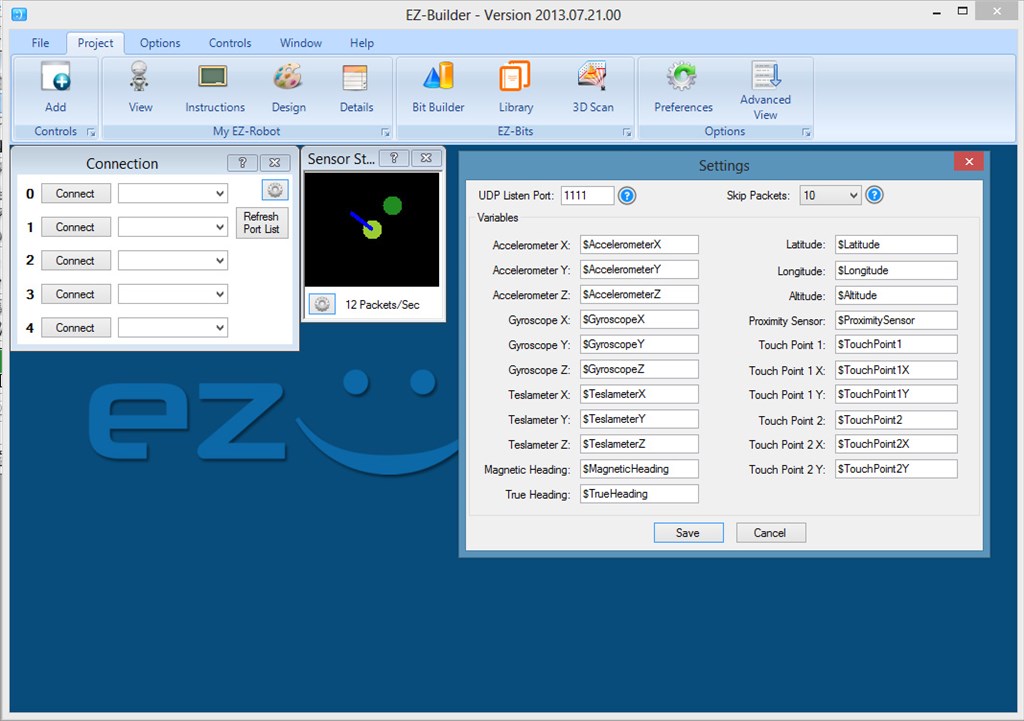
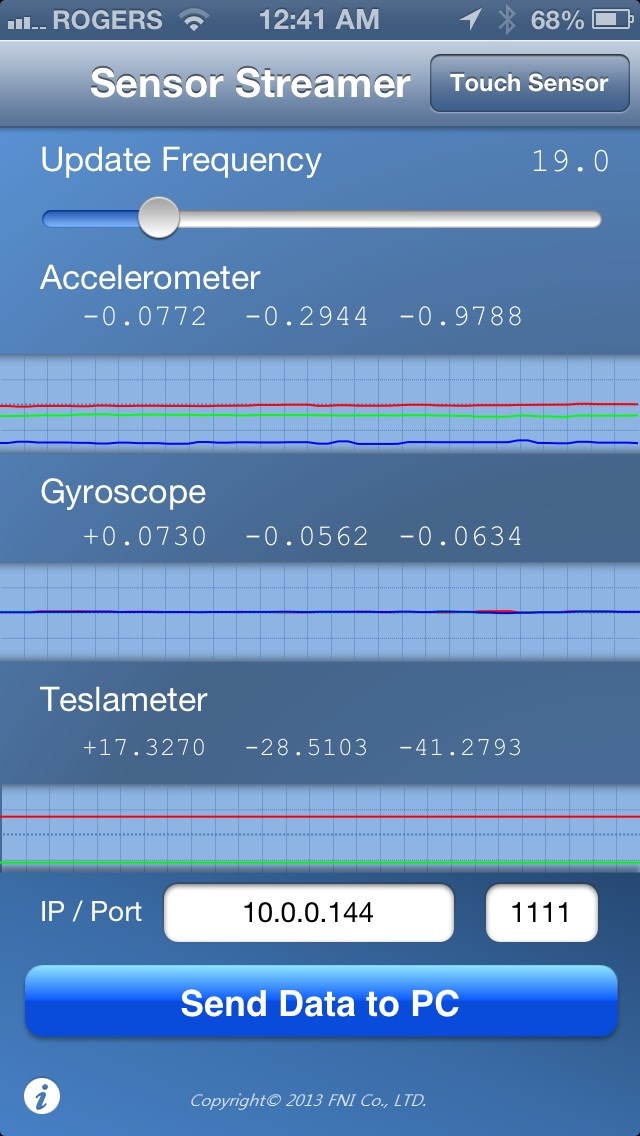
A really neat add-in is a new control for the Apple Mobile Device App called FNI Co. Sensor Streamer. There is both a free and paid version available. The control can be found under the Misc category of Add Control. The control will set variables to the values of parameters from the application. This includes sensors such as Compass (teslameter), Accelerometer, Gyroscope, GPS (longitude, latitude), and touchscreen. It's a really great app! Download App: https://itunes.apple.com/app/sensor-data-streamer/id608278214?mt=8
New EZ-Script compiler
New Control: Sensor Streamer Server
New memory Variable Manager
File->Open dialog remembers last open location To Use
- Load ARC
- Select Projects tab from top menu
- Press Add Control
- Select MISC tab
- Add the control "Sensor Streamer Server"
The control will default to port 1111. Configure your Mobile Device to connect to your computer's IP Address. The control will display the Accelerometer, Gyroscope and Compass Direction. The Config menu will allow you to assign sensor values to EZ-Script variables. The Sensor Stream Server will also control servos. This can be configured under the Config menu of the control.
ARC Downloads
ARC
FREE- 1 third-party plugin skill per project
- Trial cloud services
- Personal, DIY & education use
- Updated every 6–12 months
 Download
ARC
PRO- Use on 2+ PCs simultaneously
- Unlimited robot skills
- Cloud backup & revision history
- Weekly features & bug fixes
- Business use permitted
ARC
RUNTIME- Load & run any ARC project
- Read-only mode
- Unlimited robot skills
- Includes early access fixes & features
- Minimum requirements: Windows 10 or higher, 2 GB RAM, 500 MB free disk space.
- Recommended: Windows 10 or higher, 8 GB RAM, 1 GB free disk space.
- Prices are in USD.
- More about each edition: Download & install guide.
- Latest changes: Release notes.
Compare Editions
| Feature |
ARC
FREE
|
ARC
PRO
|
|---|---|---|
| Get ARC Free | View Plans | |
| Usage | Personal · DIY · Education | Personal · DIY · Education · Business |
| Early access to new features & fixes | — | ✓ |
| Simultaneous microcontroller connections * | 1 | 255 |
| Robot skills * | 20 | Unlimited |
| Skill Store plugins * | 1 | Unlimited |
| Cognitive services usage ** | 10 / day | 6,000 / day |
| Auto-positions gait actions * | 40 | Unlimited |
| Speech recognition phrases * | 10 | Unlimited |
| Camera devices * | 1 | Unlimited |
| Vision resolution | max 320×240 | Unlimited |
| Interface builder * | 2 | Unlimited |
| Cloud project size | — | 128 MB |
| Cloud project revision history | — | ✓ |
| Create Exosphere requests | — | 50 / month |
| Exosphere API access | — | Contact Us |
| Volume license discounts | — | Contact Us |
| Get ARC Free | View Plans |
* Per robot project
** 1,000 per cognitive type: vision recognition, speech recognition, face detection, sentiment, text recognition, emotion detection, azure text to speech

Upgrade to ARC Pro
Unlock the true power of automation and robotics by becoming a proud subscriber of Synthiam ARC Pro.
The BlinkM is in great condition. It works flawlessly with the ARC BlinkM control connected to the EZ-Robot as well as with the BlinkM Software via an Arduino to program and operate it. It has the header pins soldered to the board and they have good connections.
So far, the only thing I cannot get to work is the example script provided above of which I posted the reference to where I found it in the EZ-Robot forum. My actual project is a I2C compass module that I cannot get working with the ARC script. But since I am certain my BlinkM is operational, I figured it is better to use to debug my I2C issues.
Since the ARC BlinkM control works, I'm certain the EZ-Robot and BlinkM work fine. Just trying to figure out the script side.
Thanks so much. I appreciate all you can do to help me figure out how to use I2C with the ARC script.
@SkinnerFam95: download this https://synthiam.com/Community/Questions/4155 new release
That will help
Works great with 2013.07.24.00.
Now I'm looking forward to getting my compass working. Thanks for all the help. EZRobot makes this hobby super fun.
Hi DJ, I was trying to write an ezscript using the sensor streamer compass variable for navigation without success. Would you please publish an example on how to do that? Nick
Hi everybody,
@Dj I suppose that since this conversation is 3 years old now there's no hope that there'll be a version of the the current UDP sensors listener that is compatible with either of the Android apps mentioned by @thetechgourou? It's really a pity since the iPhone is a control freak which does not allow for any remote control, nor any customization nor any way to relaunch an app remotely, while Android allows for all these options. Using a GPS, and orientation sensors in general is, in my case, totally meant to work on autonomus robots, not high tech RC cars, so there's no point for me to use an iphone since they will always eventually stop running their sensor and it will not be possible to restart it remotely...
@Alan, btw, the ARC is receiving the data stream from IMU+GPS Stream Android App, if you look into the debug you'll see it prints in loops that the received data is invalid. I think you're right, it might indeed be a matter of headers and raw data. It's really frustrating to see that, basically, my robot will never have any sort of reliable position/direction/orientation reading since on one end my EZ-robot's MPU9150 systematically end up sending inconsistent data, even after calibration attempts : sometimes it works to the perfection, some other times it simply doesn't work any longer (even once plugged to a totally separate controller without any other device connected to it) and, on the other end, my HMC5883, although it sends pretty consistent data, it however systematically crashes the EZBoard due to the inherent totally unreliable nature of i2C on a moving robot with motors and, thus, induction, bumps, etc. (and this is also a pb with the MPU).
@Elfege, ez-robot has an awesome plugin which allows 3rd party development. Take a look and you can create your own udp listener. Have fun!
Writing this plugin is absolutely on my (unfortunately lengthy and rarely getting any shorter) to do list. From the research I have done there is plenty of source to steal bbbb^b borrow from for IMU listeners. I actually can't believe we have been talking about this for 3 years. It is really something I want to do.
Alan
@Dj : seriously? You want me to fight my lazyness and not satisfy my capricious Mind?! Hahaha!
Well... ok then, I'll get to work...
Thanks for the link I'll look into this as soon as the time is given to me... I have a champagne party to set up for Saturday and so far I only bought tons of champagne... @Alan, @Rich or @Dj, join us if you're in NY! Well celebrate five years (I think) since I started as a complete beginner in the field and now became the guy to whom you say: Hey! program it yourself! " I'm sooo Flattered! but beware of the tons of dumb questions that'll come (with the usual spaghettis) once I put my nose Into it!