

jd3873024
Unknown Country
Asked
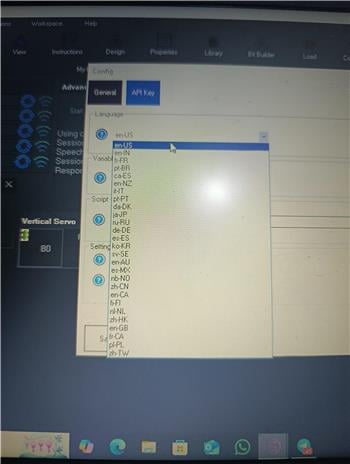
Language Setting For Tts
I want to program jd humanoid via EZ-Script so he will speak the words i want him to say , in the dutch language. How do i do that ?.
Related Hardware (view all EZB hardware)

JD Humanoid
by EZ-Robot
JD humanoid robot kit - WiFi-enabled, 16 DOF with metal-gear servos; easy, fun, educational, available from the EZ-Robot online store.
Wi-Fi / USB
Servos
24
Camera
Audio
UART
3
I2C
ADC
8
Digital
24
Related Robot Skills (view all robot skills)

Bing Speech Recognition
by Microsoft
Accurate Bing cloud speech-to-text for ARC: wake-word, programmable control, $BingSpeech output, Windows language support, headset compatible

Azure Text To Speech
by Microsoft
Azure TTS for ARC robots: generate natural, customizable neural voices for companion, educational, assistive, and entertainment applications.
Requires ARC
v11

@Athena For correction, the controller has an Arduino Mega, and this is the program I used https://synthiam.com/Firmware/EZB-Arduino-Mega-Z5CFV0B0YQI I connected the servo to pin 9.
You must create a new thread because your question and topic has changed.
Hello @Athena , I apologize for going off-topic earlier. I'm a beginner with Synthiam, please excuse me. All the problems are now resolved, but the servo only works with English speech in the Talk servo v2 skill and doesn't work with Arabic. What's the solution? Thank you for your patience.
Good progress - you solved the hardware issues, nice work. The behavior you describe is expected: Talk servo v2 analyzes text to find vowels and consonants to animate the mouth. Because Arabic uses a different script and vowel system, Talk servo v2 usually won’t detect vowels the same way it does for English (Latin) text - so the servo appears to do nothing for Arabic text.
Two reliable ways to fix this:
Option A - Explicit commands (simple)
Option B - Transliterate automatically (recommended)
Both options require you to explicitly call the Talk servo v2 Speak ControlCommand - the Azure TTS skill does not automatically guarantee Talk servo v2 will receive text for non-built-in Say() calls or for non-Latin scripts.
Step-by-step (recommended approach with JavaScript)
Tuning tips
Troubleshooting checklist
Would you like:
Which Arabic voice and which servo port are you using (e.g., ar-EG-SalmaNeural, d0)? I’ll tailor the code and delay suggestions to that.
This thread has already been notified that it is off-topic. Athena cannot provide assistance when the conversation goes off topic. However, the advice is to use one of the Sound servo robot skills based on your audio configuration.
*Note: there is a great document that helps explain how to ask questions and specifically use LLM's to get the most out of athena: https://synthiam.com/Support/website-features/How-To-Ask-Robot-Building-Questions
Short answer: your Talk servo v2 uses text parsing for English, so it won’t animate Arabic correctly. The recommended fix is to use one of the Sound-Servo robot skills that animate from the actual audio waveform (languageagnostic). That way Azure TTS speaks Arabic and the sound-servo reads the audio to move the mouth/jaw.
Before you start: because this is now a new topic (servo animation / audio routing) please consider starting a new thread so it’s easier for others to find and follow. Meanwhile, below are the exact steps and troubleshooting tips so you can get it working right away.
Which Sound-Servo to use
Helpful skill links (add via Project -> Add Robot Skill):
Step-by-step setup (recommended)
Decide audio output
Add the correct Sound-Servo robot skill
Configure the Sound-Servo (kebab menu / Config)
Configure Azure Text To Speech
Test full pipeline
Why this works (and why Talk servo v2 failed)
Troubleshooting checklist
Optional: If you must keep using Talk servo v2
Next steps / what I need from you
If you post those, I’ll give a concise, customized config and a short test script you can paste into a Script skill to verify the setup.