


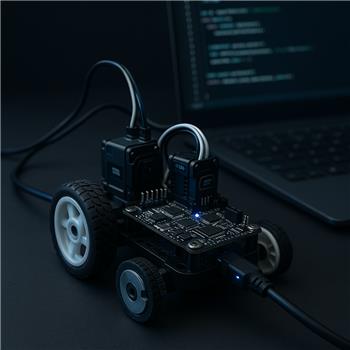
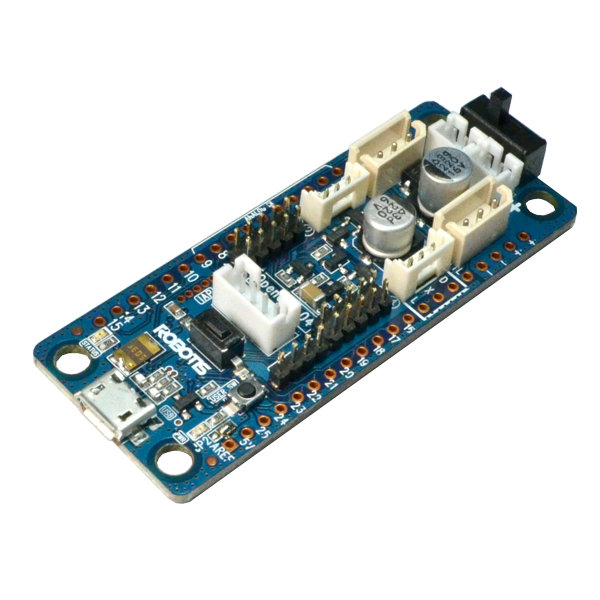
I’m running ARC on Windows with a Robotis OpenCM 9.04-C over USB. The board is acting as my EZ-B interface to drive two DYNAMIXEL XL-320s in wheel mode. I’ve added single-channel Hall encoders (open-collector, pulled up to 3.3v) on each wheel and I’m trying to use the Wheel Encoder Counter robot skill so I can feed pose to NMS. The skill’s page references Arduino UNO firmware, but I’d really like to keep everything on the OpenCM if possible.
I ported the UNO sketch to OpenCM (Arduino IDE with OpenCM core), using attachInterrupt on two digital pins. Counts look correct in Serial Monitor. To test with the Wheel Encoder Counter skill, I pointed it at the OpenCM’s COM port and tried a few baud rates (9600/115200). With my current output format:
SerialUSB.print("L:"); SerialUSB.print(leftCount);
SerialUSB.print(",R:"); SerialUSB.println(rightCount);
the skill’s debug shows intermittent "timeout reading encoder values" and sometimes "invalid data frame". I also tried only responding when polled (listening for a single character like 'G' then printing counts), but I’m clearly not matching the protocol the skill expects.
A few concrete questions:
- What exact serial protocol does Wheel Encoder Counter expect (baud, request/response or streaming, delimiters, and field order)? A short example of a valid line would be great.
- Does the skill require the UNO firmware’s specific command set, or is it simply reading formatted text each poll interval?
- Can Wheel Encoder Counter share the same COM port that ARC uses to talk to the OpenCM for servos, or does it need a dedicated serial device?
If keeping it on one MCU is unrealistic, I can add a tiny Arduino just for encoders, but before I do that, is there a documented protocol I can implement on the OpenCM to satisfy the Wheel Encoder Counter skill?



Yes - the key issue is that Wheel Encoder Counter is not a generic "read any text" serial parser. It expects the specific command/response behavior used by its supported firmware, which is why your
L:...,R:...output and "listen forGthen print" approach are timing out or framing badly.Short answer
What the skill is expecting
The Wheel Encoder Counter skill was built around the firmware documented here:
Wheel Encoder Counter skill:
https://synthiam.com/Support/Skills/Navigation/Wheel-Encoder-Counter?id=17591
Wheel Encoder firmware source/reference:
https://synthiam.com/Firmware/Wheel-Encoder-Firmware-NVXCXGPCQMJ
From that implementation, the skill expects to send a command and receive a structured reply, not parse arbitrary text output. The exact byte-level framing is tied to the firmware used by the skill, so a simple serial line like this is not sufficient:
Why your current approach fails
Your current output is human-readable and asynchronous:
But the skill is likely doing something like:
If the response doesn’t match the expected structure exactly, ARC reports:
Can it share the same COM port as OpenCM servo control?
Usually, no.
If ARC is using the OpenCM 9.04-C over USB as the EZB interface for DYNAMIXEL control, that USB serial connection is already in use for the board’s primary role.
So if you try to also use that same link for wheel encoder polling, you’re mixing:
That is typically not supported on the same serial channel unless the firmware was specifically designed to multiplex both features.
Best options
Option 1: Use a separate small MCU just for encoders
This is the simplest and most reliable path.
This is exactly the use case the skill was designed for.
Option 2: Extend the OpenCM firmware and create a custom ARC robot skill
If you want to keep everything on the OpenCM, the better ARC-native approach is:
That gives you full control and avoids forcing your OpenCM firmware into the UNO-specific Wheel Encoder Counter protocol.
Create a robot skill overview here:
Practical recommendation
If your goal is NMS pose updates, I’d recommend one of these:
About the protocol
I don’t want to guess the exact frame format and baud assumptions here, because the Wheel Encoder Counter skill is tied to its firmware implementation, and using the wrong packet structure will keep causing the same timeout/framing behavior.
If you want, I can help you do either of these next:
If you paste your current OpenCM serial code and tell me whether you prefer custom skill or separate Arduino bridge, I’ll help you map out the exact next steps.
Also, if you’re scripting this behavior in ARC, the ARC AI Assistant can be handy for rewriting the code directly in the editor:
https://synthiam.com/Products/AI-Assistant