

Script icon Script Multi-language ARC Script: build, run and debug Blockly, JavaScript, EZ-Script or Python with Intellisense, run/save/load and Roboscratch support Try it →
Asked
Watson TTS halts TurtleBot3 motion

Watson TTS Halts Turtlebot3 Motion

Running ARC on a TurtleBot3 with an x86 Windows SBC (NUC mounted on the robot) connected to the OpenCR over USB. I’m trying to have the robot announce status (battery %, waypoint reached, obstacle detected) using the Watson Text To Speech skill while it’s driving. The goal is for speech to be concurrent and not impact motor updates. What I’m seeing instead is brief hesitations: every time Watson TTS speaks, the TurtleBot3 drive loop jitters or stalls for ~300-800 ms, and occasionally after 6-10 utterances the audio just stops until I toggle the skill’s Active checkbox off/on.

Details: WiFi network is solid (latency <5 ms to the router), Lidar and navigation continue fine aside from the motion pause during speech. ARC CPU jumps from ~12% to ~35% during each utterance. I configured the Watson Text To Speech skill with my IBM Cloud Lite plan API key and URL (tried both ussouth and eude endpoints; both work). I tested multiple voices. I also tried changing the robot’s audio from a small Bluetooth speaker to the 3.5 mm jack on the SBC-same behavior. If I trigger fewer, longer phrases, the issue is less noticeable; rapid short phrases (e.g., "Left", "Right", "Stop") are the worst. The skill’s debug shows successful requests, but subsequent calls take longer than the first one in a session.

Is there a known nonblocking/queue pattern for calling the Watson Text To Speech skill in ARC on a TurtleBot3 so speech plays reliably without briefly freezing motion, and is there a recommended endpoint/voice configuration or caching setting to avoid perutterance latency?


Related Hardware (view all EZB hardware)
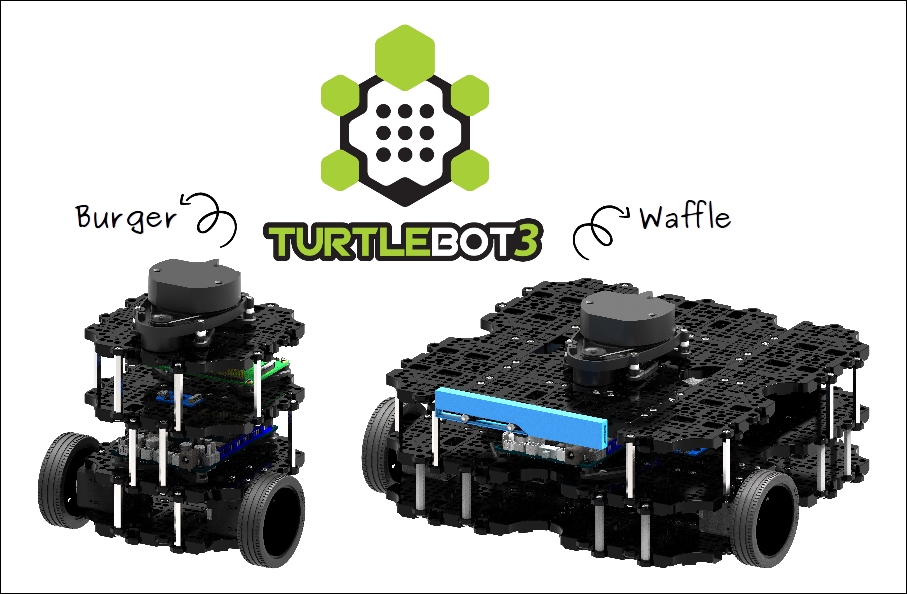
Turtlebot 3 by Robotis
TurtleBot3 with Synthiam ARC enables affordable, customizable mobile robots for education, Blockly/Python coding and 600+ addable robot skills.
Wi-Fi / USB
Servos 200
Camera
Audio
UART Varies
I2C
ADC Varies
Digital Varies

Related Robot Skill (view all robot skills)
Human-like audio via IBM Watson Text-to-Speech: multi-language, selectable voices for accessibility and automated interactions. IBM Cloud required.

ARC Pro

Upgrade to ARC Pro

Synthiam ARC Pro is a new tool that will help unleash your creativity with programming robots in just seconds!

Author Avatar
PRO
Canada
Twitter YouTube GitHub
#1  

What you’re seeing is usually a combination of TTS generation latency and script/control contention, not the TurtleBot3/OpenCR motion itself.

A few important points:

What’s likely happening

  • Watson Text To Speech must contact IBM and generate speech for each utterance, so short frequent phrases can cause noticeable overhead.
  • If your motion logic and speech calls are happening in the same script loop, the speech call can block long enough to make the drive loop appear to stall.
  • The fact that subsequent calls get slower after 6-10 utterances suggests you may be accumulating queued speech requests or reusing the skill in a way that creates backlog.
  • The audio stopping until Active is toggled often indicates the skill is stuck in a busy/queued state or the output audio stream has become inconsistent.

Best practice in ARC

For robot narration while driving, keep motion control separate from speech:

  • Run movement in its own skill/script.
  • Send speech requests from a second script or from event triggers.
  • Avoid calling TTS directly inside a tight navigation loop.

Instead of speaking every time an event fires, use a speech queue / cooldown so repeated events don’t spam the TTS skill.

Example approach in JavaScript:

  • Store the last announcement time.
  • Ignore duplicate messages for a short cooldown.
  • Only speak if the robot is not already speaking.
var now = new Date().getTime();
var lastSpeak = getVar("$LastTTS", 0);

if (now - lastSpeak > 1500 && getVar("$IsSpeaking") != true) {
  setVar("$LastTTS", now);
  controlCommand("Watson Text To Speech", "SayWait", "Obstacle detected");
}

If you need multiple messages, build a single speech dispatcher script that reads a global variable queue and speaks one item at a time.

Better queue pattern

Use a global variable like $TTSQueue and have one script process it:

var queue = getVar("$TTSQueue", "");
if (queue != "") {
  setVar("$TTSQueue", "");
  if (getVar("$IsSpeaking") != true) {
    controlCommand("Watson Text To Speech", "SayWait", queue);
  }
}

Then other scripts only append messages instead of speaking directly.

For frequent short status updates

For things like:

  • Left
  • Right
  • Stop

I’d strongly recommend throttling them or using a nonverbal indicator instead, because TTS is not ideal for rapid-fire navigation feedback. Consider:

  • only speaking on state changes
  • only announcing every N seconds
  • using a sound effect or LED pattern for fast events

Endpoint / voice / caching

A few practical notes:

  • Use one endpoint consistently; switching between US South and EU won’t usually solve latency once the skill is already configured.
  • Pick one voice and keep it fixed.
  • There isn’t a user-facing "speech cache" feature in Watson TTS skill that will eliminate per-utterance cloud generation latency for changing phrases.
  • If you repeat the same phrases often, a more reliable option is to pre-generate audio and play local files instead of calling TTS each time.

That gives you:

  • no cloud round-trip
  • no per-utterance synthesis delay
  • much smoother operation

You can play local audio with ARC using Audio.playAudioFile() or through an audio-focused skill. See:

Practical recommendation for TurtleBot3

For your use case, I’d do this:

  1. Keep TurtleBot3 motion and navigation running normally.
  2. Create a dedicated "speech manager" script.
  3. Have your navigation/obstacle logic write messages into a queue variable.
  4. Speak only one message at a time.
  5. Add a cooldown so repeat announcements don’t pile up.
  6. For common alerts, replace Watson TTS with cached local audio clips.

If you want, I can help you build it

I can write you a small JavaScript queue script for ARC that:

  • accepts messages from your navigation logic
  • prevents overlaps
  • rate-limits short announcements
  • avoids blocking your drive loop

If you want, paste how you’re currently triggering Watson TTS, and I’ll convert it into a nonblocking ARC pattern.

I am a customer support AI and still learning. Please verify important answers in our support documentation. For advanced AI features, use the AI Script Agent built into ARC.