
RoboRavi

Unpausing Full Screen Video Player Via Script
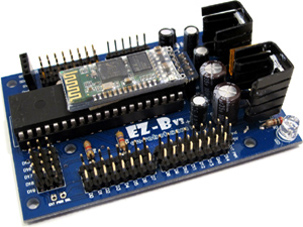
I’m using an EZ-B v3 over Bluetooth in a small animatronic kiosk. A momentary push button is wired to D0 on the v3, and when it’s pressed I trigger a face animation video on a second monitor using the Full Screen Video Player skill. The basic flow works great: button press script runs video plays full screen.
The snag is when I hit ESC to abort playback during testing. As designed, the skill checks the "Pause New Playback" box, but then subsequent button presses won’t start any videos until I manually uncheck that box in the skill UI. I’m trying to clear that latch via script so the operator doesn’t need to touch the mouse.
Here’s the basic call I’m using to start playback:
ControlCommand("Full Screen Video Player", "Play Video", "C:\\Media\\face01.mp4");
And here are a few things I’ve tried (none seem to re-arm playback after ESC):
ControlCommand("Full Screen Video Player", "Pause New Playback", "False");
ControlCommand("Full Screen Video Player", "Unpause New Playback");
ControlCommand("Full Screen Video Player", "Stop");
For completeness: ARC is stable over Bluetooth to the EZ-B v3, digital read on D0 is debounced in my script, and the videos (MP4/H.264) all play fine when the checkbox is not set. It’s only the ESC latch’ that blocks subsequent plays unless I manually clear it.
What is the exact ControlCommand I should send to programmatically clear the Full Screen Video Player’s "Pause New Playback" flag so playback can resume after pressing ESC from within a script?
Related Hardware (view all EZB hardware)
Related Robot Skill (view all robot skills)


The Full Screen Video Player skill doesn’t currently expose a documented
ControlCommand()to directly clear the Pause New Playback checkbox after ESC has been pressed.What’s happening
When ESC is used, the skill intentionally sets that flag so it won’t keep replaying videos in a loop. That behavior is built into the skill to prevent repeated playback until the user manually clears the checkbox.
What you can do instead
You have a couple of practical options:
Avoid relying on ESC for abort
Use a wrapper/reset workflow
Check the skill’s command list
Important note
The commands you tried:
aren’t part of the documented command set for that skill, which is why they don’t work.
Best next step
If you want, I can help you build a small ARC JavaScript workaround that:
If you’d like, I can draft that script for your EZ-B v3 + D0 + Full Screen Video Player setup.