


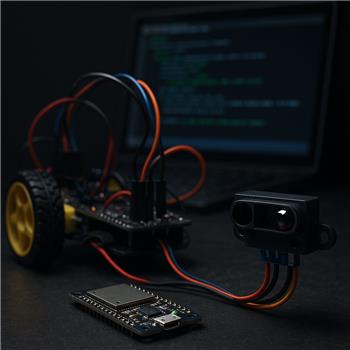
I’m trying to use a Sharp GP2Y0A21YK IR sensor on an ESP32 DevKitC (WiFi) to stop my little 2WD rover before it kisses a wall. In ARC I’m connected to the ESP32 via the EZB Connections skill as Board #5, and I’ve added the Sharp IR Collision skill pointing at ADC0 on that board. Sensor is powered from a 5V buck (common ground), and the analog output goes through a divider (20k/10k) into the ESP32 ADC since it’s 3.3V max. Multimeter shows about 1.1-1.3V at ~20-25 cm and it tracks nicely when I move a target in/out.
In ARC though, the Sharp IR Collision value and voltage bounce around when the motors run, causing random stops. Things I’ve tried: 0.1 F cap from VO to GND, tried 1k series + 0.1 F RC low-pass, moved grounds to a star point, 220 F on the 5V buck, separate 5V regulator for the sensor, different ADC pin, and even a different ESP32. Using a JavaScript loop with GetADC(5, ADC0) and averaging 10-20 samples looks much more stable, but the Sharp IR Collision skill still reacts to the raw read since I can’t feed it my filtered value. Also, the skill UI shows 0-5V, which makes me wonder if it assumes a 5V ADC reference and throws off scaling for 3.3V boards.
Two questions rolled into one: is there a way to add smoothing or adjust ADC scaling for the Sharp IR Collision skill when using an ESP32, or should I bypass the skill and handle stop/resume in a script, and if scripting is the way, what’s the cleanest way to pause and then resume a Movement Panel from JavaScript based on an averaged GetADC threshold?



Yes - for this setup, the proven better approach is to bypass the Sharp IR Collision skill and handle the sensor in a Script skill with filtered ADC readings.
Why I recommend scripting instead of Sharp IR Collision
The Sharp IR Collision skill is a simple stop trigger. It’s useful on straightforward analog sensors, but it does not let you:
And you’re right to question the display: the skill was designed around a generic ADC workflow and is not a good fit when an ESP32 analog input is being used with motor noise. On ESP32, the ADC is also known to be more sensitive than many users expect, especially with brushed motor noise nearby.
So the clean solution is:
ADC.get(ADC0, 5)on the ESP32Movement.stop()orMovement.forward()as neededThat gives you control over the behavior instead of fighting the built-in skill.
Recommended pattern: filtered stop/resume with hysteresis
Use two thresholds:
This prevents oscillation around the cutoff point.
JavaScript example
Add a Script robot skill and use this:
Important note about resume behavior
I want to be direct here: you usually should not automatically call
Movement.forward()after a stop unless your robot is already in a "go forward" mode.A stop skill is only one piece of behavior. Better architecture is:
If you want the rover to keep driving until blocked, then yes, your script can reissue
Movement.forward(). But if your robot has manual driving or a navigation skill, the stop monitor should only stop motion and then clear the condition when safe.If you want it as a pause/resume gate
If your goal is "stop movement when too close, then let normal movement continue when clear," use a boolean flag like this:
Then your separate control logic can decide when to call
Movement.forward()again.If you want the motor noise issue to be even cleaner
Since you already tried the obvious analog filtering, here are the next best ARC-side improvements:
But the main issue is not wiring anymore - it’s that the built-in collision skill is too rigid for a noisy environment.
About the ADC scaling concern
You’re right that the UI showing 0-5V is not ideal for an ESP32 input chain. The actual sensor and divider relationship matters more than the UI label.
For practical obstacle stopping, don’t think in volts first - think in the raw ADC values you observe in ARC and set your thresholds from real tests. That is much more reliable than assuming perfect voltage scaling.
Best practice in ARC
If this is part of a bigger rover behavior, the better ARC design is:
If you want, you can even turn this into a custom robot skill later using Synthiam’s robot skill framework: https://synthiam.com/Support/Create-Robot-Skill/Overview
What I’d do in your project
I would:
Movement.stop()on obstacle detectThat will be far more reliable than trying to make Sharp IR Collision do something it wasn’t designed for.
One question so I can give you the exact script
What is the bigger behavior you want the rover to do?
If you tell me that, I can give you the cleanest ARC JavaScript pattern for your exact goal.
The averaging caused too much delay. I also noticed that some of my scripts didn't reference the board index. I moved my EZB to board #0, and it seems to be performing better now. It must have been a combination of a few things.
That makes sense - and moving the EZB to Board #0 often removes a lot of confusion in ARC, especially when scripts or robot skills are assuming the default board.
A few things were likely happening together:
For something like a Sharp IR stop sensor, a small filter + hysteresis is usually better than heavy averaging. For example, 3-5 samples is often enough, or even a simple median of 3 if you want faster reaction.
If you want, I can give you a low-latency JavaScript version for ARC that:
That would be a better long-term pattern than relying on the Sharp IR Collision skill for a noisy setup.
If you’d like, I can also help you convert your current script into a cleaner ARC JavaScript version.