
PRO
manishabh77
USA
Asked
Roli Rover Exosphere Compatibility
Hello,
I'm trying to use Exosphere and would like to know whether the Roli Rover is compatible with Exosphere.
For clarity, are you asking about compatibility with Synthiam Exosphere for use with an ARC project? Also please specify how the Roli Rover is connected or controlled (for example: via an EZB/compatible robot controller, a different microcontroller, USB, Bluetooth, or a network device) and the exact model or controller board used on the rover.
Thank you, Manisha
Related Hardware (view all EZB hardware)
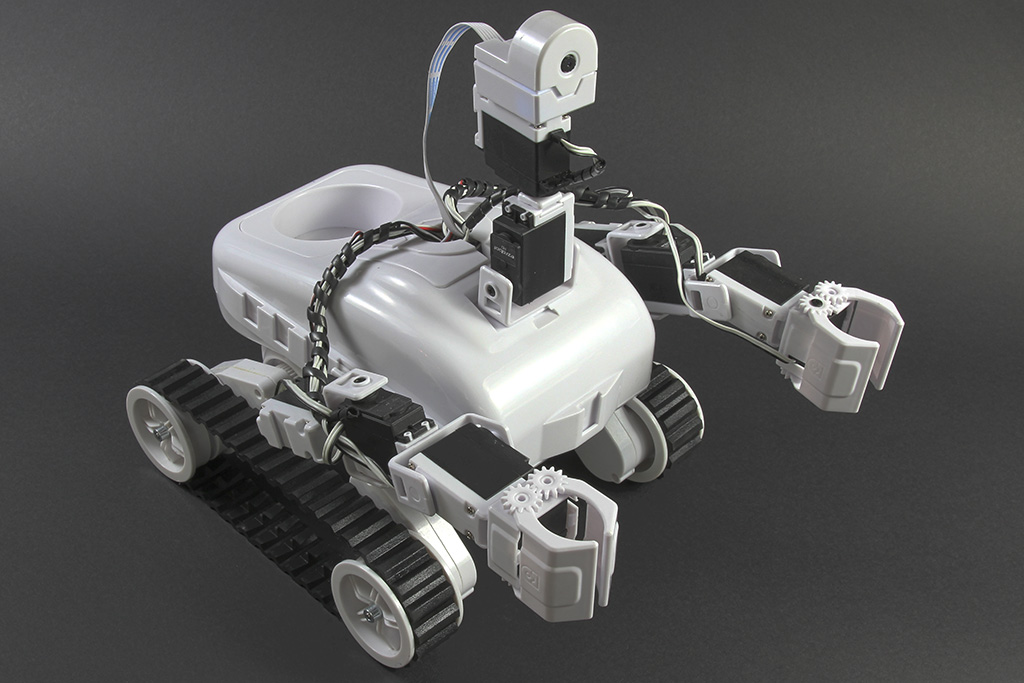
Roli Rover
by EZ-Robot
Roli WiFi planetary rover kit, customizable with 13 ez-bit ports for add-ons, built to traverse varied surfaces. Sold by EZ-Robot
Wi-Fi / USB
Servos
24
Camera
Audio
UART
3
I2C
ADC
8
Digital
24
Related Robot Skill (view all robot skills)

Exosphere
by Synthiam
Telepresence and remote control for any ARC-compatible robot from phone/tablet, combining AI and human operators to perform tasks and train autonomy
Requires ARC
v81

All robots using ARC are compatible with exosphere as long as there is a movement panel. Roli default project has a movement panel.
Yes - Roli Rover is compatible with Exosphere as long as it’s being controlled in ARC and the project includes a Movement Panel.
Since the default Roli Rover project already includes a movement panel, it can be used with Exosphere right away.
Typical setup
Project Add robot skill Machine Learning Exosphere
Important note
Exosphere works with any ARC robot project that has a Movement Panel - it’s not limited to a specific robot model. So if your Roli is already driving correctly in ARC, you’re in good shape.
Useful links
If you want, I can also walk you through the exact ARC steps to set up Roli Rover with Exosphere and camera streaming.