

PRO
RoboHappy
USA
Asked
Inverse Kinematics Guidance For Cybot3000
I have a question regarding the use of the Inverse Kinematics robot skill in Synthiam ARC. I've managed to create the general arm configuration based on the initial instructions, but I would like to know if there is a comprehensive video tutorial available, along with more detailed instructions on using this skill effectively.
For my setup, which is for the Cybot3000, I have both arms mounted in a downward position on each shoulder. Each arm consists of five servos using EZ-Robot HDD servos and grippers. I've configured them as follows:
Right Arm:
- v4 = Shoulder
- v5 = Arm
- v6 = Elbow
- v7 = Wrist
- v8 = Gripper
Left Arm:
- v11 = Shoulder
- v12 = Arm
- v13 = Elbow
- v14 = Wrist
- v15 = Gripper
Any guidance on using Inverse Kinematics with this configuration would be greatly appreciated.
Related Hardware (view all EZB hardware)

EZ-B V4
by EZ-Robot
EZ-B v4/2 robot controller: dual Cortex ARM, Wi-Fi, audio/video, 24 servo/digital ports, I2C/UART, camera and Synthiam ARC control for custom robots
Wi-Fi / USB
Servos
24
Camera
Audio
UART
3
I2C
ADC
8
Digital
24
Related Robot Skills (view all robot skills)

Camera Device
by Synthiam
Use PC or robot cameras for vision tracking: color, QR, glyph, face, object, motion; record video/data, control servos and movement, run scripts
Inverse Kinematic Arm
by Synthiam
Control robot arms with inverse and forward kinematics, converting X/Y/Z positions into joint motion and reporting end-effector location.
Requires ARC
v12

Thanks - good details. Below is a focused, practical guide for using the Inverse Kinematics (IK) Arm robot skill with your Cybot3000 shouldermounted arms (5 servos each). I also include configuration/checklist items, testing steps, sample JavaScript scripts you can paste into ARC, and follow-up questions so I can give more targeted help.
Helpful links
Quick summary for your hardware
Stepbystep configuration checklist (recommended order)
Add two instances of the IK skill (one per arm).
Open skill settings (kebab/hamburger menu - top right of the robot skill window).
Create joints in correct mechanical order (base end effector).
Configure workspace limits (Range Limits for X/Y/Z) to safely constrain the arm and avoid collisions.
Test and calibrate joint parameters:
Home/Initialization:
Fine tune:
Important notes about mounting / mirroring (shoulder on each side)
Testing procedure (safe order)
Example JavaScript snippets
Calibration tips & common pitfalls
Video tutorial availability
A few questions so I can help further (pick the ones you can answer)
Next steps I can provide
Would you like me to produce a ready-to-import Example Project with two IK skill instances and a startup script for Cybot3000? If yes, tell me:
I could not try any of the above script examples. When I go and paste them into JavaScript script window, ARC comes back saying these are created in Blocky. What is that?
A message with a meaning like that does not exist in the software, due to the inability to "paste blockly". Providing either a screenshot of the pop-up or the exact message is necessary to properly assist. Posting a screenshot is the easiest way to convey the error, so the phrasing of the exact message is clear.
Provide a screenshot and we'll be able to get you up and running
Fixed that issue. Found that my default editor was set for Blocky. I usually set it for ezscript. I tried a quick test,and was able to paste a file into a javascript from above.
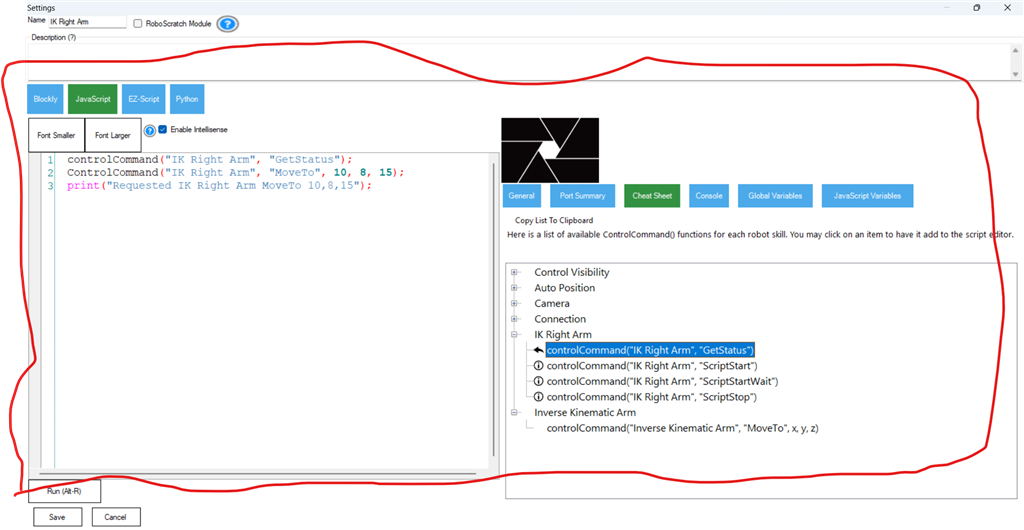
I just tried to run this test script from above to see what happens.....
This is what I got as an error.....why?
Am I missing something important make this run?
Thanks - good info. The error means ARC does not recognize the MoveTo ControlCommand for the specific skill instance name you used. That usually happens for one of these reasons:
Do these quick checks and fixes (step-by-step)
or, if your skill title really is "IK Right Arm":
If you still see the same error, please do one of the following (fastest to debug):
Once I can see the skill name or whether MoveTo appears in the Cheat Sheet, I’ll give the exact fix (or provide an alternate ControlCommand name if the skill version uses a different command).Would you like me to walk you through opening the Cheat Sheet and inserting the command step-by-step?
Ok,something is not right here. My test skill is titled "IK Right Arm". Is there yet another skill I am to create to put that in?
In the actual Inverse Kinematic Arm skill, there is nothing but the main configuration that says joints and settings, above that File, and a picture of the arm i created with joint info. In the main window it shows x,y,z cordinates. This skill is very confusing to me,thats why someone needs to create a detailed video on how use this exactly.
Good - you’re close. The error means ARC couldn’t find a ControlCommand named MoveTo for the control string you passed. That almost always comes down to one of three things:
Here’s a clear checklist and exact steps to find/fix it, plus a quick test script.
Note: the top of the skill window may show a slightly different text while the settings dialog is open; the Title in the Advanced/Configuration settings is the authoritative name used by ControlCommand().
Important script tips:
Extra help I can provide
Useful link
Which would you like to do next - paste a screenshot of your IK skill title/Advanced Title field, or shall I build a ready-to-import Example Project for your Cybot3000?