
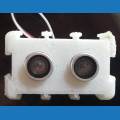


Hey guys, I made a version of the zune box I'm using for my robot in sketup and exported it to stl. When I import it it seems super small or incredibly zoomed away. It twice as wide and about 2.5 times as long as a servo so why does it seem small? Is it just the default camera angel. I designed it by measurements. Sketchup is pretty cool btw, once I got some basic things figured out I was able to make a viable item in about 30-45 min. I've never really messed with 3d programs much. Sure I've fired a few up but that was about it.
So anybody else try importing some stls yet? Is it just me?
Thanks for your input.
[EDIT] This is the plugin I used to export. https://www.guitar-list.com/download-software/convert-sketchup-skp-files-dxf-or-stl [/EDIT]

I've imported my ARC Reactor in to ARC and it seems around the correct size (I haven't actually checked). If JD's head is around 65mm diameter then it's the right size.
I hadn't really used sketchup until today, I was using AutoCAD and Inventor Fusion but I tried sketchup briefly today and was very surprised at it's ease of use and features. It's great considering it's free.
Yeah I liked it. I had to man up and figure out how to use AutoDesk Design123 (also free ) It was a little less intuitive but fortunatley the time I spent with SketchUp came in handy. 123 is quite a bit more of a resource hog but it exported and ezb imported it just fine. Not my first choice but it'll have to do.