


Hello, all. I really have not been on the site. Tell me please, what supports the latest version for my old EZ-B ver 3.1a model? Thanks a lot. Regards, Sergey

sergeyzn
Israel
Asked
— Edited
2 Participants

I believe the current version of ARC still does....
Latest version still supports older v3. Do not mix V3 and V4 EX-B's in the same project or you will have issues with servo position v3 has 100 positions, v4 has 180).
There are of course features that won't work that are V4 specific, but all of the V3 features still work at this time.
Alan
The problem is in newest version I see only Wi-Fi connection mode, not BT connection :-(
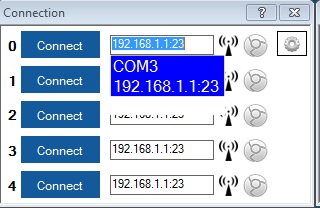
I found how to add a serial connection, but the connection fails.
In the EZ-B connection box, click on the default IP address, and select the com port of your EZ-B (after you have paired it to the computer via Bluetooth, it will make one or two com ports, it is typically the second one).
Thank you all, I was able to connect to my EZ-B with old version: 2013.03.18.00 In Connection Window under a setting button in my version I see "Refresh Port List" button. After clicking on it, I got the right port COM10. My robot come to life! :-)