

Abbott.davis716
USA
Asked

EZ-B V3 Serial Connection Issue
I'm trying to connect an EZ-B V3+ to ARC using a USB-to-TTL serial adapter. Details:
- Hardware: EZ-B V3+
- Connection method: USB-to-TTL (direct to PC) on COM8 - so the EZ-B is connected to the PC via the serial adapter (not via WiFi or a native EZ-B USB interface).
- Wiring: RX to RX and TX to TX (I also tried swapping RX/TX), ground is connected, 5V on the adapter is NOT connected.
- ARC: Using the Connection Panel, set to COM8. I press Connect, then plug the EZ-B board into power, but ARC reports that it is "not an EZ-B board."
- Troubleshooting I’ve tried: multiple baud rates, not using DTR or RTS, swapping RX/TX.
What am I missing?
Related Hardware (view all EZB hardware)
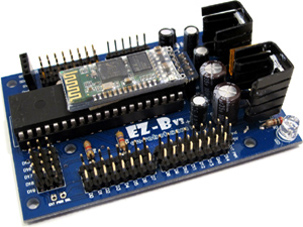
EZ-B V3
by EZ-Robot
EZ-B v3 Bluetooth robot controller supported by Synthiam ARC - features, specs and legacy connection tutorial
Bluetooth
Servos
24
Camera
Audio
UART
✕
I2C
ADC
8
Digital
24
Related Robot Skills (view all robot skills)

EZB Connection
by Synthiam
Connects EZ-B I/O controllers to ARC via COM or IP (5 connections). Supports init scripts, battery monitoring, TCP/EZ-Script server and serial/I2C.

Comm Expansion Configuration
by Synthiam
Configure EZ-B v4/2 Comm Expansion: switch between UART transparent proxy and USB direct PC link (avoids WiFi); EZ-B needs separate power.

It sounds like ARC is not talking to the EZ-B v3 the way it expects to.
A few important points for EZ-B v3 + ARC:
What’s likely wrong
1) The EZ-B v3 does not connect through a generic USB-to-TTL adapter
ARC expects the EZ-B v3 to be connected as a Bluetooth COM port. A USB-to-TTL adapter is not the normal connection path for this board, so ARC may see the serial port but still reject it as "not an EZ-B board."
The supported connection method for v3 is described here:
2) RX-to-RX / TX-to-TX is usually incorrect for serial
For normal serial communication, the lines are typically:
You said you tried swapping them, which is good, but if the adapter is just a TTL bridge, the board still may not be recognized by ARC as an EZ-B v3.
3) Powering the board after clicking Connect can cause detection failure
ARC usually expects the board to already be powered and ready before connection, especially for legacy serial hardware. Power the EZ-B first, then connect in ARC.
Most likely solution
For an EZ-B v3, the best path is:
If you haven’t already, use the connection skill’s menu to configure it:
If you must use serial
If this is some special hardware bridge setup, then I’d want to confirm:
Best next step
Since this is an EZ-B v3, I’d strongly recommend trying the Bluetooth COM port method first, because that’s the connection type ARC expects for this hardware.
If you want, I can help you step-by-step check: