derrick
USA
Asked
— Edited
Cant Use Personality Genrator Script?
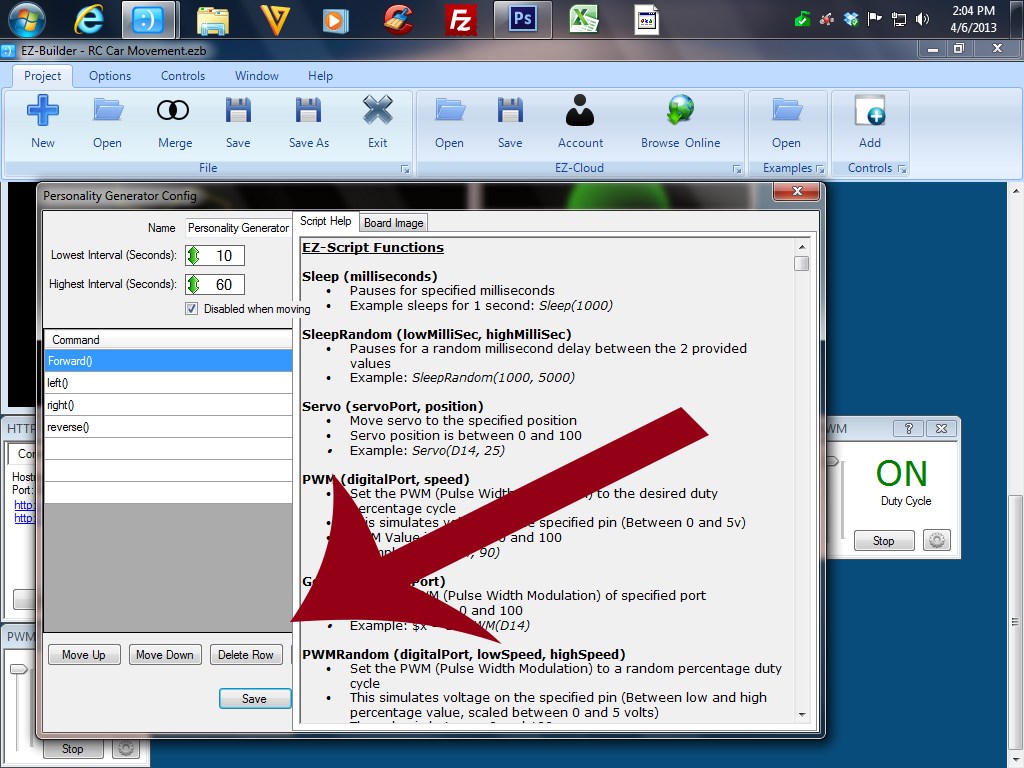
hello, when I go to use the personality script generator a lot of the boxes and fields are hidden. you can see one hiding alittle, im using windows 7 with the latest updates..is it just me or am I missing something?

Where the tip of that arrow is if you hover the mouse the pointer should change, click and drag right to make the script side bigger and the help side smaller. Or resize the dialogue window.
Edit: No that doesn't work... DJ?
Edit 2: A work around - After each line press return and a new one is inserted after. The missing boxes are insert and append, which appear to do the same thing. You can click on the lines to edit the commands.
should there be a start button here?....I think on the last update to the software he probably hid the fields on accident. if dJ is using visual basics....lol
No, as long as it isn't paused (and it isn't set to only work when not moving, or if it's not moving if that option is enabled) it will be running.
And FYI, my settings for personality generator are all shown, which indicates a resolution issue.
ok I see, this is the first time using this personality script... thanks for the help
ok, i'll check my screen resolution.... thank you
edit: you were right, the screen resolution was low... that did the trick!