

Good afternoon everyone, I would like to know how do I work the command of Voice in Portuguese,? I've tried everything but Robot only speaks Engles

Nemdez
Brazil
Asked
1 Participant
Brazilian Speech Recognition
Related Hardware (view all EZB hardware)

EZ-B V4
by EZ-Robot
EZ-B v4 with Synthiam ARCx controls servos, sensors, camera and audio over Wi-Fi or USB serial, no firmware needed.
Wi-Fi / USB
Servos
24
Camera
Audio
UART
3
I2C
ADC
8
Digital
24
Related Robot Skill (view all robot skills)

Speech Recognition
by Synthiam
Windows Speech Recognition skill: detect custom phrases via PC mic, trigger configurable scripts/actions with adjustable confidence.

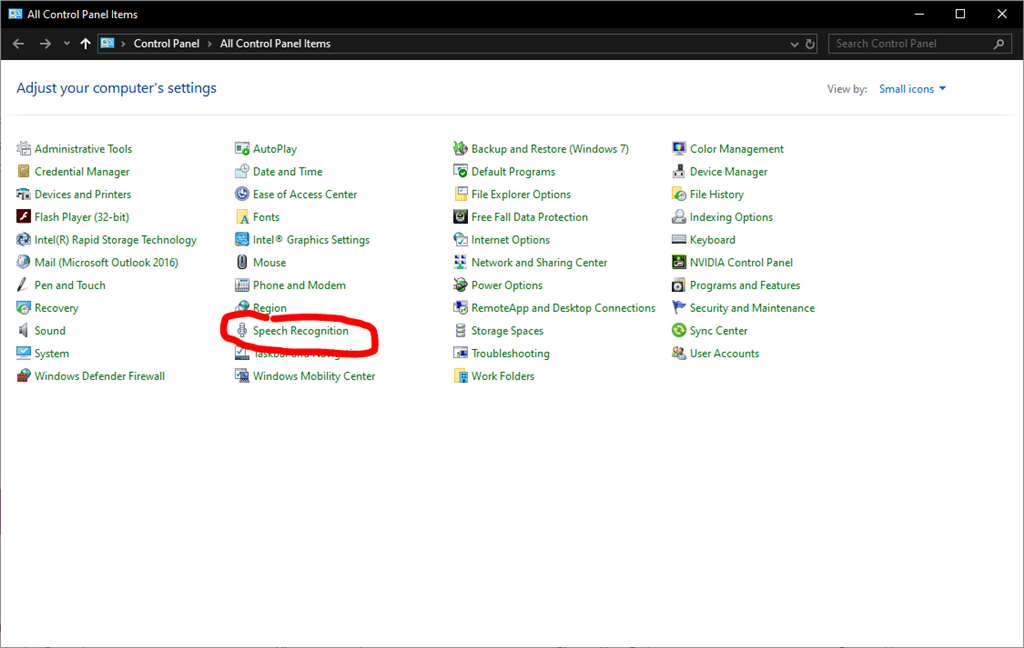
For both speech recognition and speech synthesis to use a language, install the language and select it. The language is installed via windows language settings. If your computer has the language installed, you can select it from the windows speech recognition and speech synthesis settings. The settings can be found in the control panel - and for speech recognition selected in the appropriate control configuration in ARC.
Here's more help from Microsoft regarding Windows speech recognition languages: https://support.office.com/en-us/article/how-to-download-text-to-speech-languages-for-windows-10-d5a6b612-b3ae-423f-afa5-4f6caf1ec5d3
*Note: You had selected "Artificial Intelligence -> Dialog Flow" as the control connected to this question. We edited the question and connected it to "Audio -> Speech recognition".
For help on a control, press the ? (question mark) next to the X (close) on the control to read how to use it.