

hello robo
USA
Asked
 Resolved by ptp!
Arcpi / Ezbpi On Raspberry Pi 3 Errors
Hello,
I am trying to run ARCPi and EZBPi on a Raspberry Pi 3. I have tried installing them on two different versions of Raspbian, the latest release and the 11/13/18 (stretch) version, which was released closer to "DJ's 9th Live Hack" (I have been following that YouTube tutorial). When I execute ARCPi, I get the following error before ARC launches:
pi@raspberrypi:~/EZ-BuilderPi $ mono ARC.exe
Unknown heap type: #GUlD

Unknown heap type: #Blop

Unknown heap type: #GUlD

Unknown heap type: #Blop

The help viewer could not load. Maybe you don't have chmsee installed or haven't set MONO_HELP_VIEWER. The specific error message was: ApplicationName='chmsee', CommandLine='"https://synthiam.com/Software"';, CurrentDirectory='', Native error= Cannot find the specified file
X11 Error encountered:
  Error: BadMatch (invalid parameter attributes)
  Request:     12 (0)
  Resource ID: 0x1C013B8
  Serial:      48245
  Hwnd:        Hwnd, Mapped:True ClientWindow:0x1C013B9, WholeWindow:0x1C013B8, Zombie=False, Parent:[Hwnd, Mapped:True ClientWindow:0x1C013B7, WholeWindow:0x1C013B6, Zombie=False, Parent:[]]
  Control:     System.Windows.Forms.Panel, BorderStyle: None  at System.Environment.get_StackTrace () [0x00000] in <8f2c484307284b51944a1a13a14c0266>:0
  at System.Windows.Forms.XplatUIX11.HandleError (System.IntPtr display, System.Windows.Forms.XErrorEvent& error_event) [0x00000] in :0
  at System.Drawing.GDIPlus.GdipCreateFromXDrawable_linux (System.IntPtr , System.IntPtr , System.IntPtr& ) [0x00000] in <1917aa1c39d94b1a91807b8cd9f03350>:0
  at System.Drawing.Graphics.FromXDrawable (System.IntPtr drawable, System.IntPtr display) [0x00000] in <1917aa1c39d94b1a91807b8cd9f03350>:0
  at System.Drawing.Graphics.FromHwnd (System.IntPtr hwnd) [0x00000] in <1917aa1c39d94b1a91807b8cd9f03350>:0
  at System.Windows.Forms.Control.CreateGraphics () [0x00000] in :0
  at System.Windows.Forms.TextBoxBase.CreateGraphicsInternal () [0x00000] in :0
  at System.Windows.Forms.Document.owner_VisibleChanged (System.Object sender, System.EventArgs e) [0x00000] in :0
  at System.Windows.Forms.Control.OnVisibleChanged (System.EventArgs e) [0x00000] in :0
  at System.Windows.Forms.Control.OnParentVisibleChanged (System.EventArgs e) [0x00000] in :0
Once ARC launches, if I try to open a previously saved project, a window pops up with a similar message:
Version: 2019.05.08.00

System.IO.DirectoryNotFoundException: Directory 'EZ-Builder/Examples' not found.
  at System.IO.Directory.ValidateDirectoryListing (System.String path, System.String searchPattern, System.Boolean& stop) [0x00091] in <8f2c484307284b51944a1a13a14c0266>:0
  at System.IO.Directory.GetFileSystemEntries (System.String path, System.String searchPattern, System.IO.FileAttributes mask, System.IO.FileAttributes attrs) [0x00023] in <8f2c484307284b51944a1a13a14c0266>:0
  at System.IO.Directory.GetDirectories (System.String path, System.String searchPattern) [0x00000] in <8f2c484307284b51944a1a13a14c0266>:0
  at System.IO.Directory.GetDirectories (System.String path) [0x00000] in <8f2c484307284b51944a1a13a14c0266>:0
  at EZ_Builder.FormOpenEZB.XtZsj07xQ5 () [0x0000b] in <8a9b654daa5e46dc9cae530155c2d0ff>:0
  at EZ_Builder.FormOpenEZB..ctor (System.String folder) [0x0002d] in <8a9b654daa5e46dc9cae530155c2d0ff>:0
  at (wrapper remoting-invoke-with-check) EZ_Builder.FormOpenEZB:.ctor (string)
  at EZ_Builder.FormMain.MenuClick_Open (System.Object sender, System.EventArgs e) [0x00027] in <8a9b654daa5e46dc9cae530155c2d0ff>:0
  at (wrapper delegate-invoke) :invoke_void_object_EventArgs (object,System.EventArgs)
  at System.Windows.Forms.RibbonItem.OnClick (System.EventArgs e) [0x00042] in <8137470ea8f14440974ce9168ccc636e>:0
  at System.Windows.Forms.RibbonButton.OnClick (System.EventArgs e) [0x0003f] in <8137470ea8f14440974ce9168ccc636e>:0
  at System.Windows.Forms.RibbonMouseSensor.Control_MouseClick (System.Object sender, System.Windows.Forms.MouseEventArgs e) [0x00041] in <8137470ea8f14440974ce9168ccc636e>:0
  at System.Windows.Forms.Control.OnMouseClick (System.Windows.Forms.MouseEventArgs e) [0x0001c] in :0
  at System.Windows.Forms.Control.HandleClick (System.Int32 clicks, System.Windows.Forms.MouseEventArgs me) [0x0005d] in :0
  at System.Windows.Forms.Control.WmLButtonUp (System.Windows.Forms.Message& m) [0x00071] in :0
  at System.Windows.Forms.Control.WndProc (System.Windows.Forms.Message& m) [0x0016f] in :0
  at System.Windows.Forms.Ribbon.WndProc (System.Windows.Forms.Message& m) [0x00191] in <8137470ea8f14440974ce9168ccc636e>:0
  at System.Windows.Forms.Control+ControlWindowTarget.OnMessage (System.Windows.Forms.Message& m) [0x00000] in :0
  at System.Windows.Forms.Control+ControlNativeWindow.WndProc (System.Windows.Forms.Message& m) [0x0000b] in :0
  at System.Windows.Forms.NativeWindow.WndProc (System.IntPtr hWnd, System.Windows.Forms.Msg msg, System.IntPtr wParam, System.IntPtr lParam) [0x0008e] in :0
I searched Synthiam Community for a similar thread, so forgive me if this issue has been addressed in a previous post and I missed it. I am happy to answer any questions. Does anyone know what I could have done wrong during the installation?
Thanks Tim
Related Hardware (view all EZB hardware)
Raspberry Pi
by Pi Foundation
Run Synthiam ARC on Raspberry Pi 4+ with Windows 11 for robot control; use external EZB/Arduino for reliable I/O, SSD/USB storage recommended
Wi-Fi
Servos
✕
Camera
Audio
UART
✕
I2C
ADC
✕
Digital
✕

I've read up briefly up the thread. Why can you not set the Dynamixel plugin in ARC to 1m bits for baud rate? Is there a reason you want to change the baud rate to something other than 1M? I set all my dynamixels at 1M.
I have many different versions of the Dynamixels and some work and some don't with ARC. I have two servos worth $600 that refuse to work. I've had best results with the MX series. Dj found the night of that hack, that they have different protocols for different series of servos (MX, XM,XL, etc)...which is a really bad idea from a company standpoint. ARC supports 3 protocols.....but its obvious there are more needed to cover their entire line of servos. Many servos are now discontinued and will be gone with stock including the AX-12. New series of servos are now in preorder.
So what will the new servos have as far as protocol?! Only testing will tell.
EDIT: OK I see you are using the IOTINY. so you have to change the baud rate.
Check to see that your port number matches the port on the iotiny when programming the servos id and baud using the plug in configuration.
I totally agree, those servos are great but they are super annoying to deal with...
So far I had the best luck using the Robotis OpenCM IDE, because on Arduino IDE the Examples also need tweaking to some extend, while the Robotis Software works pretty straightforward...
But one thing that is to be taken into account, you will always have to have some sort of a microcontroller for sending and receiving data from those servos.. eg an EZB, OpenCM or something similar! The Raspberry Pi and its GPIOs are not made for this!
Hello fxrtst,
Thank you for your input. I agree with your statements about the different protocols. Robotis makes excellent servos, but I find them challenging to work with... I can say that their support is responsive... I am using the IoTiny because my other EZ-B v4 boards are in other robots. I may order another board or "borrow" one from a different robot.
Also, I will go back and double check the port number.
Hey Mickey666Maus, Yes, it's increasingly beginning to look that way. In post #55, ptp suggested that I use a U2D2, found here:
https://www.trossenrobotics.com/dynamixel-u2d2.aspx
I ordered one and should have it by Thursday or Friday. It would even be great if I could get the EZ-B IoTiny to work. It is small enough to be mounted inside of the MAKI robot (the EZ-B v4 is a bit too large), but I still want to use the Google AIY voice kit for speech...
Also, here is the latest response from Robotis (spoiler, they also suggest the U2D2):
Hi Tim, Thanks for providing the additional information. Based on what you shared here's what we believe is causing this:
1)The first thing that stands out is that the OpenCM9.04 isn't fully supported on the DYNAMIXEL Wizard 2.0.
Normally other ROBOTIS software allows users to interact with the OpenCM9.04, However because the software is unable to see the OpenCM9.04 you are unable to make necessary changes to a firmware in the OpenCM9.04.
In the OpenCM9.04 firmware Address 12 sets the DXL Baud Rate which determines what baud rate the OpenCM9.04 uses to look for DYNAMIXELs. Because you are unable to change the baud rate in the OpenCM9.04 firmware the software is unable to change the baud rate DYNAMIXELs.
The U2D2 is ROBOTIS' recommend Interface device for the DYNAMIXEL Wizard 2.0
2)Using R+ Manager 2.0 will allow you to make these changes using the OpenCM9.04.
Hey there, I never checked the price tag on those servos! Did you say you ordered 90 OF THOSE???
Well, if so...or even if you are just using a few of them, I can totally understand that you need to get them to work!!
I would suggest we are going step by step, with the hardware at hand!!
So could you confirm, that your servos are working with the example code provided by Robotis for the OpenCM board! Please use the Robotis software to upload, the code will not work with the Arduino IDE...
So we can confirm, that you are able to drive those servos, the way that Robotis wants us to drive them!!
/* Dynamixel Basic Position Control Example
Turns left the dynamixel , then turn right for one second, repeatedly.
CM900 O OpenCM9.04 O
CM900 O O O O X OpenCM9.04 O O O O X **** OpenCM 485 EXP board is needed to use 4 pin Dynamixel and Pro Series ****
created 16 Nov 2012 by ROBOTIS CO,.LTD. / / Serial device defines for dxl bus / #define DXL_BUS_SERIAL1 1 //Dynamixel on Serial1(USART1) <-OpenCM9.04 #define DXL_BUS_SERIAL2 2 //Dynamixel on Serial2(USART2) <-LN101,BT210 #define DXL_BUS_SERIAL3 3 //Dynamixel on Serial3(USART3) <-OpenCM 485EXP / Dynamixel ID defines / #define ID_NUM 1 / Control table defines */ #define GOAL_POSITION 30
Dynamixel Dxl(DXL_BUS_SERIAL1);
void setup() {
// Dynamixel 2.0 Baudrate -> 0: 9600, 1: 57600, 2: 115200, 3: 1Mbps Dxl.begin(3); Dxl.jointMode(ID_NUM); //jointMode() is to use position mode }
void loop() {
//Turn dynamixel ID 1 to position 0
Dxl.writeWord(ID_NUM, GOAL_POSITION, 0); //Compatible with all dynamixel serise // Wait for 1 second (1000 milliseconds) delay(1000);
//Turn dynamixel ID 1 to position 300 Dxl.writeWord(ID_NUM, GOAL_POSITION, 300); // Wait for 1 second (1000 milliseconds) delay(1000);
}
Hey Mickey666Maus,
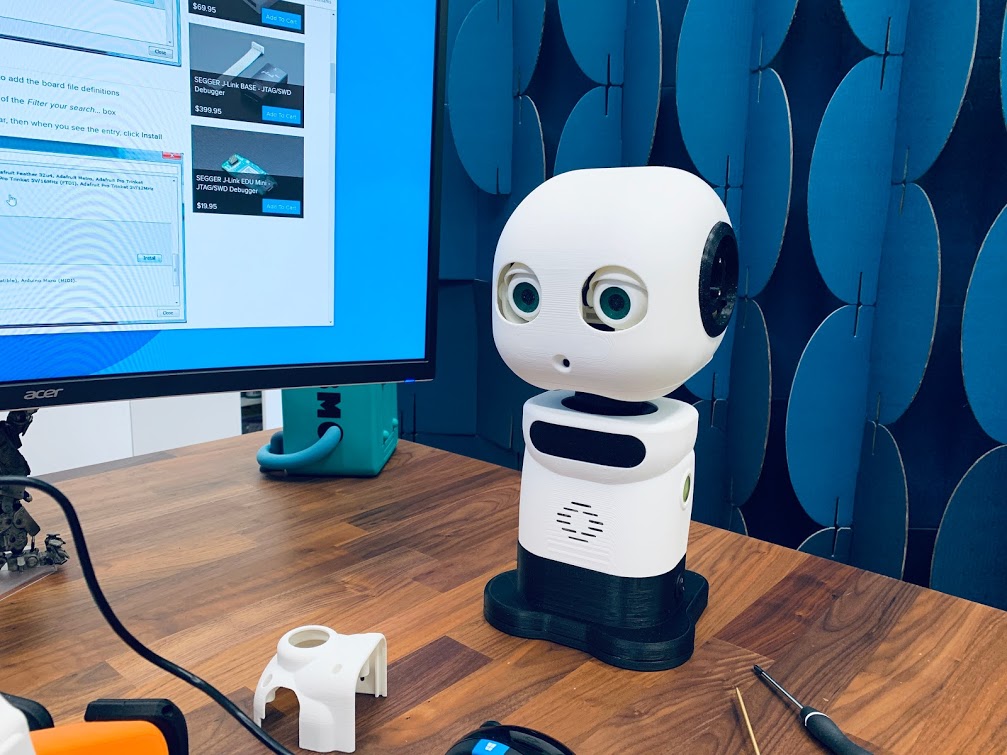
Yes, I am invested in getting these servos to work Also, here is an image of those robots assembled:
I forget my power supply at my shop yesterday, but I grabbed it this morning. I will test the example code after lunch. I also received the U2D2 yesterday, so I will test that as well. Lastly, if I have time today I would like to install EZBPi server onto an OpenCM9.04 and test that.
Thanks again for everyone's help.
hi that looks awesome.are there more pics of front and back from the robots you make.