
hello robo
USA
Asked
 Resolved by ptp!
Arcpi / Ezbpi On Raspberry Pi 3 Errors
Hello,
I am trying to run ARCPi and EZBPi on a Raspberry Pi 3. I have tried installing them on two different versions of Raspbian, the latest release and the 11/13/18 (stretch) version, which was released closer to "DJ's 9th Live Hack" (I have been following that YouTube tutorial). When I execute ARCPi, I get the following error before ARC launches:
pi@raspberrypi:~/EZ-BuilderPi $ mono ARC.exe
Unknown heap type: #GUlD

Unknown heap type: #Blop

Unknown heap type: #GUlD

Unknown heap type: #Blop

The help viewer could not load. Maybe you don't have chmsee installed or haven't set MONO_HELP_VIEWER. The specific error message was: ApplicationName='chmsee', CommandLine='"https://synthiam.com/Software"';, CurrentDirectory='', Native error= Cannot find the specified file
X11 Error encountered:
  Error: BadMatch (invalid parameter attributes)
  Request:     12 (0)
  Resource ID: 0x1C013B8
  Serial:      48245
  Hwnd:        Hwnd, Mapped:True ClientWindow:0x1C013B9, WholeWindow:0x1C013B8, Zombie=False, Parent:[Hwnd, Mapped:True ClientWindow:0x1C013B7, WholeWindow:0x1C013B6, Zombie=False, Parent:[]]
  Control:     System.Windows.Forms.Panel, BorderStyle: None  at System.Environment.get_StackTrace () [0x00000] in <8f2c484307284b51944a1a13a14c0266>:0
  at System.Windows.Forms.XplatUIX11.HandleError (System.IntPtr display, System.Windows.Forms.XErrorEvent& error_event) [0x00000] in :0
  at System.Drawing.GDIPlus.GdipCreateFromXDrawable_linux (System.IntPtr , System.IntPtr , System.IntPtr& ) [0x00000] in <1917aa1c39d94b1a91807b8cd9f03350>:0
  at System.Drawing.Graphics.FromXDrawable (System.IntPtr drawable, System.IntPtr display) [0x00000] in <1917aa1c39d94b1a91807b8cd9f03350>:0
  at System.Drawing.Graphics.FromHwnd (System.IntPtr hwnd) [0x00000] in <1917aa1c39d94b1a91807b8cd9f03350>:0
  at System.Windows.Forms.Control.CreateGraphics () [0x00000] in :0
  at System.Windows.Forms.TextBoxBase.CreateGraphicsInternal () [0x00000] in :0
  at System.Windows.Forms.Document.owner_VisibleChanged (System.Object sender, System.EventArgs e) [0x00000] in :0
  at System.Windows.Forms.Control.OnVisibleChanged (System.EventArgs e) [0x00000] in :0
  at System.Windows.Forms.Control.OnParentVisibleChanged (System.EventArgs e) [0x00000] in :0
Once ARC launches, if I try to open a previously saved project, a window pops up with a similar message:
Version: 2019.05.08.00

System.IO.DirectoryNotFoundException: Directory 'EZ-Builder/Examples' not found.
  at System.IO.Directory.ValidateDirectoryListing (System.String path, System.String searchPattern, System.Boolean& stop) [0x00091] in <8f2c484307284b51944a1a13a14c0266>:0
  at System.IO.Directory.GetFileSystemEntries (System.String path, System.String searchPattern, System.IO.FileAttributes mask, System.IO.FileAttributes attrs) [0x00023] in <8f2c484307284b51944a1a13a14c0266>:0
  at System.IO.Directory.GetDirectories (System.String path, System.String searchPattern) [0x00000] in <8f2c484307284b51944a1a13a14c0266>:0
  at System.IO.Directory.GetDirectories (System.String path) [0x00000] in <8f2c484307284b51944a1a13a14c0266>:0
  at EZ_Builder.FormOpenEZB.XtZsj07xQ5 () [0x0000b] in <8a9b654daa5e46dc9cae530155c2d0ff>:0
  at EZ_Builder.FormOpenEZB..ctor (System.String folder) [0x0002d] in <8a9b654daa5e46dc9cae530155c2d0ff>:0
  at (wrapper remoting-invoke-with-check) EZ_Builder.FormOpenEZB:.ctor (string)
  at EZ_Builder.FormMain.MenuClick_Open (System.Object sender, System.EventArgs e) [0x00027] in <8a9b654daa5e46dc9cae530155c2d0ff>:0
  at (wrapper delegate-invoke) :invoke_void_object_EventArgs (object,System.EventArgs)
  at System.Windows.Forms.RibbonItem.OnClick (System.EventArgs e) [0x00042] in <8137470ea8f14440974ce9168ccc636e>:0
  at System.Windows.Forms.RibbonButton.OnClick (System.EventArgs e) [0x0003f] in <8137470ea8f14440974ce9168ccc636e>:0
  at System.Windows.Forms.RibbonMouseSensor.Control_MouseClick (System.Object sender, System.Windows.Forms.MouseEventArgs e) [0x00041] in <8137470ea8f14440974ce9168ccc636e>:0
  at System.Windows.Forms.Control.OnMouseClick (System.Windows.Forms.MouseEventArgs e) [0x0001c] in :0
  at System.Windows.Forms.Control.HandleClick (System.Int32 clicks, System.Windows.Forms.MouseEventArgs me) [0x0005d] in :0
  at System.Windows.Forms.Control.WmLButtonUp (System.Windows.Forms.Message& m) [0x00071] in :0
  at System.Windows.Forms.Control.WndProc (System.Windows.Forms.Message& m) [0x0016f] in :0
  at System.Windows.Forms.Ribbon.WndProc (System.Windows.Forms.Message& m) [0x00191] in <8137470ea8f14440974ce9168ccc636e>:0
  at System.Windows.Forms.Control+ControlWindowTarget.OnMessage (System.Windows.Forms.Message& m) [0x00000] in :0
  at System.Windows.Forms.Control+ControlNativeWindow.WndProc (System.Windows.Forms.Message& m) [0x0000b] in :0
  at System.Windows.Forms.NativeWindow.WndProc (System.IntPtr hWnd, System.Windows.Forms.Msg msg, System.IntPtr wParam, System.IntPtr lParam) [0x0008e] in :0
I searched Synthiam Community for a similar thread, so forgive me if this issue has been addressed in a previous post and I missed it. I am happy to answer any questions. Does anyone know what I could have done wrong during the installation?
Thanks Tim
Related Hardware (view all EZB hardware)
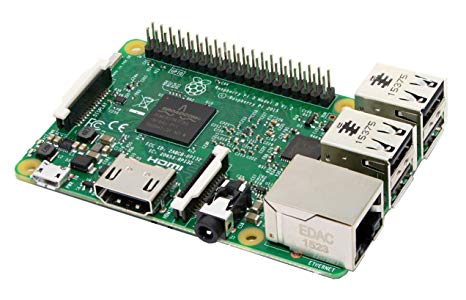
Raspberry Pi
by Pi Foundation
Run Synthiam ARC on Raspberry Pi 4+ with Windows 11 for robot control; use external EZB/Arduino for reliable I/O, SSD/USB storage recommended
Wi-Fi
Servos
✕
Camera
Audio
UART
✕
I2C
ADC
✕
Digital
✕

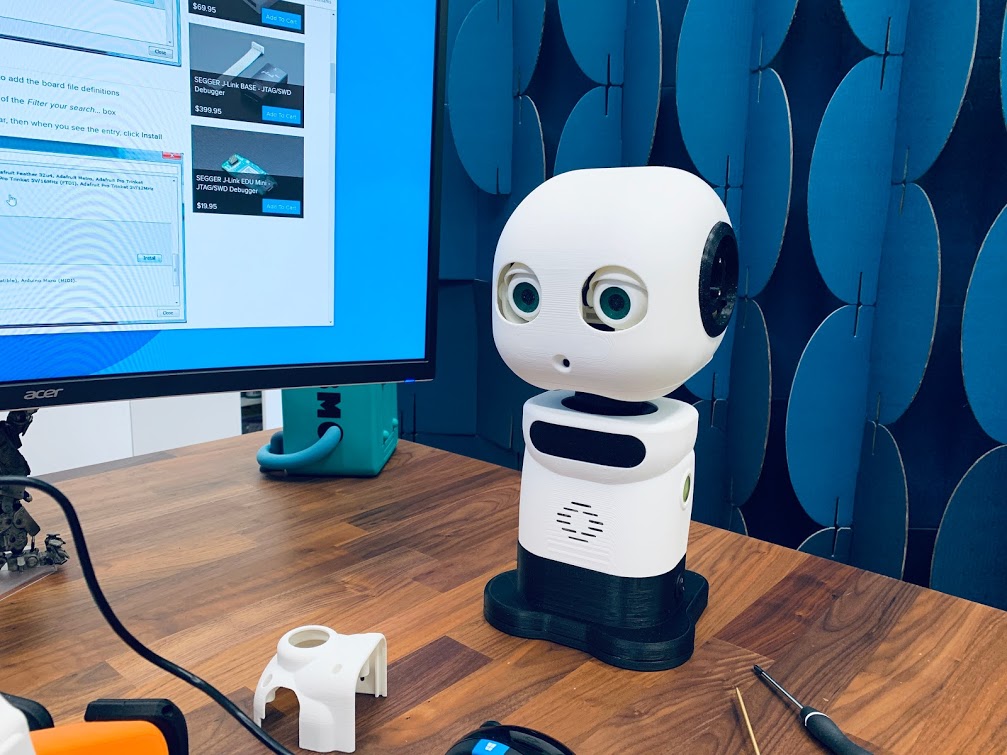
Thank you Nomad 6R, here are some additional photos:
o wow that looks awesome.great colors to.i cant wait to see them in action.
Sweet, you own your private little robot army now!!
And yes the EZBPi server on the OpenCM would be the best option if you want a smooth ARC integration...I am sure that @DjSures will also update the plugin code, if you are having trouble to get those servos working!!
Let us know, how things are evolving!!
Btw, whats that power supply that you are using...and I am curious about that screen too!!
I wish that I could have kept my little "army" of MAKI’s (or even just one), but they were all built to order. The robots currently have ROS installed; however, I would love to help them run ARC on the Pi’s instead.
Here is a link for the power supply (Coolmax I-400): https://www.coolmaxusa.com/productDetailsPower.asp?item=I-400&details=overview&subcategory=80mm&category=single Here is a link for the touchscreen display: https://www.waveshare.com/7inch-hdmi-lcd-c.htm
Oh, but that's cool too right?
Seems like there are already a lot of people interested in your robot!! ARC has a nice, and easy to use GUI...so it should get a lot easier for anyone to get started with MAKI!!
I experienced that ARC is a bit slow when running on the Raspberry Pi, but I also only tried it on the 3B... The new Pi should have more than enough juice to run the software I guess!
Thanks to everyone who commented on this thread, your input was very useful. Special thanks to ptp who helped me offline solve this issue. I can now run EZBPi on my Raspberry Pi 3 B+ as well as control Dynamixel servos (XL430's) using the Dynamixel plugin (ARC is running on my Windows laptop). This is thanks to ptp's version of EZBPi server, EZB Server (BlueBerry Server).
In addition to the Raspberry Pi 3 B+, I am also using an OpenCM9.04 connected to the Pi via USB. The XL430 servos have a default baud rate of 1 Mbps, so I made sure that the DXL baud rate was also set to 1 Mbps on the OpenCM9.04. I am powering the OpenCM9.04 board directly from a 12v power supply. If you are using an OpenCM 485 Expansion Board, be sure to change the channel to 1, otherwise leave it set to the default which is 0.
To install EZB Server (BlueBerry Server), follow ptp's setup instructions; in addition, you will also have to follow these instructions (also provided by ptp) if you are using an OpenCM9.04:
run those 4 lines:
after connecting the opencm you can confirm is available:
you should see the serial device: /dev/ttyACM0
the last command updates your local repository
4.1 help with the options:
4.2 use opencm as serial ARC uart0 :
*or
4.3. use opencm and picamera
*Other notes:
When using XL430 servos, in the Dynamixel plugin settings, set the baud rate to 1000000 (unless you have changed the default setting) and use UART Port #0. When moving the servos to different positions, the movement was very "jerky" until I increased the number of Steps.
This is a great first step and I am happy that I am able to run EZBPi server on a Raspberry Pi, but ultimately I would like to run ARC on the Pi as well. I will update this post once I am able to run ARC on the Pi with this version of EZB Server. Once I get "most" of the bugs worked out, I will also let you know when the STL files will be available for download (if you are interested in building your own MAKI) I need to solve the interpolation issue which I am experiencing. Right now I am not able to slow the movements of the servos. I will try playing with the Delay/Step settings more, as well as changing the Global Max servo Positions from 180 to 4095...
*Please let me know if anyone has any input on this issue.
There is also just a bit of delay in the RPI camera feed. I am hoping that once I am able to run both EZB Server and ARC on the same Pi, that delay will be reduced.
Thanks again everyone
Nice update...good to see you are making progress on setting up your robot!!