

I've got the latest ARC and i'm working with windows 8.1. After adding the MYO plug-in or the monitor plug in, the system suddely stops working. Al the other works just fine...
DigiEddy
Belgium
Asked
— Edited
1 Participant

What is a "monitor plugin"?
MYO does not have a plugin, there is a user control, which you can find here: https://synthiam.com/Tutorials/Help.aspx?id=206
MYO is not an ez-robot hardware device. If you provide an error or additional information that is presented when ARC "stopped working", perhaps i can take a peek and see what's up
Hi DJ,
Tnx for the info.
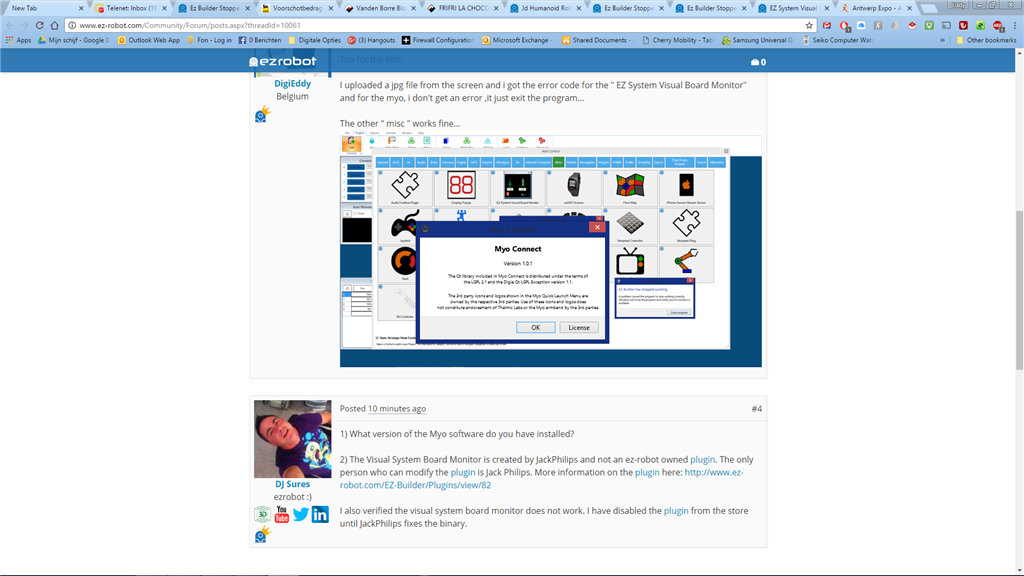
I uploaded a jpg file from the screen and i got the error code for the " EZ System Visual Board Monitor" and for the myo, i don't get an error ,it just exit the program...
The other " misc " works fine...
What version of the Myo software do you have installed?
The Visual System Board Monitor is created by JackPhilips and not an ez-robot owned plugin. The only person who can modify the plugin is Jack Philips. More information on the plugin here: https://synthiam.com/redirect/legacy?table=plugin&id=82
I also verified the visual system board monitor does not work. I have disabled the plugin from the store until JackPhilips fixes the binary.
version 1.0.1 it's from oktober 2014
ok, we wait for that one
Thanks very much, DJ