

Asked
— Edited
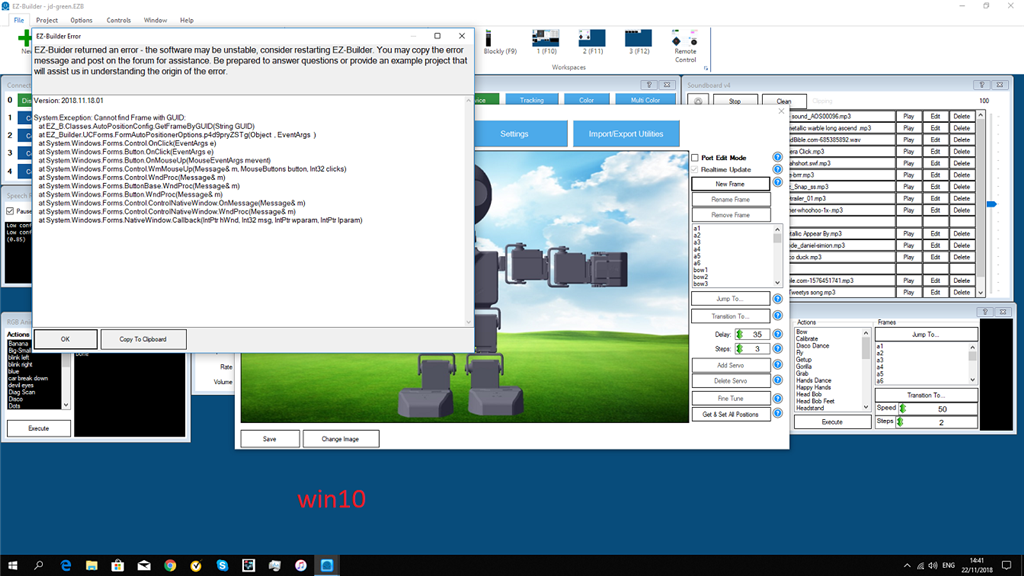
Error When Trying To Make Motions
when trying to make poses i get an error.i delete the old version and downloaded, the latest version.still same error.
 Joystick (Direct Input)
— DirectInput joystick control for ARC: drive movement panels, control servos, assign button scripts, variable speed and rumble feedback.
Try it →
Joystick (Direct Input)
— DirectInput joystick control for ARC: drive movement panels, control servos, assign button scripts, variable speed and rumble feedback.
Try it →
when trying to make poses i get an error.i delete the old version and downloaded, the latest version.still same error.

You need to have a frame you've already created selected, then click on the New Frame. This is a good thing, in the past if you just clicked a New Frame without having a previously created frame selected, all your servos would come up at 90 degrees. I found that out the hard way.
Bhouston
many thanks,it works.sorry to hear you found out the hard way. my first bioloid i broke 10 servo in one download.so iknow the feeling.
thanks
Maybe a warning with some direction could be put there instead of the error message.
yes some direction what to do.but now there is this topic.