



Feetech Servo Update Issue
Hello support team,
I'm encountering significant issues with the Feetech RS485 servo Skill update after upgrading to ARC version 2026.02.19.01.
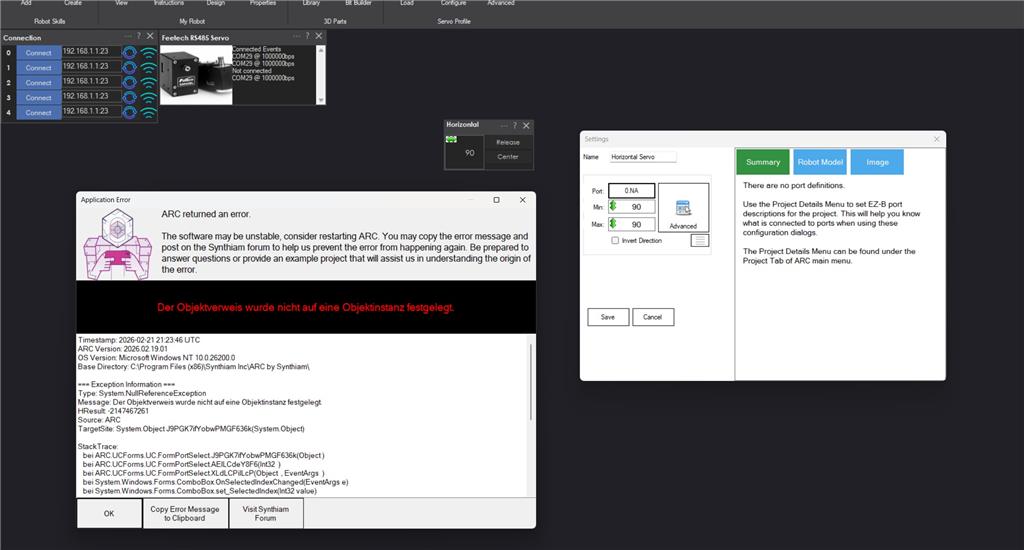
I have two robots equipped with a total of 38 Feetech servos, model STS32125-12V. After updating, none of these servos are functioning. To troubleshoot, I ran a test with a single servo, #1, connected to COM port 29. However, assigning the address is proving impossible. Please refer to the attached screenshot.
I am seeking a way to revert the update to get everything operational again, or if there is an alternative solution available, I would appreciate your guidance.
Thank you very much.
Error message:
Timestamp: 2026-02-21 21:14:05 UTC
ARC Version: 2026.02.19.01
OS Version: Microsoft Windows NT 10.0.26200.0
Base Directory: C:\Program Files (x86)\Synthiam Inc\ARC by Synthiam\
=== Exception Information ===
Type: System.NullReferenceException
Message: Object reference not set to an instance of an object.
HResult: -2147467261
Source: ARC
TargetSite: System.Object J9PGK7ifYobwPMGF636k(System.Object)
StackTrace:
at ARC.UCForms.UC.FormPortSelect.J9PGK7ifYobwPMGF636k(Object )
at ARC.UCForms.UC.FormPortSelect.AElLCdeY8F6(Int32 )
at ARC.UCForms.UC.FormPortSelect.XLdLCPiILcP(Object , EventArgs )
at System.Windows.Forms.ComboBox.OnSelectedIndexChanged(EventArgs e)
at System.Windows.Forms.ComboBox.set_SelectedIndex(Int32 value)
at System.Windows.Forms.ComboBox.set_SelectedItem(Object value)
at ARC.UCForms.UC.FormPortSelect.PgnoNfivILWH6QLQuwNl(Object , Object )
at ARC.UCForms.UC.FormPortSelect.JOvLCxoVcnv(Int32 )
at ARC.UCForms.UC.FormPortSelect.SetConfig(ServoDescriptor servo)
at ARC.UCForms.UC.UCPortButton.pgh4CYiE6NEaCcucFRjN(Object , Object )
at ARC.UCForms.UC.UCPortButton.OnClick(EventArgs e)
at System.Windows.Forms.Button.OnMouseUp(MouseEventArgs mevent)
at System.Windows.Forms.Control.WmMouseUp(Message& m, MouseButtons button, Int32 clicks)
at System.Windows.Forms.Control.WndProc(Message& m)
at System.Windows.Forms.ButtonBase.WndProc(Message& m)
at System.Windows.Forms.Button.WndProc(Message& m)
at System.Windows.Forms.Control.ControlNativeWindow.OnMessage(Message& m)
at System.Windows.Forms.Control.ControlNativeWindow.WndProc(Message& m)
at System.Windows.Forms.NativeWindow.Callback(IntPtr hWnd, Int32 msg, IntPtr wparam, IntPtr lparam)

Rather than revert an update, you should update all plugins as well. Please sure you have updated the robot skill
Sorry, I don't quite understand the answer.
I've opened a new program for testing. It only contains Servoskill and the horizontal slider.
What else needs to be updated?
And how?
I think what they’re saying is you need to update the robot skill.
That's exactly what I did along with the update. Skills Fetech serial and RS 485 were updated. Would a complete reinstall help?
Shouldn’t need a reinstall. I’ll have to poke around and see if it’s missing something
Many thanks, DJ, for the super-fast response, especially on the weekend!!
It's great that such service still exists.
Hats off to this business identification and commitment. The problem is, of course, solved with the new update.
What exactly are the improvements in the updated servo skill for Feetech/Waveshare servos?
I believe this type of servo will very soon replace the simple, classic PWM servo. The price difference is no longer as significant as it was five years ago.
Therefore, it would be fantastic if there were a skill that supports the greatly expanded capabilities of these servos. I'm thinking of things like temperature monitoring, current limits, manual teaching, etc.
It would also be important if the servos were no longer iteratively guided to their target position, but rather if the acceleration and braking profiles were left to the servos themselves.
The advantages are significantly less traffic on the COMs and much smoother movements.
A blessing for humanoid robots.