


Sorry to bother everyone with this but I can not find any information on how to change your email address. If you can help it would be great.
BC
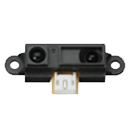 Sharp IR Collision
— Stops movement panels when a Sharp IR sensor on EZB ADC detects objects within a set range; displays ADC voltage, VU meter and 0-255 distance value.
Try it →

Sorry to bother everyone with this but I can not find any information on how to change your email address. If you can help it would be great.
BC

In your settings options. In the upper right corner.
when I go to settings I do not see anything in the upper right corner. Is settings and setting options the same thing?
Thanks.
says at top right corner screen name orders settings logout, when signed in, just click on settings and it has your info to edit
your identity is defined by your e-mail address. it's something that you cannot change yourself. contacting us is the only way. we will require a bidirectional communication to ensure you are who you say you are. otherwise, someone would be able to modify your account
hardcore.
Thank you all for your help.
DJ I thought the old brain was going when I could not change it. You are doing a GREAT job and the members are just incredible. Thanks.
I just want to let everyone know that my problem was solved by DJ's team. Thanks
Great to hear!