


Hello , I want to control the JD camera from my visual studio plugin , I've try the following code but it doesn't work EZ_B.Camera.GetVideoCaptureDevices();
plz I need ur help as soon as possible .
 Lewansoul Servo
— Control LewanSoul LX-16A servos via ARC (EZ-B v4/IoTiny): assign virtual ports, read positions, set speeds, and enable continuous rotation.
Try it →
Lewansoul Servo
— Control LewanSoul LX-16A servos via ARC (EZ-B v4/IoTiny): assign virtual ports, read positions, set speeds, and enable continuous rotation.
Try it →

Hello , I want to control the JD camera from my visual studio plugin , I've try the following code but it doesn't work EZ_B.Camera.GetVideoCaptureDevices();
plz I need ur help as soon as possible .

ptp
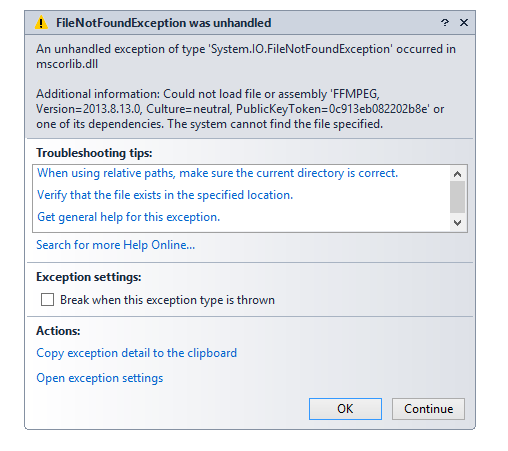
yup , i still need ur help . I've run ur code but it gave me the following error in the image ,

for that i asked u to control the camera from my windows form . for example i try to put ur code in a button in my form but unfortunately , it didn't workptp image for error
Are you sure that you're creating a plugin? Or a standalone application?
Also, do not use ptp's code. Use the tutorial that i posted.
In the tutorial, to draw on a Panel, for example...
DJ. He is not building an ARC plugin. Needs SDK instructions (I would provide but answering from phone).
If you're not building a plugin, then read the README.TXT that is included in the SDK. You're not following the instructions. All files from the SDK package must be copied into your output folder. Read the instructions.
If you are making a plugin, then read the tutorial and use the code i presented.
Windows Form Application Example code:
https://github.com/ppedro74/ez-robot-form-application
It takes a Picture, displays in the form and it saves to the desktop.
Cheers,
Attention to:
DJ wrote:
Platform target: must be x86 (32 bits)
Some dlls are needed in the application folder you have two options:
copy the dlls "packages/EZ_B.dll.2015.05.20.00" to the application folder i.e. (bin/debug or bin/release)
add application references to the missing dlls: e.g. VS>Project>Add Existing Item>(look for the missing DLL)>ADD VS>Project>dll properties>"Copy to Output Directory" Change to "Copy if newer"
personally i like the option 2, you are aware of the dlls needed, but the safest option is the 1).
thanks ptp for your help ,I appreciate you effort _