



is it possible to solder a wire on to the backside off connectors off the speaker. am asking cause i dont want to ruing the ez-b4.
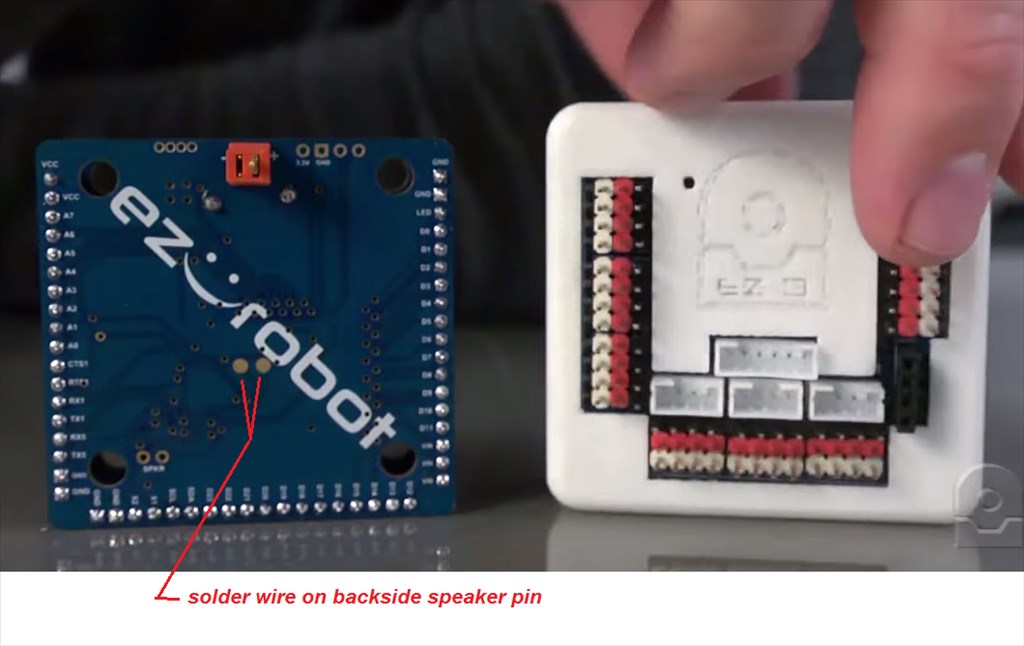
i dont want to make a hole,just put a led behind the mouth.
 Auto Position Movement Panel (Gait)
— Create servo frames/actions to animate humanoid, hexapod or custom gaits with smooth transitions, SW ramping and directional control
Try it →
Auto Position Movement Panel (Gait)
— Create servo frames/actions to animate humanoid, hexapod or custom gaits with smooth transitions, SW ramping and directional control
Try it →
 Resolved by Rich!

is it possible to solder a wire on to the backside off connectors off the speaker. am asking cause i dont want to ruing the ez-b4.
i dont want to make a hole,just put a led behind the mouth.

From my understanding it may be better to connect the wires at the plug to the lower left, labelled as spkr.
Use the spkr points.
There is an unamplified point too if you are going to a different amp.
my idea was.to solder as this point,when the jd speaks it wil flach desame ritme . led will go on whit avery letter he's speaks.can i di this also whit your idea?
Here is Dave's write up on breaking out the sound from the EZ-B.
It's not quite as simple as just adding an LED, you would need some clever processing to flash an LED on every syllable spoken by the robot. Connecting an LED to the speaker will just make the LED flicker a bit based on the volume of the sound (which can be achieved using digital ports and the SoundServo(EZB) control)
yes thats why i normally use straight solder on speaker but ez-b4 has special connection.
thank you all