
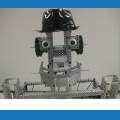


I have a robot that is connected to the computer through WIFI1. This computer will have another WIFI 2 that will be used to connect the computer to network. I will be controlling this computer from another one (Master) using Remote Desktop App. I want to be able to control the movement of the robot using a joystick connected to the master computer, How can I do that?
Thanks Abdel



How remote are we talking? A different room in the same house/building? Or a different house/building altogether?
If it's in the same house/building you can use a wireless Joystick (like the Xbox 360 or Xbox one with receiver, or bluetooth if new enough) connected to the slave computer. If the controller has enough range (30-60 feet) you could use it at your Master computer location.
You could use long range wireless modules like synapse/xbee paired with a Arduino micro (shows up as a USB-HID) to create a much longer distance controller to get to the 100-1000 meter range. I made my Power glove project with this concept.
Otherwise, you could possibly use an IP joystick connected to the network on the Master computer side but I don't know how you could have it show up as an HID device on the slave computer. I believe a device such as this could help:
https://atlona.com/product/at-omni-311/
I’d recommend a product like usb gate. It allows sharing usb devices over networks.
here’s a link to get started: https://www.net-usb.com/share-usb/
if you want to look for more options, google "share usb device over network"