
Change Release Notes
There has been a lot of talk recently about adding conversational A.I. to your robot. Many years ago, I created a learning A.I. called Synthia. I appreciate the interest in Synthia, however she'd require a bit of work to go public. So, a few of you have mentioned PandoraBots - which is an online bot hosting service.
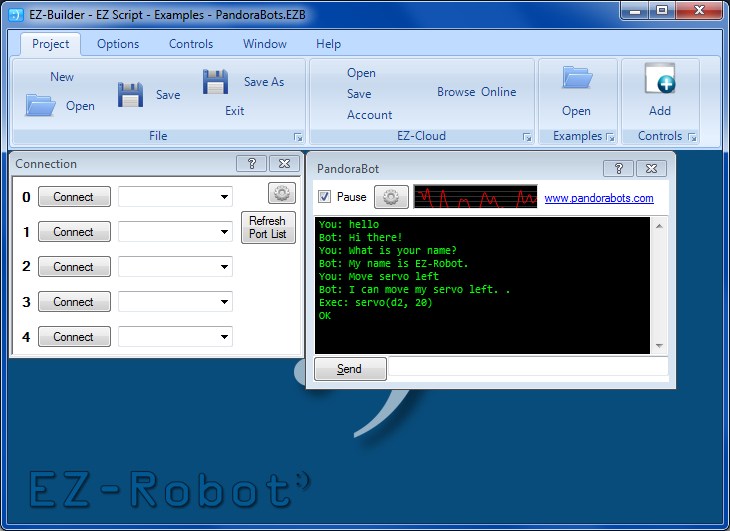
This release introduces a PandoraBot Control, found under the Speech category when adding controls. Please use the ? to read details on how this control works, and the issues with speech recognition. There is also an Example Project you may load to review functionality.
If you create your own Bot, you may also add speech commands that are specific to your robot. If you review the example that I had included, you will notice that "Move servo Left" will execute EZ-Script. Any response that includes EZ-Script can be surrounded by [ and ]. The help page will explain more
- New Control: PandoraBot Artificial Intelligence
ARC Downloads
ARC
FREE- 1 third-party plugin skill per project
- Trial cloud services
- Personal, DIY & education use
- Updated every 6–12 months
 Download
ARC
PRO- Use on 2+ PCs simultaneously
- Unlimited robot skills
- Cloud backup & revision history
- Weekly features & bug fixes
- Business use permitted
ARC
RUNTIME- Load & run any ARC project
- Read-only mode
- Unlimited robot skills
- Includes early access fixes & features
- Minimum requirements: Windows 10 or higher, 2 GB RAM, 500 MB free disk space.
- Recommended: Windows 10 or higher, 8 GB RAM, 1 GB free disk space.
- Prices are in USD.
- More about each edition: Download & install guide.
- Latest changes: Release notes.
Compare Editions
| Feature |
ARC
FREE
|
ARC
PRO
|
|---|---|---|
| Get ARC Free | View Plans | |
| Usage | Personal · DIY · Education | Personal · DIY · Education · Business |
| Early access to new features & fixes | — | ✓ |
| Simultaneous microcontroller connections * | 1 | 255 |
| Robot skills * | 20 | Unlimited |
| Skill Store plugins * | 1 | Unlimited |
| Cognitive services usage ** | 10 / day | 6,000 / day |
| Auto-positions gait actions * | 40 | Unlimited |
| Speech recognition phrases * | 10 | Unlimited |
| Camera devices * | 1 | Unlimited |
| Vision resolution | max 320×240 | Unlimited |
| Interface builder * | 2 | Unlimited |
| Cloud project size | — | 128 MB |
| Cloud project revision history | — | ✓ |
| Create Exosphere requests | — | 50 / month |
| Exosphere API access | — | Contact Us |
| Volume license discounts | — | Contact Us |
| Get ARC Free | View Plans |
* Per robot project
** 1,000 per cognitive type: vision recognition, speech recognition, face detection, sentiment, text recognition, emotion detection, azure text to speech

Upgrade to ARC Pro
Discover the limitless potential of robot programming with Synthiam ARC Pro – where innovation and creativity meet seamlessly.
@Robotmaker
That second link is a great price for an array microphone. How far away can you be and still get good sound pickup?
Alan
About 5 feet or more,havent fully tested the distance,pretty soon looking at designing a special voice tracker to go with it,simple circuit using the great EZB analog inputs and one servo for panning
Kinda like the camera tracking we have ,but for voice already bought 5 of them
Looking at a much better circuit design,andrea microphone uses a array of a few microphones in its design
MY idea is a scanning array like the larson led snanner but with microphones and a special min/max comparator circuit ,so if your voice is on the left of the robot will pick it up ,and same on the right or middle
BUT that will take a lot of designing and testing
A TON more money, but if you need more range - like 30+ feet, I have heard very good things about this:
https://store.homeseer.com/store/Acoustic-Magic-AM100-Voice-Tracker-Microphone-P26C49.aspx
(disclaimer, I know one of the people at Homeseer, and he is the one who told me how good this mic is, but other people on their forum agree).
Alan
Don't think that the Kinect mic array is any use though, just to throw this out there (I know nobody has mentioned it but I guarantee some will have thought it). It isn't the greatest when used on a PC.
ALAN most robots dont need a 30 feet range,most average rooms at 10 by 10 so well under 10 feet is good
RICH i have a few KINECTS and i agree with you,kinect nicrophone is not great at all i dont think they use any filters or noise cancelling circuits in it
I would prefer 8 feet to 5 for the best coverage, but not at 5x the price. When you finish your voice tracking design, I may give the one you recommend a try.
ALan
DJ,
Thanks for this update! I just saw it today. PANDORABOTS! Yippee! I've been building pandorabots for about 5 years now.
I'm going to try it out later with Betty9.
I need to keep up. The book I have been writing on robots has taken all my robot BUILDING time.
Thomas
PS. Do you want to put a coupon in my robot book, "I, Robot Builder"? I will have an EZ robot project in one of the chapters. It comes out in October.
Click here to see the book listed on Amazon.com