
Change Release Notes
There has been a lot of talk recently about adding conversational A.I. to your robot. Many years ago, I created a learning A.I. called Synthia. I appreciate the interest in Synthia, however she'd require a bit of work to go public. So, a few of you have mentioned PandoraBots - which is an online bot hosting service.
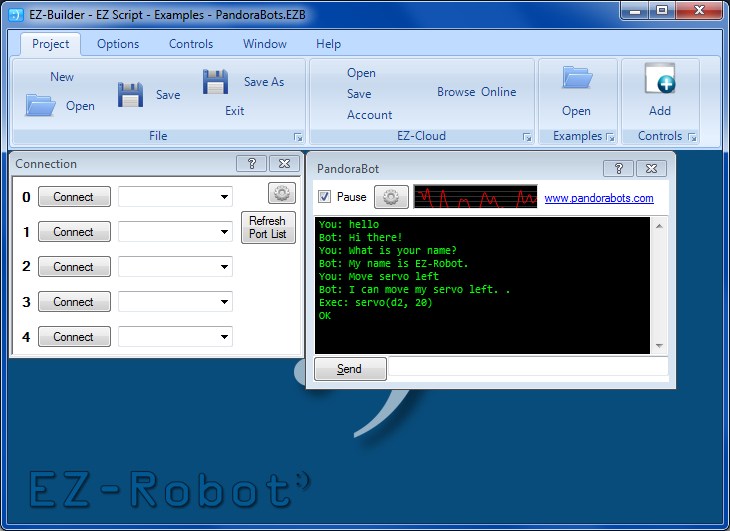
This release introduces a PandoraBot Control, found under the Speech category when adding controls. Please use the ? to read details on how this control works, and the issues with speech recognition. There is also an Example Project you may load to review functionality.
If you create your own Bot, you may also add speech commands that are specific to your robot. If you review the example that I had included, you will notice that "Move servo Left" will execute EZ-Script. Any response that includes EZ-Script can be surrounded by [ and ]. The help page will explain more
- New Control: PandoraBot Artificial Intelligence
ARC Downloads
ARC
FREE- 1 third-party plugin skill per project
- Trial cloud services
- Personal, DIY & education use
- Updated every 6–12 months
 Download
ARC
PRO- Use on 2+ PCs simultaneously
- Unlimited robot skills
- Cloud backup & revision history
- Weekly features & bug fixes
- Business use permitted
ARC
RUNTIME- Load & run any ARC project
- Read-only mode
- Unlimited robot skills
- Includes early access fixes & features
- Minimum requirements: Windows 10 or higher, 2 GB RAM, 500 MB free disk space.
- Recommended: Windows 10 or higher, 8 GB RAM, 1 GB free disk space.
- Prices are in USD.
- More about each edition: Download & install guide.
- Latest changes: Release notes.
Compare Editions
| Feature |
ARC
FREE
|
ARC
PRO
|
|---|---|---|
| Get ARC Free | View Plans | |
| Usage | Personal · DIY · Education | Personal · DIY · Education · Business |
| Early access to new features & fixes | — | ✓ |
| Simultaneous microcontroller connections * | 1 | 255 |
| Robot skills * | 20 | Unlimited |
| Skill Store plugins * | 1 | Unlimited |
| Cognitive services usage ** | 10 / day | 6,000 / day |
| Auto-positions gait actions * | 40 | Unlimited |
| Speech recognition phrases * | 10 | Unlimited |
| Camera devices * | 1 | Unlimited |
| Vision resolution | max 320×240 | Unlimited |
| Interface builder * | 2 | Unlimited |
| Cloud project size | — | 128 MB |
| Cloud project revision history | — | ✓ |
| Create Exosphere requests | — | 50 / month |
| Exosphere API access | — | Contact Us |
| Volume license discounts | — | Contact Us |
| Get ARC Free | View Plans |
* Per robot project
** 1,000 per cognitive type: vision recognition, speech recognition, face detection, sentiment, text recognition, emotion detection, azure text to speech

Upgrade to ARC Pro
Don't limit your robot's potential – subscribe to ARC Pro and transform it into a dynamic, intelligent machine.
hi all, whaouu , i Did it ( don't laught i'm newbie) i created a pandorabot account and put the id in ez-robot, wrote a sentence and ez-jarvis good me his name. he don't have already a body, but he's got a Brain. thanks a lot for all that ez-robot ( DJ of course). see you soon
@kudo48pa I am wanting the same thing to track multiple faces and have a data base like with a name,so if there is person in front of the camera it will say "hi fred " it it finds a match in the data base
BE a great add-on if the ezb MASTER DJ can do it
how do you get it to speak the reply phrase? I can get it to reply correctly if i type it in the box and click send. But I thought it would speak the reply without having to do this.
kudo48pa,
Individual face recognition would be cool, if a little complex. Could be kind of slow depending on what computer you are running your robot with. OpenCV has libraries for it, so Dj would not need to write it from scratch.
Bar codes would be about as easy as qr codes. There are existing libraries Dj could tap into if there is enough demand. What is your use case? (ie, why are qr codes not good enough? Are you wanting to recognize existing barcoded objects?)
Text recognition, the best way would probably be to have a camera to PDF function, then use existing OCR software to turn it into a text file, then use the existing script file handling functions to read it.
I don't think any of your requests are impossible to achieve if Dj wants to put the time into them (which usually just requires a few of us to express interest).
They are all possible for you to write yourself if you learn Dotnet programming and then use the SDK to integrate with yoir robot.
Alan
also could speech recognition be more accurate? and having custom object tacking ,like i would put a photo for a chair in project folder ,and if camera sees it ,the camera control will run a script so i can track objects and it finds an object unknown it would run a script so the bot can ask the user about it. and some mood tracking so he will know my mood from my voice and video. not in a hurry so may be dj can write them in a year or so.
Speech recognition accuracy is dependant on the training you give Windows and the quality of your microphone. Most, if not all Windows software relies on the Windows SAPI. Visit your control panel and run through the training set up to improve accuracy. There may be third party tools to aid in increasing accuracy also but you will need to search for those.
Make sure you are using a very good microphone, ideally a headset microphone and background noise is kept to a minimum. Speak clearly. And train a lot.
The accuracy of mine is around the 85% mark, which to me isn't accurate enough for Pandora Bots. I have constantly trained my Windows for over 12 months through other software which learns as I speak, it takes payloads from XML files for all media - basically my HTPC is voice controlled and learns a lot of different phrases and words including some obscure ones like "Spartacus". Even with that much training it is still falling short by 15%. I know part of this is due to my microphone array and the background noise and am sure it would be more like a 95% accuracy with a decent headset microphone.
In short, train it, speak clearly, use a decent microphone.
Speech Reco is based on the Windows recognition engine. If you install and train a better SAPI5 compatible recognizer, like Dragon, Windows will use it and your recognition will improve.
Alan
FYI Windows 7 ships with SAPI 5.4, Windows Vista uses SAPI 5.3