
PRO
Fred Hess
Germany
Asked
 Resolved by Nomad 6R!
Script Automatisch Starten?
Wie kann ein Script automatisch beim Verbinden gestartet werden?
Related Hardware (view all EZB hardware)

EZ-B V4
by EZ-Robot
EZ-B v4/2 robot controller: dual Cortex ARM, Wi-Fi, audio/video, 24 servo/digital ports, I2C/UART, camera and Synthiam ARC control for custom robots
Wi-Fi / USB
Servos
24
Camera
Audio
UART
3
I2C
ADC
8
Digital
24
Related Robot Skill (view all robot skills)

Script
by Synthiam
Multi-language ARC Script: build, run and debug Blockly, JavaScript, EZ-Script or Python with Intellisense, run/save/load and Roboscratch support

Um ein Script automatisch beim Verbinden zu starten, können Sie das "Connection Control" Skill verwenden. Fügen Sie das "Connection Control" Skill zu Ihrem ARC-Projekt hinzu und gehen Sie in die Einstellungen. Wählen Sie "On Connect" und wählen Sie dann das Script aus, das Sie automatisch starten möchten. Speichern Sie die Einstellungen und das Script wird automatisch gestartet, wenn Sie eine Verbindung zu Ihrem EZ-B v4 herstellen.
Wo finde ich den Skill "Connection Control"?
hi fred
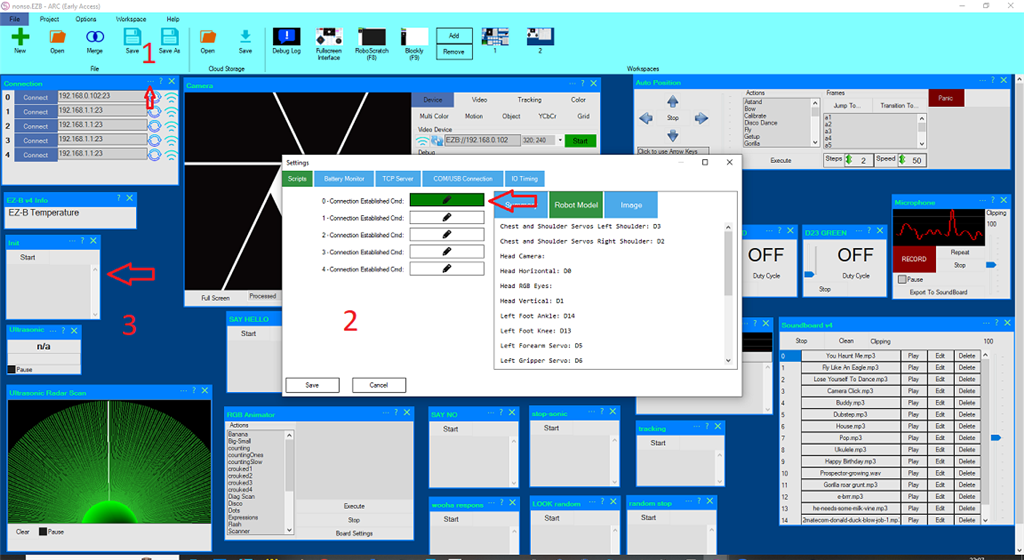
its called INIT script . you can make your own . take a script and called init . put in there what you want to see happen .
after you click number 2 you see this . this will start when you connect your robot . then save on your pc and in the cloud .
Thank you very much, @Nomad 6R, for your quick help.
your welcome fred .