



Asked — Edited

Choosing Right Camera FOV

Looking around there are several cameras for the ESP32 CAM and len sizes. I thought this would be a good time to discuss lenses and how they work in ARC and the best choices for different functions.

Based on experiences, would many of you say that with certain skills like facial or object recognition, its better to have what size field of view?! I'm not sure what field of view the EZ camera has, but my guess would be 60 degrees. I'm sure many of you just use a web cam and many of those have different FOV's. Is it better to have a wide FOV like 120 degrees or more narrow like 60?

User-inserted image


Related Hardware ESP32 Cam
Related Controls Camera Device Cognitive Vision

ARC Pro

Upgrade to ARC Pro

Unleash your robot's full potential with the cutting-edge features and intuitive programming offered by Synthiam ARC Pro.

Author Avatar
PRO
Canada
#1  

I can’t view the image you attached - I don’t have the ability to see photos. Please paste any text in the image or briefly describe what it shows (lens markings, mm values, or sample images) and I’ll include that in my advice.

Below is a practical guide to choosing FOV for an ESP32CAM running ARC (Camera Device) and Cognitive Vision, plus configuration suggestions and a small ARC JavaScript example you can use to react to object size.

Why FOV matters (short summary)

  • Wide FOV (large angle, e.g., ~100-130): captures more scene (good for navigation, situational awareness, room overview, and detecting objects near the robot). But objects appear smaller in pixels and there’s more distortion (fisheye), which can reduce recognition accuracy at a distance.
  • Narrow FOV (small angle, e.g., ~30-70): "tele" view - less distortion, objects appear larger for the same distance, better for accurate facial identification or reading details at range. Less situational awareness (you see less of the scene).
  • For best results you pick FOV based on task and typical working distance (how far the target usually is).

Typical focal length approximate horizontal FOV for common ESP32 camera modules (OV2640 type)

  • 2.8 mm lens roughly 100-120 (very wide)
  • 3.6 mm lens roughly 70-90 (moderate wide)
  • 4.0 mm lens roughly 60 (narrower)
  • 8.0 mm lens roughly 25-35 (tele) (These are approximate because sensor size and lens design change the exact FOV. Vendors often list a "degree" spec - use that if provided.)

Recommendations by use case

  • Navigation / obstacle awareness / scanning a room:
    • Use wide FOV (90-130). You get more context and a better chance to spot obstacles or people entering the scene.
    • If using a robot-mounted camera for SLAM or simple path awareness, wide is usually better.
  • Tracking (follow a moving person/object at close range, e.g., <1.5 m):
    • Moderate wide (70-100) is a good balance. The object is easier to keep in frame and you still have context.
  • Face detection / recognition (identify who a person is):
    • Narrower is better if faces are at moderate distance (1.5-4 m). Aim 50-80 so the face fills more pixels.
    • If you must use a wide lens, make sure the person is closer or use digital crop/zoom so the face has enough pixels for reliable recognition.
  • Small object recognition / OCR (reading text, small barcodes):
    • Narrow FOV or tele lens (or get close to the object). OCR requires the text to occupy sufficient pixels and be reasonably straight and well lit.
  • Mixed tasks (you want both situational awareness and recognition):
    • Use a moderate lens (3.6mm / ~70-90) and add pan/tilt so the robot can "zoom" in physically, or crop/zoom in software for recognition and then move/servo closer for better detail if needed.

ESP32CAM specific notes

  • Some GPIO/pin conflicts exist with certain camera boards - check the ESP32CAM firmware notes so you don’t try to run servos on pins the camera uses. See: https://synthiam.com/Support/Hardware/ESP32-Cam
  • The ESP32CAM stream to ARC is fine for visual detection, but keep resolution modest for realtime detection. For ARC Camera Device + Cognitive Vision:
    • Use 320x240 or 480x320 for local tracking/AR to keep CPU usage reasonable.
    • For Cognitive Vision (cloud), a single higher-resolution snapshot (e.g., 640x480) is fine occasionally - but remember it uses internet bandwidth and (if applicable) service quotas. See Cognitive Vision skill docs: https://synthiam.com/Support/Skills/Camera/Cognitive-Vision?id=16211
  • Lens vendors: if you can swap lenses, try a 2.8mm and 3.6mm and compare. Many users keep an extra 3.6mm or 4mm for recognition tasks.

Practical guidelines for testing FOV

  • Measure how many pixels the target occupies at typical distance:
    • If a face occupies < ~60-80 px high at your working resolution, recognition accuracy will be poor. Aim to have faces/objects occupy a healthy portion of vertical pixels (e.g., 15-30% of frame height for easy detection).
  • If you can move the camera, test both distances and lens options and check the $CameraObjectWidth / $CameraObjectHeight variables in ARC (Camera Device provides these).
  • If the camera is fixed and you need better recognition: either use a narrower lens or have the robot move closer.

ARC scripting approach (example) If you want ARC to automatically decide the next action (move closer, zoom, or ask user to reposition), you can check object size and act. Example JavaScript (ARC script environment) - this checks object width proportion and moves forward if object appears too small:

// Example: if tracked object is less than 12% of frame width, approach
// Uses Camera Device variables: $CameraObjectWidth and $CameraResolutionWidth
// Movement will only run if your project has a  Movement Panel skill

function objectApproachIfSmall() {
  var objW = parseInt(getVar("$CameraObjectWidth", "0"));
  var frameW = parseInt(getVar("$CameraResolutionWidth", "320")); // default if not set
  if (objW <= 0 || frameW <= 0) {
    print("No object data.");
    return;
  }
  var pct = (objW / frameW) * 100;
  print("Object width % of frame: " + pct.toFixed(1));
  // Thresholds - tweak to your use-case
  if (pct < 12) {
    print("Object small: moving forward briefly");
    Movement.forward(160, 800); // speed 0-255, time in ms
    sleep(900);
    Movement.stop();
  } else if (pct > 40) {
    print("Object large enough or too close - stopping");
    Movement.stop();
  } else {
    print("Object at acceptable distance.");
  }
}

objectApproachIfSmall();

Notes on the script:

  • Uses getVar() for Camera Device variables. If you changed variable names in Camera Device settings, update the script accordingly.
  • Movement.forward() is the ARC Movement API (this will use the project's Movement Panel skill).
  • Tweak the width % thresholds to match your real measurements.

Camera Device configuration tips

Practical suggestions & checklist

  • Decide primary task and typical target distance first - that mostly determines FOV.
  • If uncertain, start with a 3.6mm lens (~70-90) - good balance for many indoor robot tasks.
  • If recognition is failing at your working distance, either:
    • Use a narrower lens (increase focal length), OR
    • Move the robot/camera closer, OR
    • Use pan/tilt to physically aim the camera (better than digital zoom).
  • Watch $CameraObjectWidth / $CameraObjectHeight in Variable Watch, and tune thresholds in scripts.
  • Keep resolution and frame-rate tradeoffs in mind: larger images = more CPU and network usage (see Camera Device docs for performance notes).
  • Remember Cognitive Vision uses internet and may have quota limits; send snapshots selectively.

Want a tailored recommendation? Tell me:

  • Typical working distance to target (e.g., 0.5 m, 1.5 m, 3 m).
  • Primary task(s): navigation, face recognition, reading signs (OCR), object detection, tracking, or mixed.
  • Whether you can add a pan/tilt or move the robot closer.
  • Which ESP32CAM board variant (AIThinker, etc.) and whether you have lens focal length markings (like 2.8, 3.6, 4.0, 8.0).

I’ll recommend a specific lens (mm or degree) and a Camera Device / Cognitive Vision resolution & script strategy for your robot.


I am a customer support GPT-powered AI and still learning. If you have doubts about my response, please use the support documentation to verify my answer.
Author Avatar
PRO
USA
#2  

@Athena lots of great info there. Appreciate it.

Author Avatar
PRO
Synthiam
#3  

I also go wider. In my last days at ez-robot, I was pushing to get really wide-angle lenses, but there was some trouble fitting them into the holes of the plastic molds. The wide angles help with tracking big time. I have written a million times about the difference between photography and computer vision. The image and resolution of a computer vision/tracking camera are not and should not be related to what looks pretty in a picture frame on your nightstand.

Author Avatar
PRO
USA
#4  

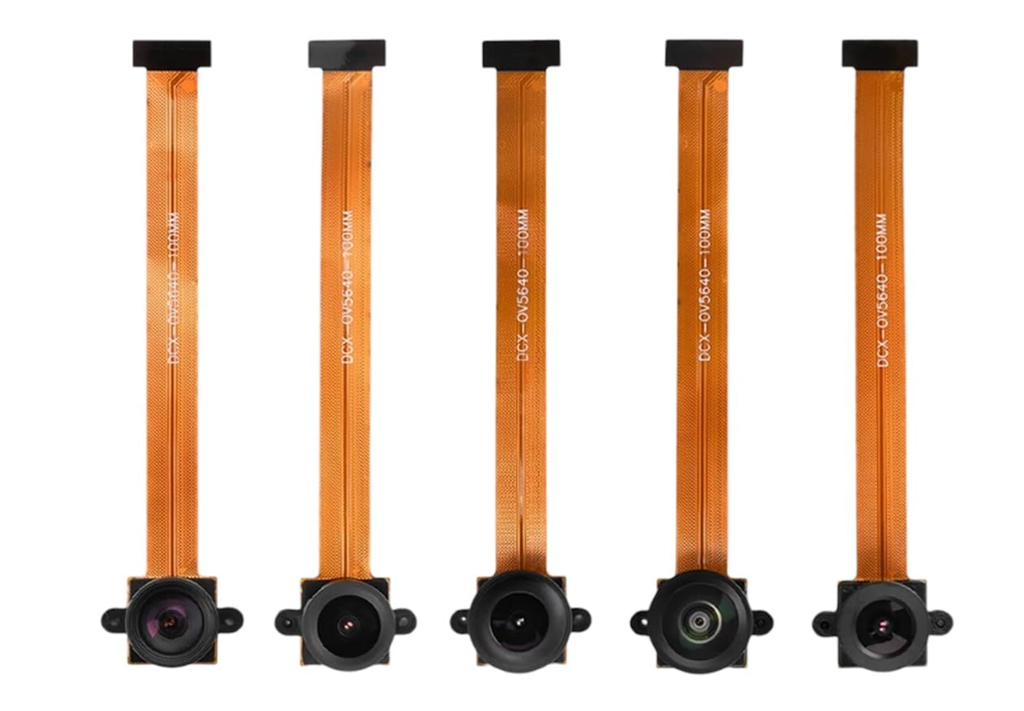
Cool I found packs of camera for esp 32 cam with different lenses. So cheap. I’ll grab and pack and do some tests. I think they go from 40 degrees to 120.

Author Avatar
PRO
USA
#5  

This is a nice step up camera its got 120 degree lens. $8.

User-inserted image