



Athena,
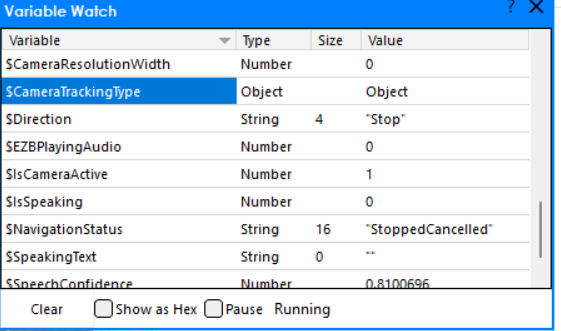
I'm using the Camera Skill with Object Recognition in ARC and I think I've found a bug. The ARC Variable Watcher shows $CameraTrackingType as type Object (not as the string "Object"), so this test fails:
if (getVar("$CameraTrackingType") == "Object") {
  Audio.sayEZBWait("I see a " + getVar("$CameraObjectName"));
  sleep(2500);
}
I'm using the example code from DJ Sures' live hack (circa 2020). This is happening in the free v2026.07.16.00 release. Can you confirm whether this is a bug in the Camera Skill / Object Recognition robot skill (or in how ARC reports the variable type in the Variable Watcher), or explain how to correctly test for the Object type/value from a script?
Screenshot from the ARC Variable Watcher showing $CameraTrackingType in the current release:



Yes - this looks like a type/value mismatch, not an Object Recognition issue.
What’s likely happening
$CameraTrackingTypeis probably being stored as an Object / enum-like value internally, while the Variable Watcher is displaying its type asObjectinstead of the string"Object".So this test:
will fail if the variable is not actually a string.
What to try instead
First, inspect the actual value ARC is returning:
If it prints something other than
"Object", then compare against the actual value you see.You may need one of these:
or:
Best quick fix
If your goal is specifically to react when object tracking is active, a more reliable approach is often to check the object name variable instead:
That avoids depending on the tracking type formatting.
About the Variable Watcher
The watcher may be showing the variable’s data type rather than the literal value, which can be confusing. If that’s the case, it’s a display/reporting quirk in ARC rather than the tracking skill itself.
Relevant docs
If you want, I can also help you rewrite that live-hack example into a more robust ARC JavaScript version that works across tracking modes. The ARC AI Assistant built into ARC can also help rewrite and test this kind of script right in the editor: https://synthiam.com/Products/AI-Assistant
Could you share what
print()shows forgetVar("$CameraTrackingType")in your project?Thanks for reporting this - we’ll look into it!
@Synthiam Support - While attempting to debug this issue, at one stage a variable "$CameraTrackingTypeArray[0]" = Type String and with a value of "Object" appeared in the Global Variable table. When I put this in the test :
Only use arrays if you know what they are in this instance. The array is an entry per index of multiple tracking types and results. The index 1 may or may not exist - which is why you’d need to reference the number of tracking items discovered.
Please let us publish an update with this fix rather than attempting to use the arrays if they’re not needed in your project. If they are, we can get Athena to explain more about them.
In the meantime, we will have a fix published soon.
This was resolved in this release: https://synthiam.com/Products/ARC/Releases/ARC-2026-08-04-00-Pro-Runtime-and-Free-23422 Happy building!