




Asked
 Resolved by DJ Sures!
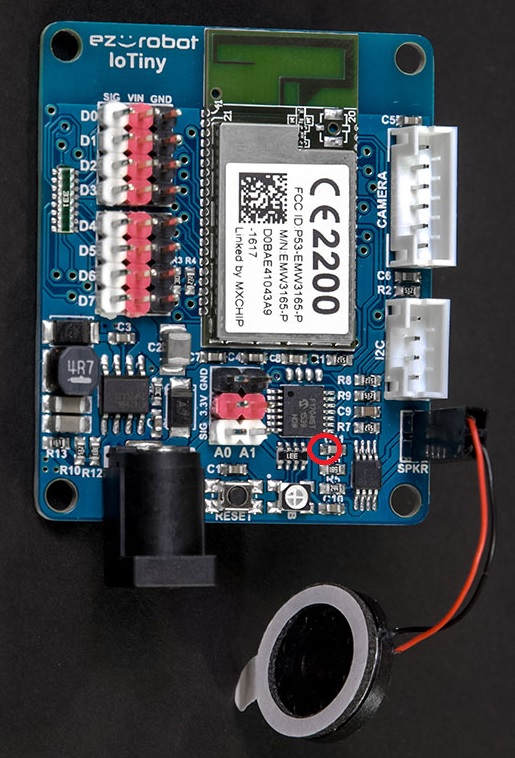
Amplifying Audio From A Iotiny
Im using the soundboard exb to play audio files but they are very faint. Is there a way to add an amplifier like on the ezb? I couldn't find a seperate audio out other than the speaker plug. The default voice from the IoTiny sound good but not my audio files which are mp3, i amplified the files in Audacity but they are still faint.
Related Hardware (view all EZB hardware)

EZ-B Iotiny
by EZ-Robot
Control IoTiny with Synthiam ARC: 100MHz Cortex‑M4 Wi‑Fi IoT/robot controller-camera, servos, ADC, I2C and digital I/O for easy internet automation
Wi-Fi / USB
Servos
8
Camera
Audio
UART
✕
I2C
ADC
✕
Digital
✕
Related Robot Skills (view all robot skills)

Output Audio From EZ-B
by Synthiam
Example ARC skill demonstrating converting, compressing and streaming MP3/WAV to an EZ-B speaker, with play/stop commands and TTS examples.
Requires ARC
v11

Soundboard (EZB)
by Synthiam
Play WAV/MP3 via EZ-B v4, manage tracks, add timed scripts for synced robot actions, control via ControlCommand(), volume and clipping indicators.

Thanks Jeremie for the idea of soldering to the left side of C11 to run audio to a separate amp. This has at last given me good sound from the IoTiny.
When editing any files, use normalization in your editor.
Also, the ARC soundboard editor has a normalize feature built in. Use it to normalize your audio files in the soundboard after they’ve been imported
It’s not documented in the manual for the soundboard, but here’s the option circled
Interesting on soldering to C11 for good sound...I have a question about where the data specs say 3.3v --5 volt signal out tolerant. would my ultrasonic sonar that runs between 4-5 volts be too much current draw from signal output? I know I was advised never to do that on EZB4
Edit-----Oh okay I see now that is only 5volt input not output only 3.3v.
Hi y'all, I’m revisiting this older thread with a practical solution.
To increase the audio volume from the IoTiny speaker output, I’m using a Logitech Z120 powered by 5 V via USB. The IoTiny speaker output is high-impedance (line-level like), so it does not load or stress the IoTiny output stage.
The Z120 has its own amplifier, adjustable volume, and provides more than enough power for voice output.
I configured it in mono by tying the left and right inputs of the Z120 together. The result is a clean, intelligible sound, with no noticeable distortion or noise.
This setup works very well for robot voice / TTS applications and requires no additional amplifier circuitry.
hi jp15sil24
did you connect the speakers using the 2 wire connection on the iotiny ?
thanks
hi Patrick, I removed the small speaker, I cut the z 120 input plug and connected the cable directly on the iotiny
jp15sil24
nice you have also a volume control on the speakers . and they are not expencive . great find .