
Perry_S
USA
Asked
— Edited
I Have Successfully Connected To The Network
Every time I log on I hear it. But my bot is male. Can I change this the a make voice?
Thanks!
 Personality Forge
— Adds a Personality Forge chatbot to ARC, giving memory, emotions, AIScript dialogue, persistent conversation IDs and speech/chat integration via API.
Try it →
Personality Forge
— Adds a Personality Forge chatbot to ARC, giving memory, emotions, AIScript dialogue, persistent conversation IDs and speech/chat integration via API.
Try it →
Every time I log on I hear it. But my bot is male. Can I change this the a make voice?
Thanks!

If Anyone updates the bios to allow you to change the audio file I would also appreciate it saying the IP address. I have connected and my IP is xxx.xxx.xxx.xxx
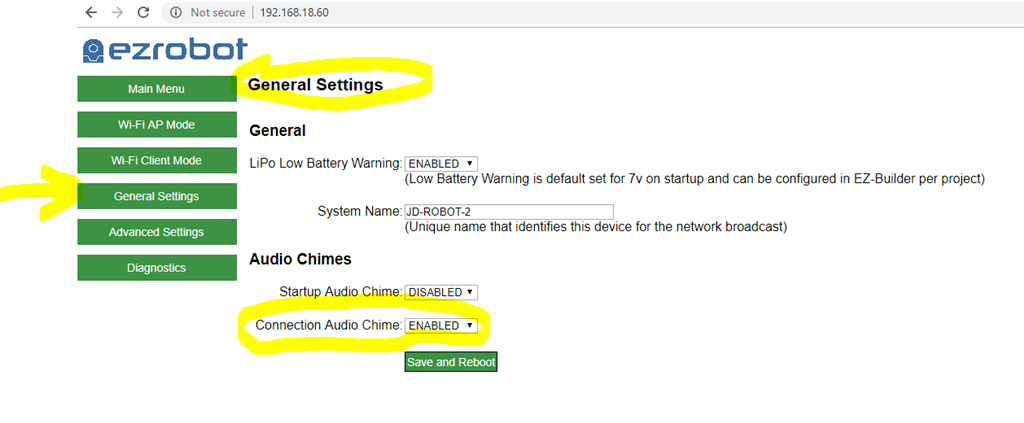
If you have the ezb4 with the comm 2 board I believe the option to turn off the "I have successfully connected... etc) login message available in the ezb4 webserver.
I would also like to do this. I have looked all over the webserver page and didn't see any way to change the default message.
@GBot:
Richard R:
You can't change the message, you can enable or disable:
@ptp
Thanks for the images. Looks like I should upgrade to the comm 2 board!