


"Set Dictionary Error loading phrases (Custom): The language for the grammar does not match the language of the speech recognizer"
I see that this issue was discussed a few years back but I am having problems now. Running latest win 64 bit with EZ software release 2017.05.16.00
The problem happens when I edit EZ software files on different computers, both running windows 10. Edit a file on one system and I cant use speech recognition on the other computer with that file. Create a new file and add new speech recognition, it works fine on the PC it was created on. I can also delete the speech recognition and create a new control and that works. I lose all my recognized words that way however.
I have tried changing default language to English(United States), I am in the UK so normally would use English(United Kingdom). This does not cure the issue.
Any ideas? thanks Lorn

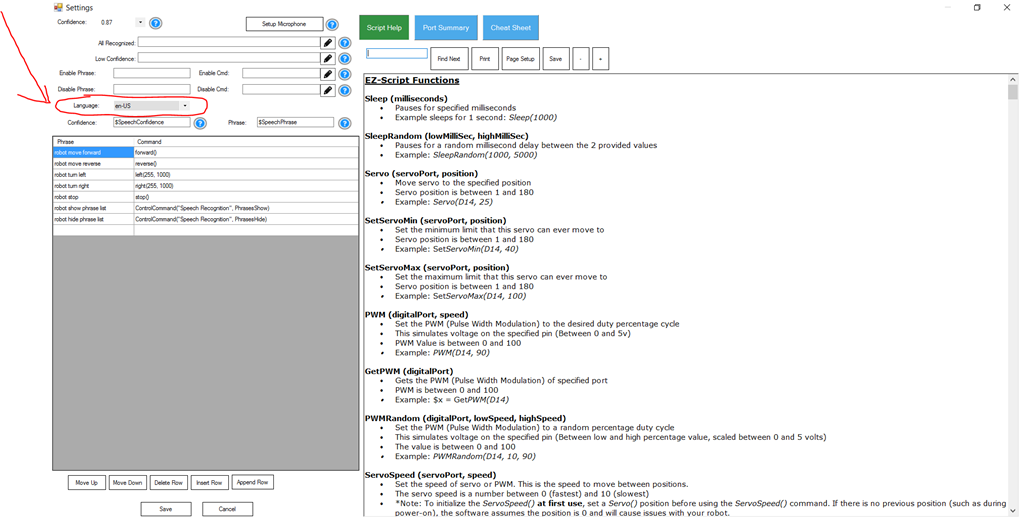
Edit the language for the speech recognition control in the config menu. For more information about your ez-robot product and the ARC software, select LEARN from the top menu and select your product. There is a section dedicated to learning ARC and how to use the CONFIG button to access menus of controls.
Additionally, press the ? (question mark) on any control to view manual page about that control. Here is a shortcut link to the speech recognition manual page containing information how to select the language: https://synthiam.com/Tutorials/Help.aspx?id=90
Fantastic, thank you DJ. My InMoov robots talking away again! regards, lorn