

Wolfie
Canada
Asked
— Edited
 Resolved by Rich!
Telnet On Win 8 ?
Hello im trying to get telnet to work but when I open it nothing happens other than it flashes and disappears completely how do I get it to stay open on windows 8 ?

How are you starting it?
Personally I use Putty as an alternative telnet clinet
I start it with the run program it worked on win xp
the folder its in is
C:\Windows\winsxs\amd64_microsoft-windows-telnet-client_31bf3856ad364e35_6.1.7600.16385_none_1426830c3ebb712d\telnet.exe 127.0.0.1 6666
I know that on win 8 you have to do something that will let some programs to run but telnet comes with windows so you would think it should just work
but it opens and the closes right away and never connects at all
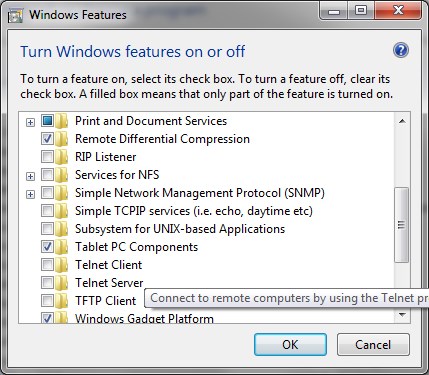
It doesn't come installed as default, make sure it's actually installed
How do I call up that menu ?
Ok I got that Putty program it works and I kinda have my mirc working it connects to and sends commands but I forgot how to use it in a malty server set up lol
Thank You Rich
That menu is in Programs and Features then choose Turn windows features on or off
ok I found it and got telnet to work thank you