

Asked
— Edited
Unexpected Popup Causing Script Issues
Hello @Athena,
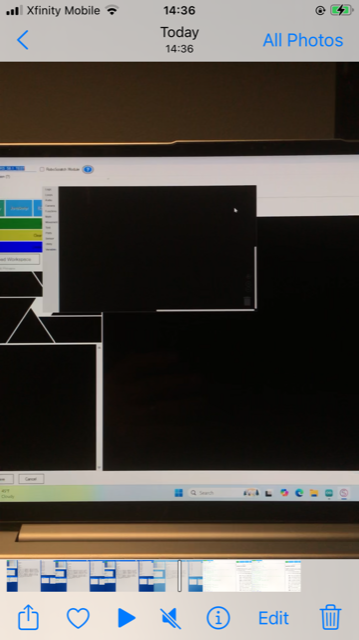
I recently upgraded to ARC version 12.21.00 and am experiencing a consistent issue where a brief "pop-up" script appears over the script I have selected. This pop-up disappears almost instantly. I've attached a screenshot of the pop-up script before it vanishes for reference.
In addition to this, I'm noticing erratic behavior with my robot's script, which seems to start and stop randomly without input. This issue is new and was not present in the previous version, ARC 6.21. Could you please investigate to determine if this new pop-up is intentional and if it might be related to the erratic behavior of the script?
Thank you,
Jack

The pop-up you may be seeing is due to how Windows renders graphical elements. While we don't see it on our machines, that doesn't mean it won't happen elsewhere. You could try a fresh reboot of the computer and perhaps that will solve your unusual graphical element.
Hi @Support, I have solved the issue, sort of. I tried a fresh reload of the latest release, and no change. I went into Settings (along the top margin) and deselected all references to 'Blockly' during the start-up sequence. This seems to have stopped the "pop-up" of a 'Blockly' type of screen, and my erratic robot start sequence has ended. I do however get a quick 'pop-up' of my JavaScript code in very large font, after which it shows my JavaScript screen correctly.
How could I stop this large font popup from showing at all? These popups seem like a new occurrence with ARC 12.21.
Thank you for your help. Jack
can you show a video of what you're seeing?
@Support, I can't seem to insert the MOV video to this thread. Am I missing a step? Jack
You would need to use a video platform, such as YouTube. Synthiam is not a video streaming service, so we are unable to host video content. Other options include sharing a Dropbox link, a Google Drive link, or whichever video or file hosting service you choose. The link can be shared in a forum comment response.
@Support, Try this link:
https://youtube.com/source/SIb8YHCz0ig/shorts?si=Tkp0R0YGL2EJBg_u
Thanks Jack
Thank you for the video, Jack. We do not see any problems with your display. Windows is rendering the form, and resizing is a function of that. Once it has rendered, it appears functional, and the layout is correct. Hope that helps!
Ok thank you for your help. I guess I had not noticed this before. Once I changed the "Blockly" default selection in Preferences, my erratic robot operation stopped. I wonder if some earlier Blockly code was interfering with my present JavaScript code. Thank you again for your assistance. Jack