
Does anyone know how to have a directional servo stop when a button is released on the phone app? i can do this when i press the arrow keys on the desktop but can't seem to figure a way to prevent the phone app from locking in a direction when letting go of the button. I have to press stop. Any ideas? Thanks.

robtbldr
USA
Asked
— Edited
1 Participant
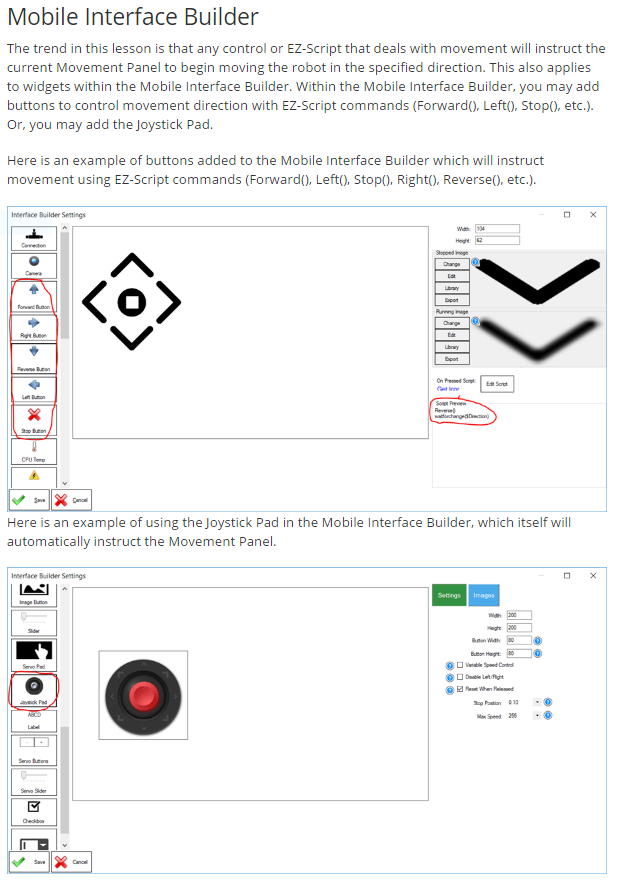

If you wish for quicker turning, either disable the speed control on the joystick or use movement buttons, as in the tutorial i posted above. Here's a screenshot of the section i'm referring to for reference...
There are blue question marks beside the options which explain what they do. For example, to disable speed control on the joystick.
Have fun!
I still have the problem of button not releasing right or left till I press stop. I have tried the joystick with no speed control but hitting it directly on left or right is difficult. If I could duplicate the keyboard arrow function it would be perfect!
Again, there is no OnRelease on the mobile app.
You may also change the sensitivity of the joystick pad with speed control disabled if you wish to customize the behavior.
Have fun!