

Change Release Notes
Introducing one of the World's most important robot platform AI integrations ever:
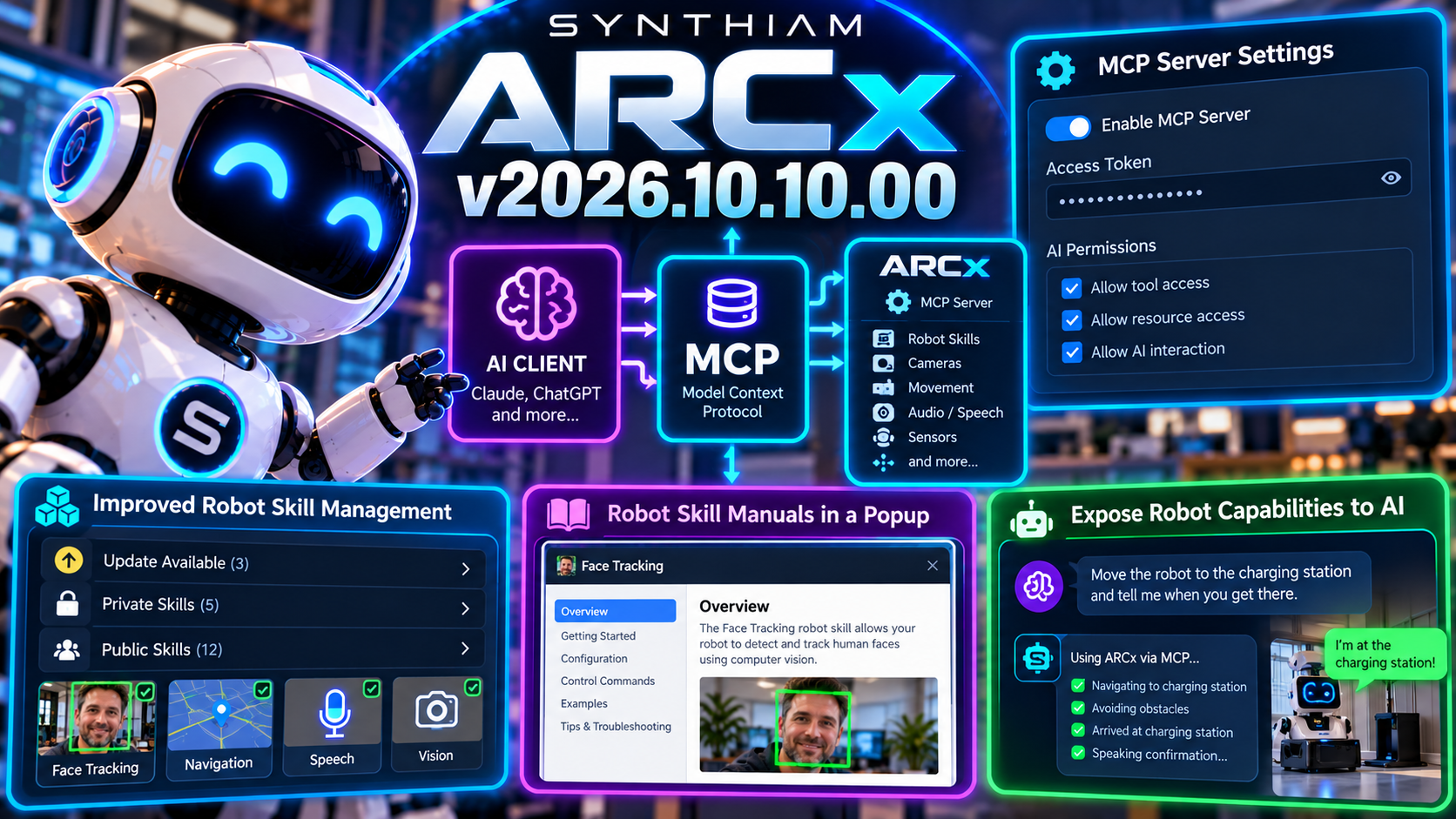
Model Context Protocol support.
ARCx can now expose robot capabilities to compatible AI clients through an integrated MCP server, creating a standardized bridge between artificial intelligence and the real-world capabilities available inside your ARCx project.
Read manual here: https://synthiam.com/Support/ai-integration/Model-Context-Protocol
Your robot already has cameras, motors, sensors, speech, scripts, and Robot Skills.
Now AI can have a structured way to discover and interact with them.
New Model Context Protocol Server
ARCx now includes an integrated MCP server that can be enabled directly from the application.
MCP - Model Context Protocol - provides a standardized way for AI systems to discover tools, resources, and capabilities exposed by other applications.
In ARCx, that means compatible AI clients can interact with the functionality you choose to make available from your robot project.
This opens the door to AI that can do more than simply talk about your robot.
It can potentially use the robot's capabilities as tools. And it gets even better. Your selected AI can also add robot skills, configure robot skills, and run projects. You can watch an entire robot project get built in real time as the AI adds and configures it based on your specifications. Instruct the AI to build a robot project and describe your ports, servos, motors, and configuration.
Turn Robot Skills Into AI Tools
ARCx Robot Skills already provide the building blocks for real-world robot functionality.
Movement.
Vision.
Audio.
Speech.
Sensors.
Automation.
Custom hardware.
With MCP, ARCx can expose selected capabilities to AI clients in a way they can understand and invoke.
That creates an exciting foundation for experiences where an AI can reason about a task and then ask ARCx to perform the appropriate real-world action.
AI provides the intelligence.
ARCx provides the robot.
You Control What AI Can Access
Connecting AI to a robot shouldn't mean handing it the keys to everything.
ARCx includes new MCP configuration controls that let you decide how the server operates and what AI clients are allowed to access.
The new settings include controls for:
- Enabling or disabling the MCP server
- Configuring an access token
- Managing AI permissions
- Controlling exposed tools and resources
This keeps the integration flexible while allowing developers to decide exactly how much control an AI client should have.
Access Token Protection
The MCP server can be protected with an access token, helping prevent unauthorized clients from connecting to ARCx.
That becomes especially important when ARCx is running on a network or when the robot exposes capabilities that can affect hardware in the physical world.
AI connectivity is useful.
Controlled AI connectivity is much better.
New MCP Documentation
Documentation has been expanded to explain how ARCx's MCP tools and resources work and how Robot Skills can expose functionality to AI clients.
This gives robot skill developers a clearer path toward building capabilities specifically designed for AI-driven robotics.
We're not just adding an AI button.
We're building an interface between AI systems and the ARCx robotics ecosystem.
Better robot skill Management
Robot Skill management also received a major usability improvement in this release.
Installed Robot Skills are now organized into clearer groups such as:
- Update Available
- Private
- Public
ARCx dynamically categorizes installed skills based on their current status and available store versions, making it much easier to see what needs attention.
Instead of hunting through one long collection of skills, you can immediately see what's installed, what's private, and what has an update waiting.
Robot Skill Manuals Now Open Inside ARCx
Robot Skill documentation is also much easier to access.
Clicking a robot skill can now open its manual directly inside a popup dialog in ARCx instead of launching a separate browser tab.
That means you can:
Read the instructions.
Close the dialog.
Keep building.
No tab juggling required.
The embedded manual also respects your selected ARCx theme for a more consistent experience.
Cleaner Debug Logging
ARCx logging received some cleanup as well.
Log formatting has been refined to include useful method information where appropriate while omitting internal details that don't add value.
The result is cleaner diagnostic output that's easier to scan when you're trying to figure out what your robot is doing.
Because debugging robots is already interesting enough without the logs fighting back.
Updated robot skill Template
The robot skill template has also been updated for this release, ensuring new Robot Skills start from the latest ARCx foundation.
Project files, installer configuration, and release versioning have all been updated for v2026.10.10.00.
The Robot Just Became an AI Tool
ARCx has always been about connecting software intelligence to real hardware.
With Model Context Protocol support, that connection becomes much more interesting.
An AI can understand the tools ARCx exposes.
ARCx can connect those tools to Robot Skills.
Robot Skills can control the physical world.
That's the bridge.
AI thinks.
ARCx acts.
The robot does.
Download ARCx
Install ARCx on the computer that runs your robot — from a first prototype to a commercial product or an industrial cell. Available for Windows 64-bit, Linux 64-bit and Linux ARM64 for Raspberry Pi (Ubuntu 24.04 LTS 64-bit).
Linux
Ubuntu, Debian & friends
64-bit (x64) (zip)
Raspberry Pi
Single board computers
Linux ARM64 (zip)
Requires Ubuntu 24.04 LTS (64-bit)
ARCx is always evolving. Follow along in the community for updates.
Follow ARCx development Download ARC today
Upgrade to ARC Pro
Discover the limitless potential of robot programming with Synthiam ARC Pro – where innovation and creativity meet seamlessly.
ai is only as good as your prompt. That means it’s only as good as your instructions. Ai isn’t a mind reader. That’s why you see some ppl struggle with it for weeks getting nowhere.
The more detailed you can be with the instruction and defined outcome, the more accurate your thing will be
@dave, yes jump in....its like we all walked into a time machine 20 years in the future. All the familiar stuff is there...it wont take you long to find your way around (ARCX). The power comes from rereading the manual and see the differences between what a skill used to do and what the super charged ones do now. Imagine using a skill and going gosh i wish the skill did ________. And then it does. That's the magical place we are in right now.
With MPC you can "hook" AI to ARC and ARCX and you have a shot gun assistant at your side, creating and coding via your own prompting (concept).
Trust me when I say I know you can make the transition to ARCX with your eyes closed.
there's a lot of stuff about arcx that i still struggle with. i find the ui to be a little more volatile because it's in a browser. i don't know if that's the right word, but that's how i think it feels to me. it feels as if i could close the browser at any minute and lose all my work. but i guess that's not the case if you can remember to press save. haha
That is def the trick save button!!! I had trouble the first couple days but my brain is trained in and out of the browser pop up windows.
Thanks for the encouragement guys. I'm looking forward to building an Arcx project and see how it compares to my current ARC robot project. Just gotta get the robot back up and running. I'm currently upgrading my second robot arm and it's detached from the robot. Maybe it's a good thing I'm working on a something else right now. It'll give me some time over the next week or so while Synthiam populates and matures Arcx.